
While installing a plugin or theme in WordPress on localhost, an FTP credentials error occurred? This is the file transfer protocol error, asking FTP login details to install a plugin or theme. Let’ solve this issue with a simple line.
WordPress FTP credentials
WordPress may ask for the FTP server name, user name, and password while installing a plugin or theme. We can’t provide these details every time we install a plugin or theme. This usually occurs when we install multiple WordPress on a single VM. Here is how we can solve this issue.
Solve WordPress FTP credentials issue
The solution to this problem is straightforward. You can solve this problem by adding a code line into wp-config.php.
define('FS_METHOD','direct');You’ve to copy the above line and paste it into the wp-config.php file of WordPress CMS.
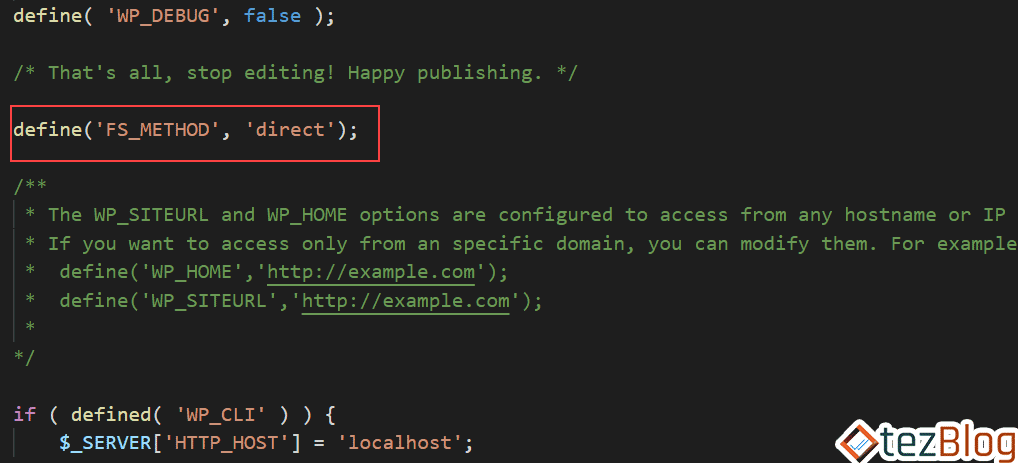
wp-config.php FTP credentials error
You can edit it using file explorer in the cPanel of your hosting or SSH terminal in cloud hosting.
That’s it, Save this file, and this will solve the WordPress credentials error issue.
Now visit your website, refresh the installation page. You can install all themes or plugins with a single click.
If you liked the above article, Subscribe to Us via email to get more tips like this. In case of any doubt, feel free to ask in the comment section provided below.
JOIN THE CONVERSATION
Comments
Have a question or something to add? Comments are moderated and appear here only after approval.
JavaScript is required to submit a comment. Published comments above remain available to read.
No approved comments yet. Be the first to join the conversation.