
This article will explain why you should not use Blogger’s default theme from SEO and User Experience.
Blogger is a microblogging platform designed for micro-level blogging. But back with a powerful server with unlimited bandwidth and high speed. Hence, the Blogger blog can handle all your traffic without any delay.
Blogger is fast, but Optimization is needed to achieve the fast speed. So need to optimize the Blogger’s template. But it may be complicated in Blogger’s default theme.
Why should you not use the default Blogger theme?
Many users believe that Blogger’s default theme is the best for SEO, but this is not true. A few years back, a new design was released for Blogger, and Blogger called these designs a theme. Earlier it was known as templates or Blogger templates.
Blogger’s themes are Good in design but lack Technical SEO.
- It uses H3 for the main heading of the article. But we should use the H1 tag here. Learn the importance of the H1 tag in SEO.
- The Blogger default theme declares the organization name asBloggerin schema markup.
- The latest robots meta tags are not included in Google Discover Results.
- Social Media tags not included,
- All HTML5 tags are not used.
It means that Blogger’s default theme is not SEO-friendly. Instead of these default themes, we should use custom Blogger themes. On-Page SEO can boost your website traffic by 200%, which is not included in the default theme.
Missing H1 Heading Tag for Blog Posts
One of the significant issues with Blogger’s default themes is the absence of H1 heading tags for blog posts. H1 tags are essential for search engine optimization (SEO) as they help search engines understand the main topic of your content. Without H1 tags, your blog posts may struggle to rank well in search results, reducing visibility and organic traffic.
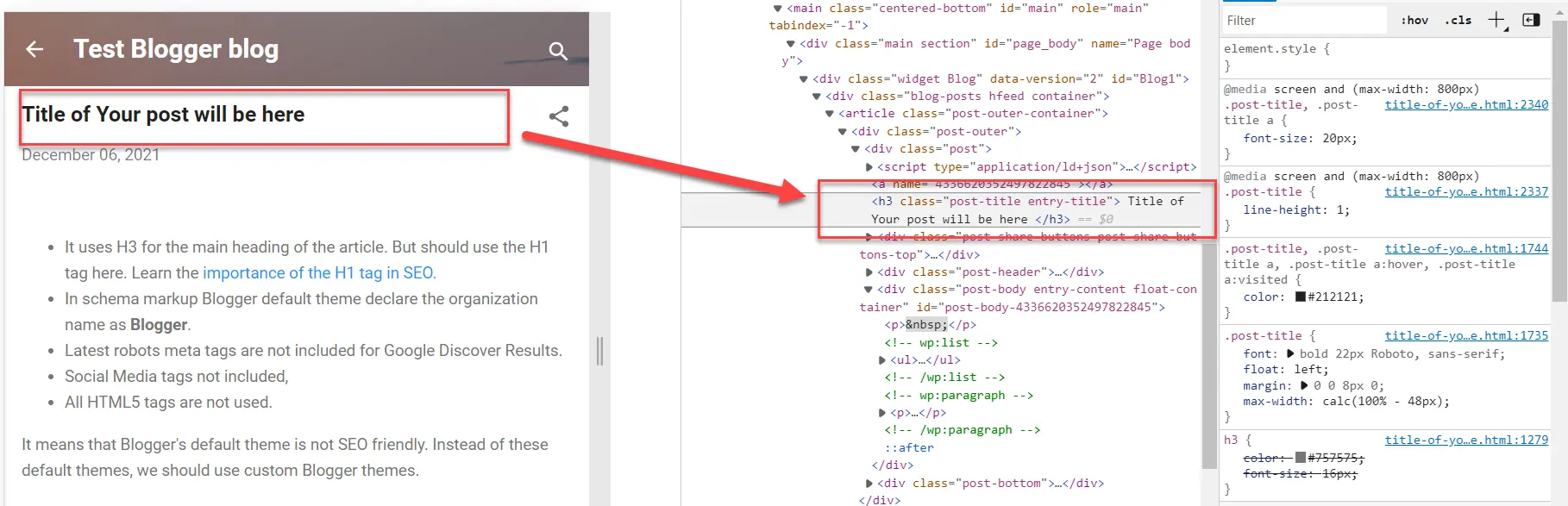
In the above image, we inspected elements of Blogger’s default theme. We can see that the main heading of the title uses the H3 tag, which should be the H1 heading tag.
The H1 heading tag is critical for on-page SEO; you can’t ignore this.
Schema Markup Issue
Schema Markup helps generate blog structure and includes information about the content’s author. Blogger’s default theme supports schema markups and generates markups for every blog post.
Blogger’s default themes come with schema markup that includes the brand name “Blogger.” While schema markup is crucial for SEO, having the brand name “Blogger” can harm your blog’s branding and recognition. Customizing your theme allows you to use appropriate schema markup, which can improve your blog’s search presence and promote your unique brand identity.
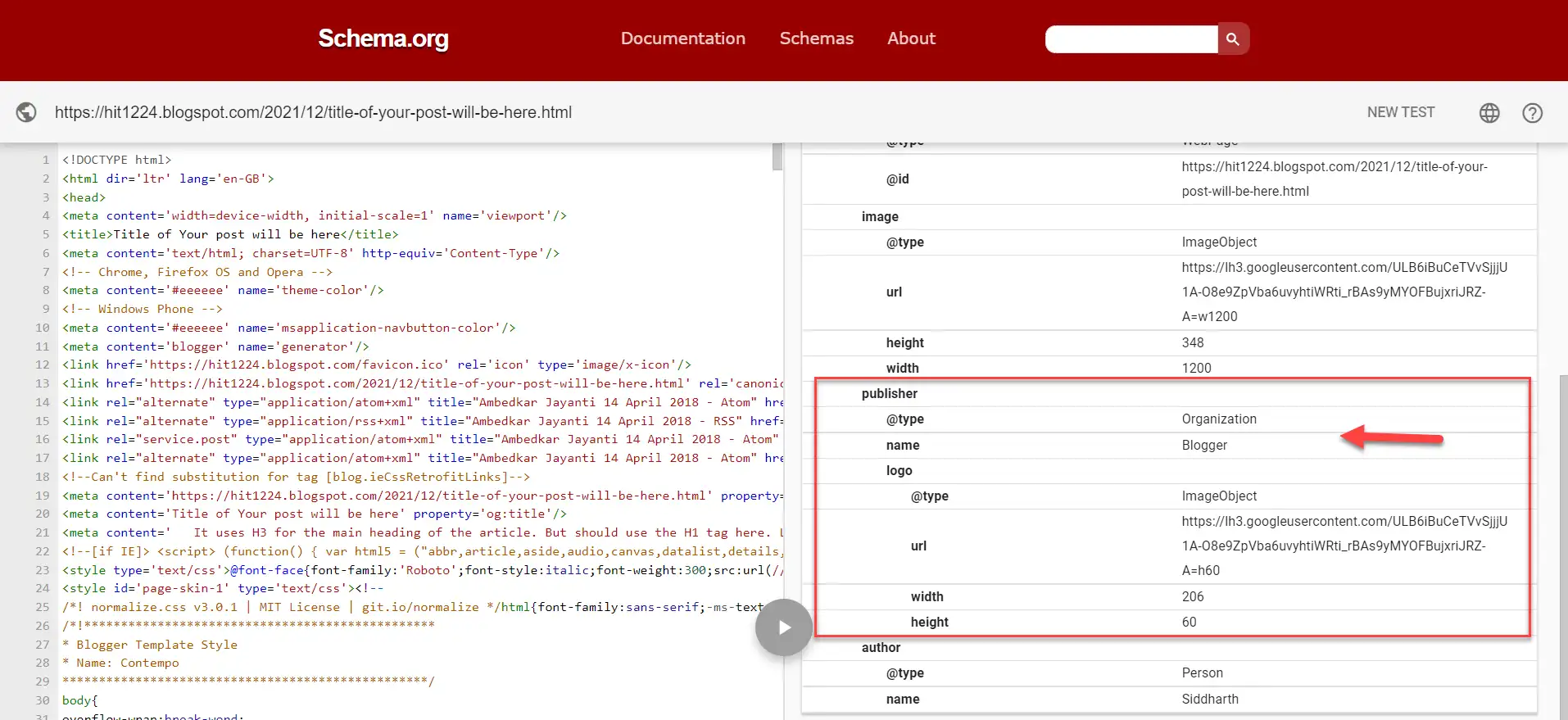
You can validate the schema markup of your Blogger blog and schema markup of it. If the Blogger theme you’re currently using does not support schema, you can add schema markup to the Blogger blog.
The latest Robots meta tags are not included with the default theme.
The Robots meta tags instruct the search engines on how to index the page or page should be indexed or not. But the Blogger default theme lacks this tag.
<meta content='index, follow, max-snippet:-1, max-image-preview:large, max-video-preview:-1' name='robots'/>This is the perfect robots meta tag for a page indexed. But it should not be on all pages. Some pages like search, label and archive pages should not index. To achieve this, follow robots.txt and robots meta tags best practices.
HTML5 tags are not included.
The default themes offered by Blogger do not incorporate HTML5 tags, which are essential for improving your blog’s structure and accessibility. HTML5 tags, such as
In the Blogger’s default theme, these semantics are partially used. We can manually edit the theme and add that, but technical skills are required. So it is better to install a customized theme that includes HTML5.
Conclusion: If not the default theme, then what?
While Blogger’s default themes may be a convenient starting point, they lack several critical features that can hinder your blog’s performance, visibility, and user experience. To ensure your blog’s long-term success, consider customizing your theme or choosing a third-party theme that addresses these shortcomings. By doing so, you can optimize your blog for search engines, enhance its branding, and provide a better experience for your readers.
Best Alternative: I inspect many Blogger themes available on the internet, but these themes are missing one thing or two. So our team designed a new theme and named it TezzBlog.
I hope you found this article helpful. Feel free to ask in the comment section below in case of any doubt or query.
JOIN THE CONVERSATION
Comments
Have a question or something to add? Comments are moderated and appear here only after approval.
JavaScript is required to submit a comment. Published comments above remain available to read.
10 published comments, including 1 reply. Threads shown oldest first.
In reply to striker