
Blogger is a free blogging platform to share your ideas with the world. You can enhance its power with SEO. This requires a little knowledge of HTML and CSS. We’re making it easier for Blogger users. We come up with a new Blogger theme TezzBlog. This is one of the best SEO-friendly themes available on the internet.
What is Blogger Theme?
The Blogger Theme is the frame for the blog. When you create a Blogger blog, it comes with a legacy design. To enhance the Blogger blog design, we can use Blogger templates. Blogger themes were also known as Templates.
Officially Blogger names it as a Theme, not Template.
TezzBlog Blogger XML Theme download
The file format of the Blogger theme is XML and can be uploaded in the dashboard>theme panel. It is always advised that before making any change, it is safe to take a backup of the existing theme of the blog.
TezzBlog Blogger Theme 2022 update
We provide almost all the features that a theme should have in this theme. We added all the features possible for the Blogger template.
Technical SEO
- JSON Schema Markup Data Tags for SEO,
- HTML5 semantic tags for SEO,
- Minimum CSS used
- Fast Core Web Vitals
- Advance meta tags
- Latest jQuery 3.6.0
- Auto Ads Setup
- Google Adsense Ads, Speed optimized. Read how to use Section to understand.
User Experience
- UI is too good to keep your traffic.
- Simple and Smart Design,
- Responsive to full width
- Smart Mobile Menu
- theia sticky sidebar is properly configured
- Blogger, Discuss Comment section.
- Recent Post Gadget,
- Random Post Gadget,
- Category Post Gadget.
All these features are included in the theme. To access all the features, you must understand how to use this theme.
The free version of the theme is available with Good Quality blogs only. You can contact us for the TezzBlog template.
How to use the TezzBlog Blogger theme.
This Guide is helpful for setting up almost all of our Blogger themes. First, we’ll understand the Layout section of the theme and how to modify it.
Header Settings of the Blogger Theme
The header is the important part, which contains the website logo, navigation panel, social media icon, etc. Let’s set it up for our Blogger website.
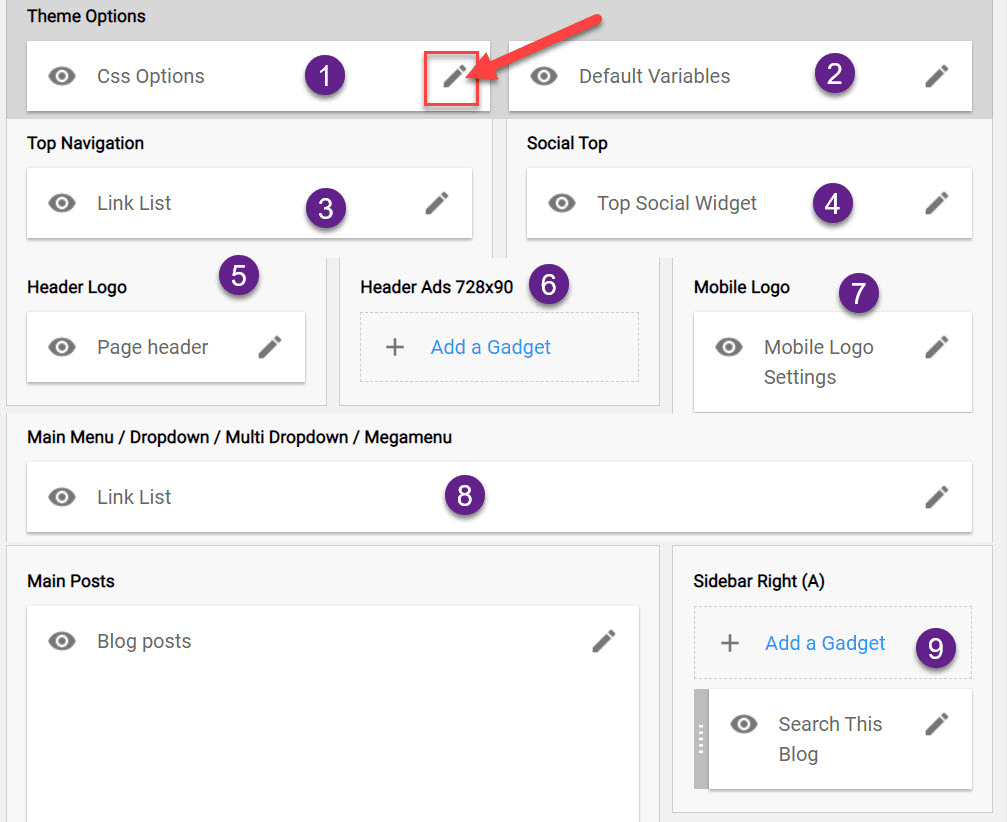
Blogger Layout settings
- CSS Options: This widget allows you to customize layout design, like the full width of the layout. You can change values, true and false.
- Default Variable: Allow you to change the variable used in the theme file.
- Comment System: You can choose between Blogger and discuss comment system,
- Fixed Sidebar, True or False. We recommend true.
- Fixed Menu: Menu should fix or not
- Post-Per Page: How many posts should be visible on archive pages,3. Link List: Add top Menu
- Social Widget: Add the social media button to the blog,
- Page Header: Add the Logo for the desktop version of the website
- Ad placement: Here, you can place ads, but this will decrease the CLS score of the website. We recommend not adding any ads. This is above the fold area. Follow the responsive Adsense guide if you need to add an ad block.
- Mobile Logo: Add a Logo for the mobile version of the website. We suggest using a transparent png format image.
- Main Menu: Here, you can set the main navigational panel for the website. The guide is provided below.
- Add Gadget: You can add Gadget here.
How to set Menu in Blogger TezzBlog theme
The menu of the website provides easy navigation to website users. It enhances the user experience and makes your website more attractive. A properly configured menu also reduces the bounce rate of the website.
Let’s understand how to configure the menu of a Blogger theme.
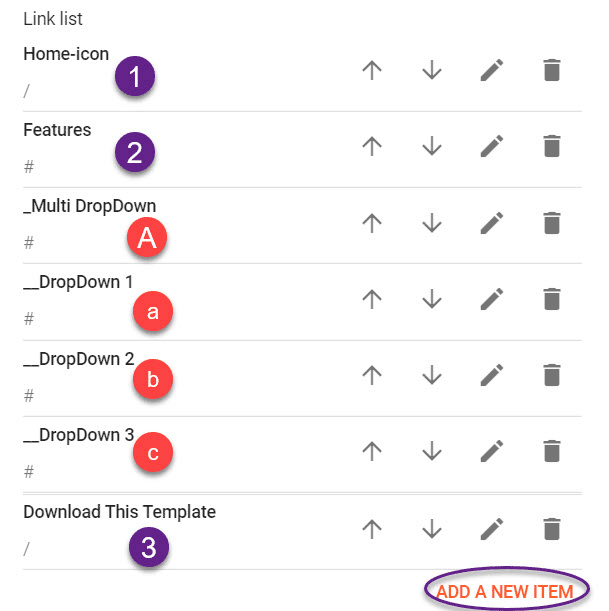
The 8th block allows you to set the blog menu in the above image of Blogger Layout. The menu settings will pop up when you click on the pencil button on the block, as displayed below.
e
Here you can see buttons 1, 2, and 3, Home-icon, Features, and Download This Template, which are the three main blocks in the menu. When you place underscore(_) to an item and place it below the main block, it will become the child of the main block. In the above image, the (_)Multi DropDown is placed under Features is the child of the Feature block.
To add a sub-child of the child item, you’ve to place a double underscore (__) and place it under a child item. In the Above image __Drodown 1 is the child of _Multi DropDown.
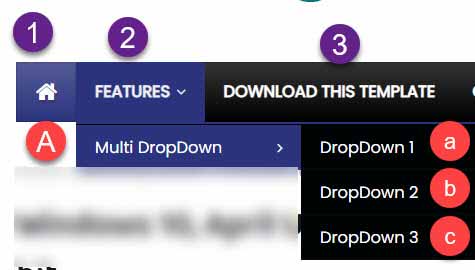
The output of the above menu settings will look like this. You can also add a new block to the menu by clicking on add new item button provided at the end of the list settings.
Set up the sidebar and Footer section
The footer section contains the website, copyright, various gadgets, and sub-menu of the website.
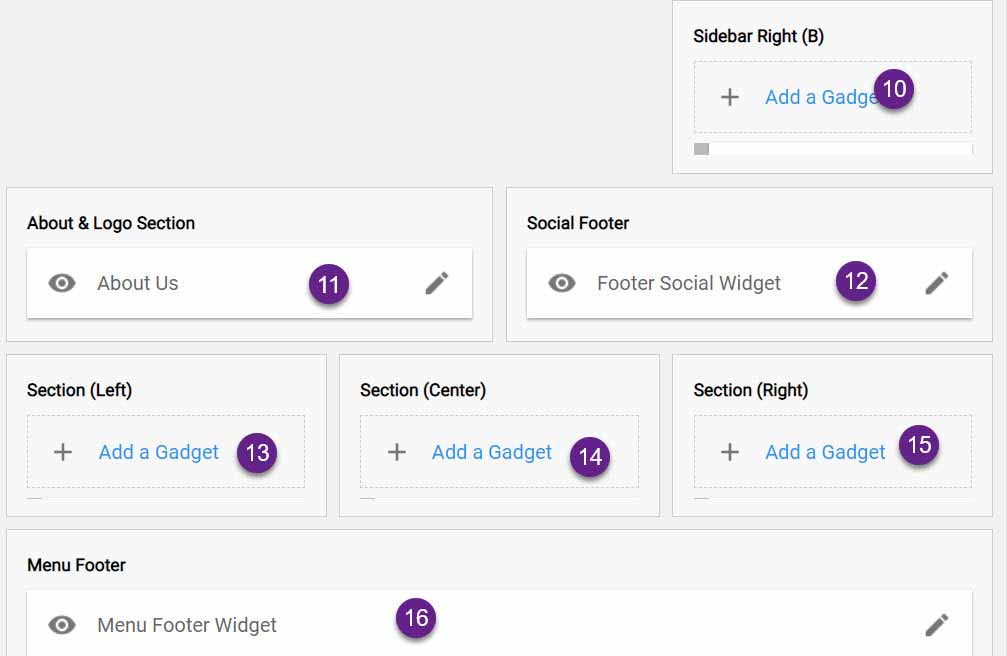
This is the layout of the sidebar and footer section of the Layout. Here you can add the widget that should appear in the footer section.
In blocks 11, 12, and 16, you can add the contact us form, social media widget, and footer menu.
Blocks 10, 13, 14, and 15 can be used to add recent posts, random posts, popular posts, category posts, and any 3rd party widget.
- To add a recent post gadget, you can add 3/recent/post-list,
- For random posts, you can add
3/random/post-list. - To display posts from a specific label
3/LabelName/post-list.
After making the desired change, save the layout. Your Blogger blog is ready, but you can make advanced changes to speed up the blog.
Advance Changes to TezzBlog or other Blogger Theme.
To make changes to the Blogger theme, you need to edit the Blogger XML theme file. In the header section, you’ve to provide meta tag details.
You can also remove auto-generated CSS and JS of the Blogger blog. Check our guide on how to speed up the Blogger blog.
I hope you like our theme in case of queries, suggestions, or feedback. Feel free to ask in the comment section provided below.
JOIN THE CONVERSATION
Comments
Have a question or something to add? Comments are moderated and appear here only after approval.
JavaScript is required to submit a comment. Published comments above remain available to read.
26 published comments, including 11 replies. Threads shown oldest first.
In reply to JC Lamont
In reply to Oyun Delisi
In reply to HUSEYIN
In reply to Pawan Dudeja
In reply to HUSEYIN
In reply to Ashok Sihmar
In reply to HUSEYIN
In reply to HUSEYIN
In reply to striker
In reply to Ashok Sihmar
In reply to striker