
Do you know the default robots.txt file blocks many pages to crawl in a Blogger blog or website? This tutorial article will guide you on how to use robots.txt and robots meta tag combined for the best SEO results of Blogger blog—letting all the crawlers crawl and index the whole website or blog without duplication of content error.
Perfect Combination of Blogger robots.txt and meta robots tag
Blogger now gives you more control over its features than earlier. It supports advanced XML themes that enable us to enhance the On-Page SEO of the Blogger.

Blogger SEO index noindex tool. A smart way
You can add robot meta tags to control the index behavior at the page level. And allow all the search and archive sections to crawl with noindex value in the meta tags.
How does Google Indexing work?
When the search engine’s bot visits your blog, it first checks the robots.txt file rules. The Robots.txt file contains the rules that a search engine should follow. Blogger’s default robots.txt file blocks only blog’s search and label pages to appear in Google’s search results.
You can access your website’s robots.txt file at http://www.yourblog.com/robots.txt or https://example.blogspot.com/robots.txt.
As we already discussed, this file contains rules for bot crawl. Try visiting your robots.txt file.
User-agent: Mediapartners-Google
Disallow:
User-agent: *
Disallow: /search
Allow: /
Sitemap: https://www.xyz.blogspot.com/sitemap.xml
What is the mean of each line? Understand it here
- The following line declared User-agent: * means bots or spiders of all search engines.
Disallow: /searchmeans that all pages similar in structure to https://xyz.blogspot.com/search are not allowed to crawl.Allow: /it states that all other pages are allowed.- And the last line declares the location of the sitemap: https://www.xyz.blogspot.com/sitemap.xml.
Blogger Robots.txt File settings will be.
Now I hope you understand all robots.txt file functions. So, some changes need to be made for better search engine crawling and indexing your web pages.
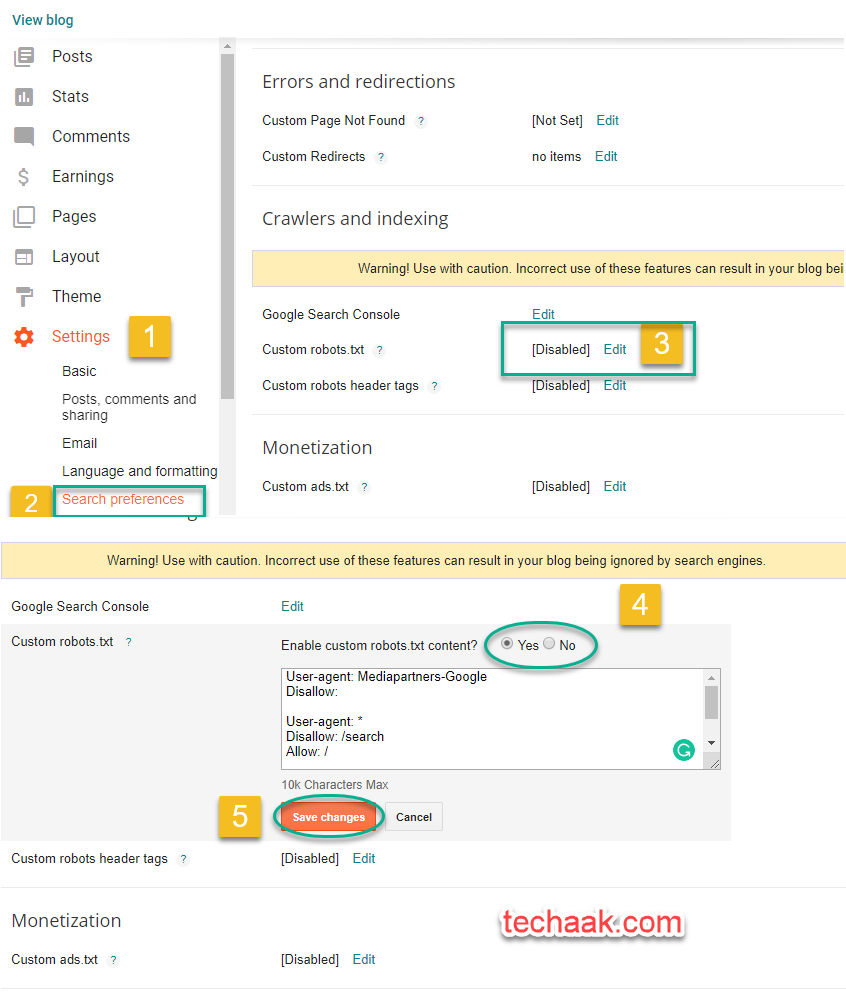
- Visit the Blogger dashboard.
- Dashboard > setting > Search Preference.
- Find Custom robots.txt and enable it.
- Paste the code given below. Note: Change the website name with yours.
User-agent: *

Allow: /

Sitemap: https://www.xyz.com/sitemap.xml
Sitemap: https://www.xyz.com/sitemap-pages.xml
Here you submitted both sitemaps for pages and posts. And also, Google Spider or a bot can crawl your whole website. But for SEO, remember to submit only posts and pages for the Search Engine Index. Understand how noindex is important for SEO.
Blogger Robots Meta Tags settings.
Using robots meta tags, we’ll avoid junk/duplicate content to index in the search engine. Here we’re using the latest robots meta tag suggested by Google.
- Go to Theme
- Now click on Edit HTML
- Find
<b:include data='blog' name='all-head-content'/>
Now, below this line <b:include data='blog' name='all-head-content'/>, past the code given below.
<b:if cond='!data:view.isHomepage and !data:view.isSingleItem'>
 <meta content='noindex,follow' name='robots'/>
<else/>
 <meta content='max-snippet:-1, max-image-preview:large, max-video-preview:-1' name='robots'/>
</b:if>
What happens with this code? Final SEO Results.
- Boost SEO as only the content will index to google or other search engines.
- Resolve the Google search console error “blocked by robots.txt” for all pages.
- The website will interlink and, as a result, boost on-page SEO.
- The bot or spider can visit all pages of your website/ webpage. That results in more pages to index.
You can download our Blogger themes, Best SEO, Speed, and User Friendly.
Step by Step robots.txt Blogger settings
I hope you like this article on Blogger SEO. If any questions regarding any issue, feel free to ask in the comment below. Thank you.
JOIN THE CONVERSATION
Comments
Have a question or something to add? Comments are moderated and appear here only after approval.
JavaScript is required to submit a comment. Published comments above remain available to read.
23 published comments, including 7 replies. Threads shown oldest first.
In reply to emrah baldan
In reply to Ashok Sihmar
In reply to onakpa danladi
In reply to Ashok Sihmar
In reply to matteo desimone
In reply to jdgaming.info
In reply to Oscar