
Every search engine crawling bot first interacts with a website’s robots.txt file and its crawling rules. This means that the robots.txt file plays a pivotal role in the Blogger blog’s search engine optimization (SEO). This article will guide you on how to create a well-optimized custom robots.txt file for Blogger and how to understand the implications of blocked pages reported by Google Search Console.
What are the functions of the robots.txt file?
The robots.txt file tells the search engine which pages should and shouldn’t be crawled. This allows us to control the crawling of all web spiders. In the robots.txt file, we can control the crawling activity of each user-agent by allowing or disallowing them. We can also declare sitemaps of our website for search engines like Google, Bing, Yandex, etc. So that these search engines can easily find and index our content.

Blogger robots.txt for best SEO
The function of robots meta tags is to control page level indexation i.e. page should be visible in search result or not.
Usually, we use the robots meta tags to index or noindex blog posts, pages, and other format web content throughout the web. And the robots.txt to control the search engine bots. You can allow the complete website to crawl, but it will exhaust the crawling budget of the website. To save the crawling budget of the website, you have to block the website’s search, archive, and label sections.
The robots meta tag is page level and used to decide whether a web page should be visible in SERP. Additionally, a file called robots.txt helps control how search engine bots should behave on the website. If we let the bots freely crawl through our entire website, it could use up a lot of resources. To manage this, we can use robots.txt to tell the bots not to crawl certain parts, like search, archive, and label sections. This way, we save resources and ensure the bots focus on the important stuff on our website.
Default Robots.txt file of the Blogger Blog.
To optimize the robots.txt file for a Blogger blog, we first need to understand the CMS structure and analyze the default robots.txt file. Default robots.txt file of Blogger-
User-agent: Mediapartners-Google
Disallow:

User-agent: *
Disallow: /search
Allow: /

Sitemap: https://www.example.com/sitemap.xml- The first line (User-Agent) of this file declares the bot type. Here it’s Google AdSense, which is disallowed to none(declared in 2nd line). That means the AdSense ads can appear throughout the website.
- The following user agent is *, which means all the search engine bots are disallowed to /search pages. That means disallowing all search and label pages(same URL structure).
- And allow tag to define that all pages other than the disallowing section can be crawled.
- The following line contains a post sitemap for the Blogger blog.
This is an almost perfect file to control the search engine bots and provide instructions for pages to crawl or not crawl. But this file allows for indexing the archive pages, which can cause a duplicate content issue. That means it will create junk for the Blogger’s blog.
Optimizing Robots.txt File for a Blogger Blog
We understood how the default robots.txt file performs its function for the Blogger blog. Let’s optimize it for the best SEO.
The default robots.txt allows the archive to index, which causes the duplicate content issue. We can prevent this issue by stopping the bots from crawling the archive section. For this, /search\* will disable crawling of all search and label pages.
Applying a Disallow rule /20\* into the robots.txt file will stop the crawling of archive sections. The /20\* rule will block the crawling of all posts, so to avoid this, we have to apply a new Allow rule for the /\*.html section that allows the bots to crawl posts and pages.
The default sitemap includes posts, not pages. So you have to add a sitemap for pages located under https://example.blogspot.com/sitemap-pages.xml or https://www.example.com/sitemap-pages.xml for the custom domain. You can submit Blogger sitemaps to Google Search Console for good results.
So, the new perfect custom robots.txt file for the Blogger blog will look like this.
User-agent: Mediapartners-Google
Disallow:

User-agent: *  # to select all crawling bots and search engines
Disallow: /search* # to block all user generated query item within the website.
Disallow: /20*  # this line will disallow archieve section of Blogger.
Disallow: /feeds*  # this line will disallow feeds. Read instruction below
Allow: /*.html  # allow all post and pages of the blog

#sitemap of the blog
Sitemap: https://www.example.com/sitemap.xml
Sitemap: https://www.example.com/sitemap-pages.xml- /search* will disable crawling of all search and label pages.
- Apply a Disallow rule /20* into the robots.txt file to stop the crawling of archive sections.
- Disallow: /feeds* this rule will disallow crawlers to crawl the feed section. But if you are not generated new Blogger XML sitemap then do not use this line.
- The /20* rule will block the crawling of all posts, So to avoid this, we’ve to apply a new Allow rule for the /*.html section that allows the bots to crawl posts and pages.
You’ve to replace www.example.com with your Blogger domain or custom domain name. For example, suppose your custom domain name is www.iashindu.com; then the sitemap will be at https://www.iashindu.com/sitemap.xml. In addition, you can check the current robots.txt at https://www.example.com/robots.txt.
In the above file, the setting is the best robots.txt practice for SEO. This will save the website’s crawling budget and help the Blogger blog to appear in the search results. You have to write SEO-friendly content to appear in the search results.
Effects in Search Engine Console after implementing these rules in robots.txt
It’s important to note that Google Search Console may report that some pages are blocked by your robots.txt file. However, it’s crucial to check which pages are blocked. Are they content pages or search or archive pages? We can’t display search and archive pages, which is why these pages are blocked.
But if you want to allow bots to crawl the complete website, then you have to configure robots meta tag and robots.txt file in such a way that.
- Robots.txt file allows crawlers to crawl the whole website.
- Robots Meta tag disallows non-important pages to noindex.
The amalgamation of Blogger robots.txt and robots meta tags may exhaust the crawling budget, but the better alternative is to boost the SEO of the Blogger blog.
How do you implement this Robots.txt File to Blogger?
The Robots.txt file is located at the root level of the website. There is no access to the root in Blogger, so how do you edit this robots.txt file? You can access root files like robots.txt under the settings section of Blogger.
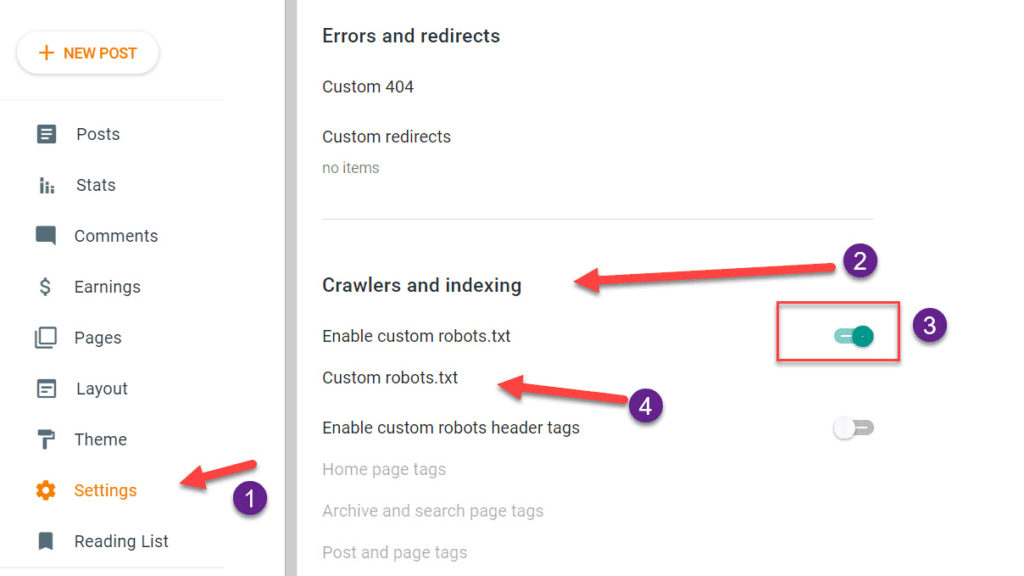
Provide custom robots.txt
- Go to Blogger Dashboard and click on the settings option,
- Scroll down to the crawlers and indexing section,
- Enable custom robots.txt by the switch button.
- Click on custom robots.txt; a window will open. Paste the robots.txt file and update.
After updating the custom robots.txt file for the Blogger blog, you can check the changes by visiting your domain like https://www.example.com/robots.txt, where www.example.com should be replaced with your domain address.
Conclusion.
We’ve explored the function of the robots.txt file and created an optimal custom robots.txt file for the Blogger blog. In the default robots.txt file, the archive section is also allowed to crawl, which causes duplicate content issues for the search engine. This confusion can lead to Google not considering any Page for the search results.
Remember, Google Search Console may report blocked pages, but it’s crucial to understand which pages are blocked and why. This understanding will help you optimize your site for better SEO results.
I hope you found this article helpful. If you have any doubts or questions regarding Blogger or WordPress SEO, feel free to comment below.
JOIN THE CONVERSATION
Comments
Have a question or something to add? Comments are moderated and appear here only after approval.
JavaScript is required to submit a comment. Published comments above remain available to read.
81 published comments, including 24 replies. Threads shown oldest first.
In reply to IrfandBlog
In reply to Ashok Sihmar
In reply to starklee0011
In reply to Pintu Prasad
In reply to Abdul Rafay
In reply to Sreenivas.k
In reply to Ashok Sihmar
In reply to Sreenivas.k
In reply to Ashok Sihmar
In reply to Ashok Sihmar
In reply to Ashok Sihmar
In reply to Salim Reza
In reply to Ashok Sihmar
In reply to Nazarahmed Khan
In reply to Youcef debih
In reply to QnA Bangla
In reply to vicky
In reply to Nilabh Verma
In reply to Ashok Sihmar
In reply to Nilabh Verma
In reply to Md Jakir Hossain
In reply to Javier
In reply to Martin
In reply to Ali Haider