
THE SHORT VERSION
What you’ll take away.
- Give every important page one unique, descriptive title that makes sense outside the page.
- There is no fixed character limit; lead with useful information and remove unnecessary wording.
- Align the title tag, H1, and page content around the same intent without forcing identical text.
- Google may create a different title link from headings, visible text, or links when those signals describe the page better.
A title tag has a small footprint in the HTML, but it follows a page almost everywhere: into browser tabs, bookmarks, browsing history, accessibility tools, and search results.
That makes it an important part of on-page SEO. It does not guarantee a ranking or give you complete control over the title Google displays. Its job is more practical: identify the page clearly, distinguish it from other pages, and help the right person decide whether it matches what they need.
What is a title tag?
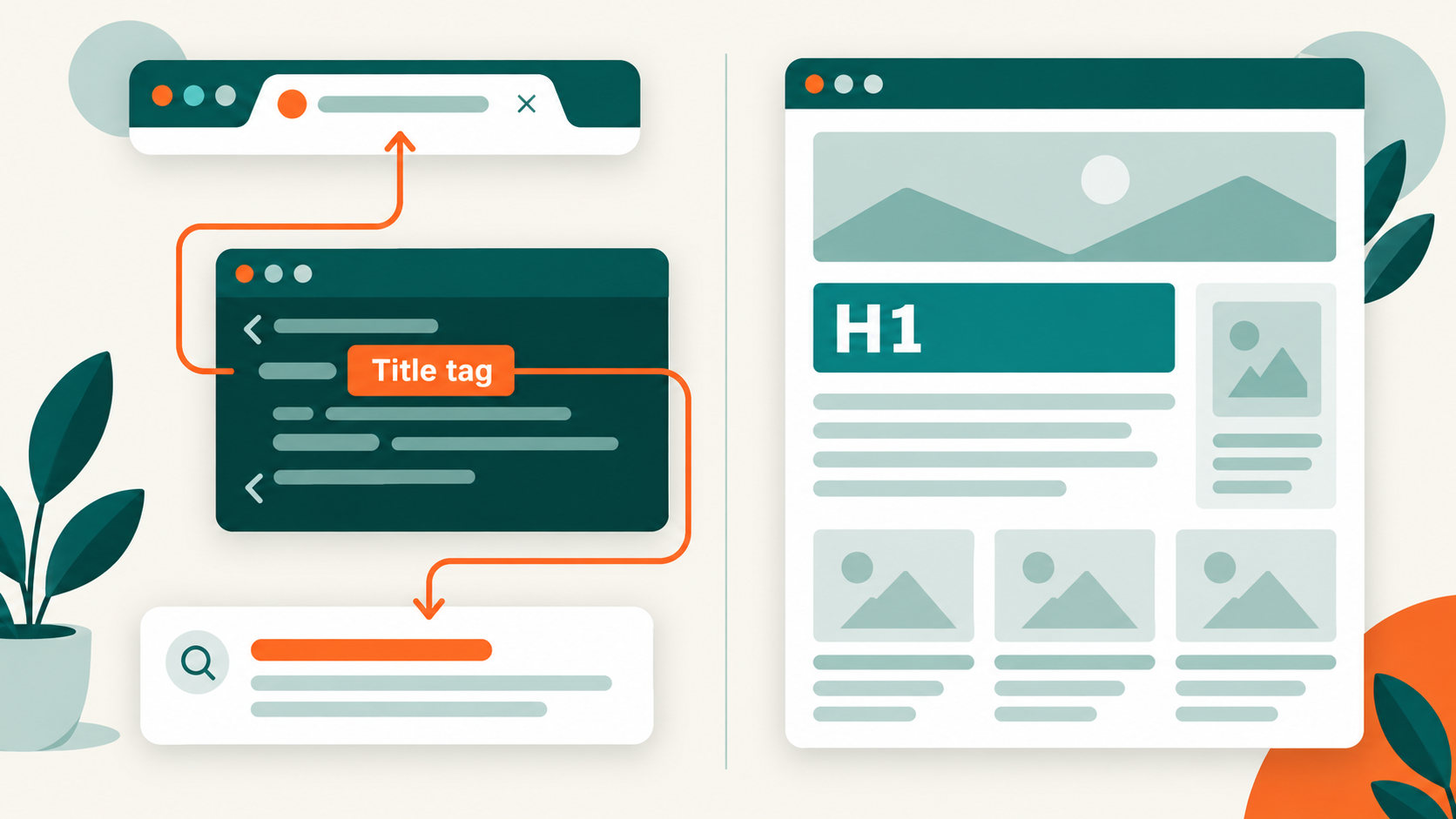
The title tag is the text inside the HTML <title> element. It belongs in the document <head>, not inside the visible page content.
<!doctype html>
<html lang="en">
  <head>
    <title>Technical SEO Audit Guide | Example Brand</title>
  </head>
  <body>
    <h1>How to Perform a Technical SEO Audit</h1>
  </body>
</html>
The HTML Standard defines the <title> element as the document’s title or name. It should identify the document even when someone encounters it outside the page, such as in browser history, a bookmark, or a search result. A document should not contain more than one <title> element.
People often call this text the SEO title or meta title. “SEO title” is a useful interface label, but “meta title” is technically inaccurate: the title is its own HTML element, not a <meta> tag.
Where does the title appear?
A page title can be used in several places:
- Browser tabs and window titles
- Bookmarks and reading lists
- Browser history
- Screen-reader page announcements
- Link previews and applications that read document metadata
- Search results as a strong source for the clickable title link
The phrase source for the title link matters. Google may display the title tag as the search result’s clickable heading, but it is not required to reproduce it word for word.
Title tag vs. title link vs. H1
These three terms describe related but different things.
| Title tag | Google title link | H1 heading | |
|---|---|---|---|
| What it is | The <title> element in the HTML head |
The clickable title Google generates for a search result | The main visible heading in the page body |
| Who controls it | The site owner or page template | Google’s automated systems | The site owner or page template |
| Where it appears | Browser interface and page metadata | Google Search and some Google surfaces | On the webpage |
| Must the wording match? | No | Google chooses the displayed wording | No, but it should describe the same topic and intent |
| Main job | Identify the document out of context | Help searchers understand and choose a result | Introduce the visible page content |
The title tag and H1 can be identical. They can also differ when each context needs slightly different wording.
For example:
- Title tag:
Title Tag SEO: Best Practices and Examples | SEO Neurons - H1:
Title Tags and SEO: Best Practices, Examples, and Fixes
Both make the same promise. The title tag is compact enough for a browser tab and search result, while the H1 reads naturally as the article headline. Our guide to H1 tags and SEO explores that relationship from the heading side.
Why title tags matter for SEO and users
They identify the page topic
A descriptive title gives search systems a strong indication of the page’s subject. It helps distinguish a product page from a category, an informational article from a service page, or one location page from another.
The title is only one signal. Google also considers the visible content, headings, links, and other information. A precise title supports a relevant page; it cannot make an irrelevant or thin page deserve a result it does not satisfy.
They influence the searcher’s decision
The title link is often the first and most prominent part of a search result. It helps a searcher answer:
- Is this page about my question?
- Does it offer the type of answer I need?
- Is the source recognizable?
- Is the information current enough for this query?
A clearer title can make a result easier to choose, but no wording guarantees a higher click-through rate. The query, ranking position, competing results, rich features, brand familiarity, and searcher intent all affect the decision.
They support orientation and accessibility
Page titles are not only search metadata. They help people distinguish open tabs and recognize a page when moving through browser history.
The W3C’s Page Titled accessibility guidance explains that descriptive titles help users identify their current location without first reading the page. This is especially important when someone uses a screen reader or keeps several similar pages open.
They make large websites manageable
On a small site, a weak title is an isolated writing problem. On a large ecommerce, publishing, or directory site, titles are often produced by templates. A good pattern can create thousands of useful titles; a bad pattern can produce thousands of duplicates.
Title-tag SEO therefore includes both writing and systems design.
Does the title tag affect rankings?
The title tag helps search engines understand a page and connect it with relevant searches. That makes it an important on-page element, but it should not be treated as an isolated ranking lever.
Adding a keyword, moving it to the first position, or shortening a title does not guarantee that rankings will improve. The result depends on the complete page, the query, competing pages, internal and external signals, technical accessibility, and whether the title describes what the page actually delivers.
A useful way to think about the title tag is:
It helps a relevant page explain itself. It does not make an irrelevant page relevant.
How Google creates title links
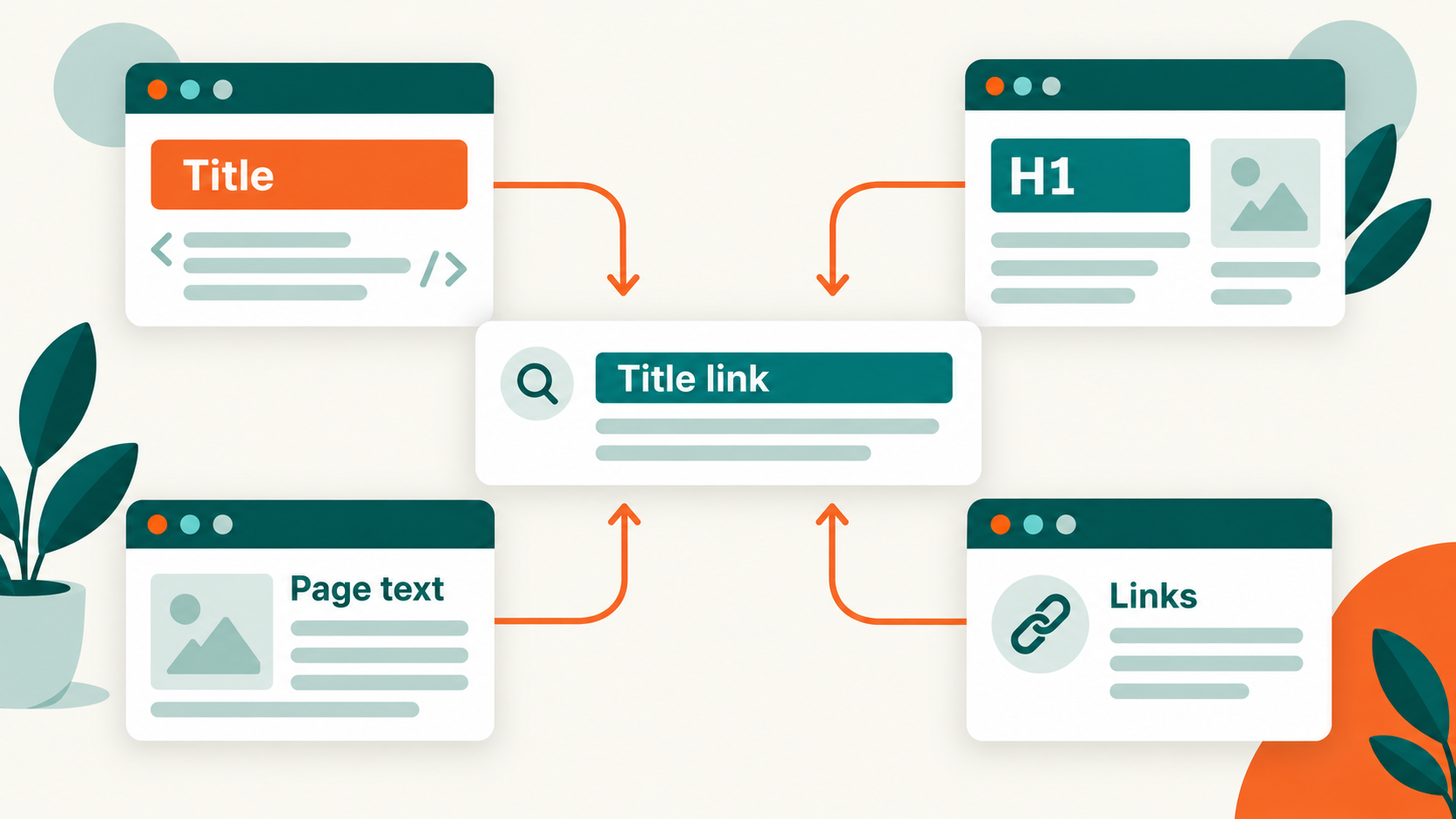
Google calls the clickable heading in a search result a title link. Its generation is automated.
According to Google’s title-link documentation, its systems can use:
- Text in the
<title>element - The main visual title on the page
- Heading elements such as the H1
- The
og:titlevalue - Other large and prominent text
- Other text on the page
- Anchor text within the page
- Text in links pointing to the page
WebSitestructured data
You can provide a strong preference through a good title tag, but you cannot force a particular title link for every result.
Google also needs to recrawl and reprocess the page before it can notice title changes. That can take anywhere from several days to several weeks. An immediate CMS update does not imply an immediate change in search.
Why Google rewrites title tags
When Google displays different wording, it is usually trying to produce a clearer description of the page—not applying a penalty.
Common causes include:
The title is missing or partly empty
Examples such as | Example Brand or Untitled | Example Brand do not identify the page. Google may use a visible heading or link text instead.
The title is inaccurate
The template may describe content that is not present, or an old page may retain a title from its previous purpose. A product page titled “Blue Cotton Shirt” should not become a page for red linen shirts without updating its metadata.
The title is outdated
Dates, availability, event names, prices, and recurring editions can become stale. If the visible H1 says “2026 conference schedule” but the title still says “2025,” the inconsistent signals invite a rewrite and confuse visitors.
Several pages reuse the same boilerplate
Titles such as Products | Example Store across thousands of product pages fail to distinguish one URL from another. Google may replace the generic portion with visible page-specific information.
The wording is unnecessarily long
An extremely long title may bury its useful words beneath categories, slogans, locations, keyword variations, and brand repetition. Google can choose a more relevant portion instead.
The page has no clear main title
Several equally prominent headings can make the intended page title ambiguous. A clear, visible H1 that agrees with the title tag gives both readers and search systems a more consistent structure.
The title uses a different language or writing system
A Hindi page with an English title—or a title transliterated into a different script—may be rewritten to match the primary content.
Google cannot crawl the page content
If crawling is blocked but the URL can still be indexed through links, Google has less on-page information available. It may rely on off-page anchor text to produce the title link.
The fix is not to repeat the title in more places. Find the inconsistency, correct the page or template, and let all major signals describe the same content.
How long should a title tag be?
There is no fixed character limit for the <title> element. Google explicitly says that title links are truncated as needed, usually to fit the device width.
That means a title is not “valid” at 59 characters and “too long” at 60. Different letters occupy different widths, devices have different displays, and Google may produce different wording from other page signals.
Practical recommendation: aim for 50–60 characters for most title tags. This range is usually enough to describe the page while keeping the important wording visible and easy to scan.
A title can still be useful at 40 characters or extend to roughly 65–70 characters when the extra detail genuinely helps. Do not add filler merely to reach 50 characters, and do not remove essential meaning solely to stay below 60. Treat the range as a writing target, not a Google rule or a guarantee against truncation.
When reviewing length:
- Put the unique page information early.
- Remove words that repeat the same idea.
- Keep a useful qualifier when it changes the intent.
- Shorten brand or category boilerplate before cutting the page topic.
- Read the title as a person, not only as a character counter.
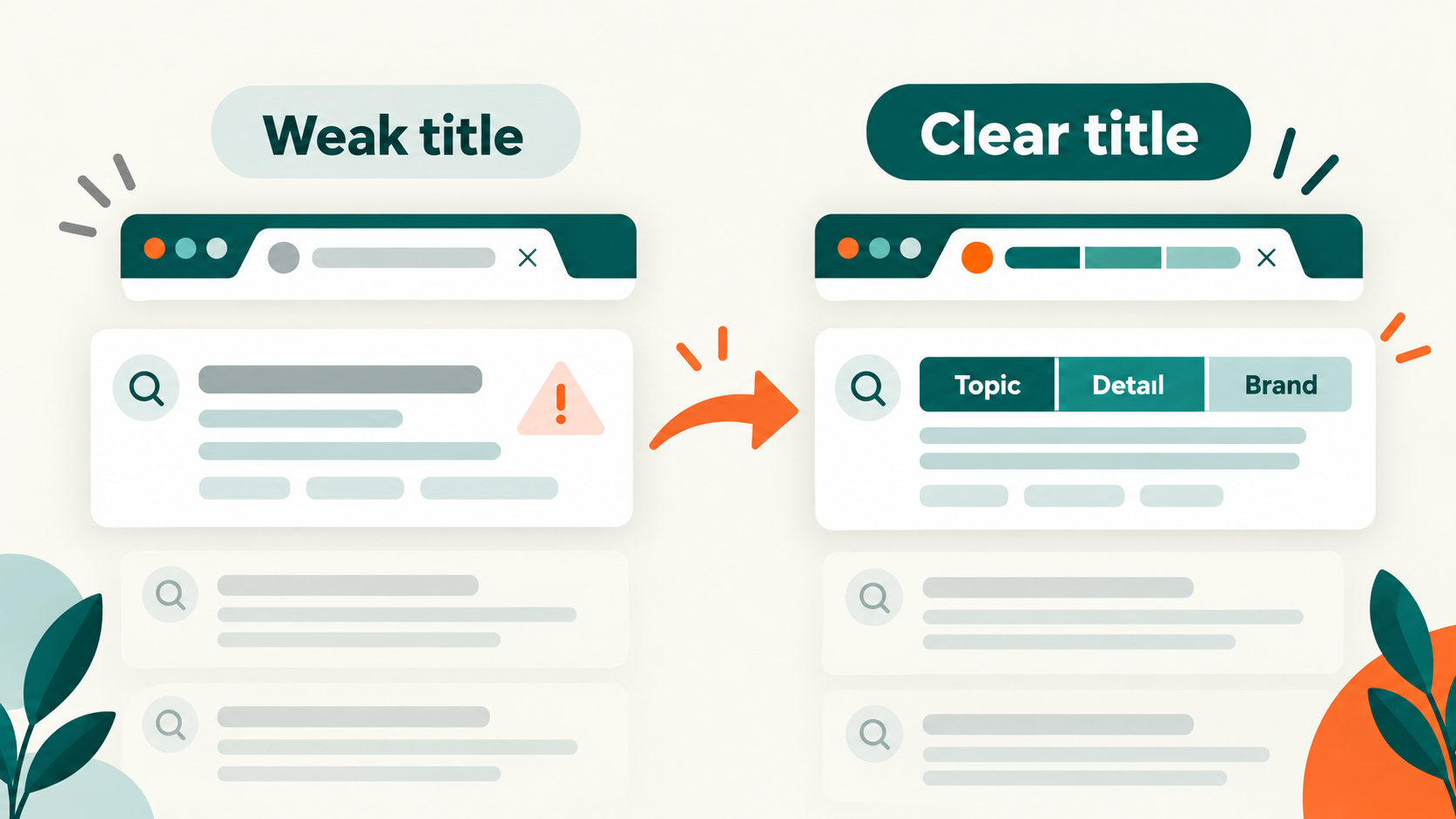
This title is short but weak:
Services | BrandThis one is longer but far more useful:
Technical SEO Audits for Ecommerce Websites | BrandConcise means no unnecessary words, not as few characters as possible.
Title tag SEO best practices
Give every important page a title
Every indexable page should have one non-empty <title> element. The HTML Standard permits no more than one title element per document, and most normal webpages are expected to have exactly one.
Do not add a second title when a plugin and theme disagree. Find which system owns the document head and remove the duplicate output.
Describe the specific page
A title should make sense without the introduction, breadcrumb, navigation, or URL.
Avoid generic labels such as:
- Home
- Products
- Services
- Profile
- Article
- Page 1
Add the information that distinguishes this page from the rest of the site.
Match the search intent
The title should honestly represent the kind of page a searcher will reach.
- A tutorial should sound instructional.
- A product page should identify the product.
- A category page should identify the collection.
- A comparison should name what is being compared.
- A local service page should specify the service and relevant location.
Do not disguise a sales page as an informational guide or promise a template, calculator, price, or download that the page does not provide.
If you’re still deciding what the page should offer, identify the intent your title needs to reflect first. The guide helps you use search-result clues to choose a clear purpose for the page.
Use the main topic naturally
Include the primary subject or entity when it helps someone identify the page. An exact-match keyword is not mandatory, and repeating variations does not make the title more relevant.
Prefer:
Robots.txt Testing Guide for Technical SEOAvoid:
Robots.txt SEO, SEO Robots.txt, Best Robots.txt SEO GuideWrite for clarity first. Our SEO copywriting guide applies the same principle to the rest of the page.
Put the distinctive information first
Browser tabs and search results may show only part of a title. Lead with the words that distinguish the page.
For most inner pages, this order works well:
Unique page topic | BrandThis is usually clearer than placing a long brand name and slogan before every page topic. The homepage can be an exception when the brand itself is the primary identifier.
Keep branding concise
Adding the site or organization name can provide context and recognition. Use it once, usually at the beginning or end, and separate it with a consistent delimiter such as a pipe, dash, or colon.
Canonical Tags: A Practical Guide | Example BrandDo not repeat the brand in the page topic, suffix, and slogan. Google may also omit a site name when it is already shown separately in the result.
Align the title, H1, and content
These elements do not need identical wording, but they should satisfy the same intent. A searcher who clicks a title about title-tag auditing should not land on a page headed “General Marketing Services.”
Strong alignment also reduces ambiguity when Google evaluates the main visible title.
Keep titles unique where pages are unique
Duplicate titles often reveal one of two problems:
- Distinct pages are using an overly generic template.
- Several URLs represent substantially the same content.
In the first case, improve the template with page-specific fields. In the second, review canonicalization, redirects, indexability, or whether the pages should be consolidated. Changing only the title does not solve duplicate content.
Keep changing information accurate
Use a year, price, stock status, event date, or number only when it helps the searcher and your system can keep it correct.
Do not add the current year to every title simply to look fresh. If the page has not been materially updated, the new date creates a misleading promise.
Use the page’s language and writing system
Write the title in the same primary language and script as the page content. Localized pages should have genuinely localized titles, not one global English title copied across every language version.
Bad and good title tag examples
The weak title comes first in each example so you can see the problem before comparing it with the improved version.
| Page type | Bad title | Better title | What improves |
|---|---|---|---|
| Article | Title Tag Information | How to Audit Title Tags Across a Website | The task and scope are clear. |
| Product | Shoes for Sale | TrailRunner X2 Waterproof Shoes - Men’s | The product and distinguishing attribute are named. |
| Category | Shop Clothing Online | Women’s Waterproof Hiking Jackets | The collection is specific. |
| Service | Best SEO Services Company | Technical SEO Audits for Ecommerce Sites | The service and audience replace a vague superlative. |
| Local service | Home | Emergency Plumber in Jaipur - 24/7 Callouts | The service, place, and useful qualifier are visible. |
| Comparison | Which Platform Is Best? | Shopify vs. WooCommerce: Costs and Tradeoffs | The compared options and decision factors are named. |
| Homepage | Welcome to Example Brand | Example Brand - Technical SEO Crawler | The product is explained alongside the brand. |
| Documentation | Settings | Configure XML Sitemap Validation | The task can be understood in history or a tab. |
The best title is not necessarily the cleverest. It is the one that helps the intended visitor recognize the right page quickly.
A practical process for writing a title
1. Define the page’s purpose
Write one sentence describing what the page helps a visitor do or understand. If the page has several unrelated purposes, the content may need restructuring before the title can be clear.
2. Identify what makes this page different
Find the product name, topic, service, location, comparison, audience, or task that distinguishes this URL from neighboring pages.
3. Check the visible page
Read the H1, introduction, main sections, and call to action. The title should represent the page that exists—not the page the keyword list wishes existed.
4. Draft the title without a character counter
Write the clearest standalone description first. This keeps arbitrary limits from producing incomplete or robotic wording.
5. Add only useful context
Consider whether a location, audience, product attribute, format, date, or brand meaningfully helps someone choose the page.
6. Remove repetition
Cut synonyms, empty adjectives, repeated brand text, and words already implied by the context.
7. Compare it with nearby pages
The title may look good alone but become indistinguishable in a list of products, locations, articles, or browser tabs. Review related titles together.
Title patterns for common page types
Templates should organize reliable page data, not manufacture keyword variations.
Articles and guides
[Topic or task] + [useful qualifier] | [Brand]Example:
Internal Linking Audit: Process and Checklist | BrandProduct pages
[Product name] + [distinguishing attribute] | [Brand]Example:
TrailRunner X2 Waterproof Shoes - Men’s | BrandDo not force every possible color, size, category, and selling point into the title.
Category pages
[Category] + [audience or use when helpful] | [Brand]Example:
Accounting Software for Small Businesses | BrandLocal service pages
[Service] in [location] + [useful qualifier] | [Brand]Only create location combinations supported by real, useful page content. Changing city names in otherwise identical pages does not make those pages valuable.
Paginated pages
If later pages are indexable and useful, distinguish them consistently:
Technical SEO Articles - Page 2 | BrandDo not put Page 2 before the actual topic. If pagination or filter combinations should not be indexed, solve that indexing decision rather than trying to optimize every thin URL’s title.
How to add a title tag
Static HTML
Place one <title> element inside <head>:
<head>
  <meta charset="utf-8">
  <title>Descriptive Page Title | Brand</title>
</head>
Do not place <title> in the page body and do not use HTML markup inside its text.
Content management systems
Many systems generate the title from the page or post name. SEO plugins and platform settings may provide a separate search-title field.
In WordPress, confirm which theme or plugin owns the final <title> output. Our Yoast SEO configuration guide shows one common workflow. Avoid having a theme and two plugins generate competing titles.
Templates and large sites
Build titles from validated fields and define sensible fallbacks.
For example:
If product name exists:
  Product name + important attribute + brand
Otherwise:
  Category name + brand
Do not allow an absent field to create half-empty output such as:
| Example BrandTest templates with missing, unusually long, multilingual, and special-character values before deploying them across the site.
JavaScript applications
Single-page applications should update the document title when the user navigates to a distinct view.
document.title = 'Account Settings | Example App';The title must describe the current view rather than remaining Loading… or retaining the previous route’s title. The W3C guidance for page titles specifically notes that dynamic application views should update their titles.
Google can process titles set with JavaScript, but reliable server-rendered or prerendered metadata reduces the chance that users, crawlers, or link-preview systems encounter the default application shell. See Google’s JavaScript SEO guidance.
How to check a title tag
Look at the browser tab
The tab provides a quick check, but long titles may be visually shortened. Hovering the tab may show more text depending on the browser.
Inspect the HTML
Open developer tools and inspect the document <head>, or view the source and search for <title>.
For JavaScript applications, compare the original source with the rendered DOM. They may contain different values.
Use the browser console
This command returns the current rendered document title:
document.titleTo count title elements:
document.querySelectorAll('title').lengthMost webpages should return 1.
Check Google’s displayed title
Search Console can show which queries and pages receive impressions, but Google does not provide a report containing every generated title link. Inspect representative results manually and remember that recrawling and reprocessing take time.
Audit title tags with SEO Neurons Spider
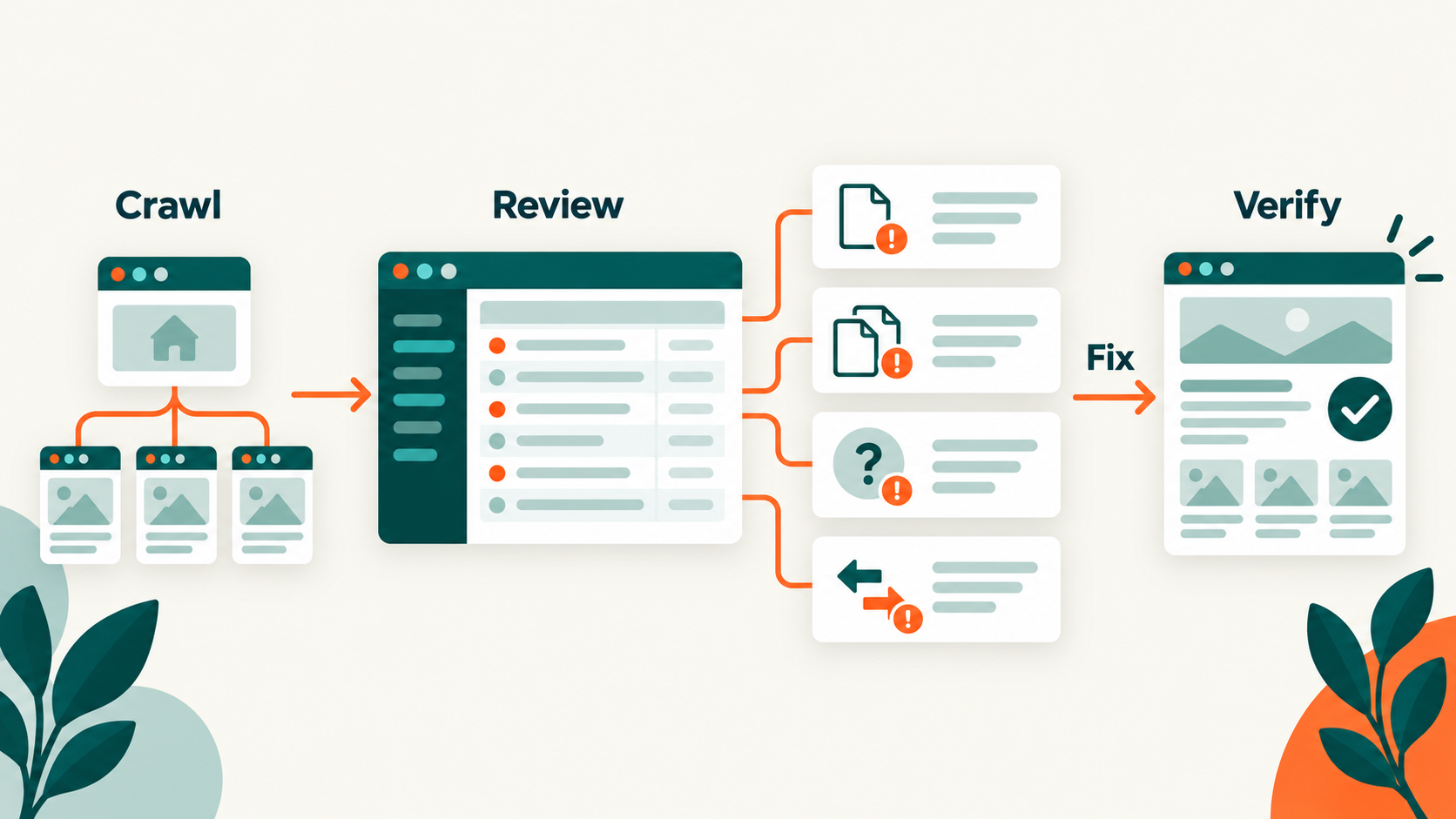
You can audit title tags across an entire website with SEO Neurons Spider. Crawl the site, then review each title alongside its URL and related page signals instead of checking pages one at a time.
This can help you spot missing or duplicate titles, pages with more than one title element, titles that deserve a length review, and wording that does not align well with the page’s H1 or canonical context.
Export or compare:
- URL
- Indexability
- HTTP status
- Title text
- Title count
- Title length as a review metric
- H1 text
- Canonical URL
- Content type or template
Group problems by template. A duplicate title across 5,000 products is usually a data or rendering rule that needs one systemic fix.
Common title-tag problems and fixes
| Problem | Likely cause | What to do |
|---|---|---|
| Missing title | Template omission or route metadata failure | Generate one descriptive title in the document head. |
| Empty or half-empty title | Required data was absent | Add validation and a useful fallback. |
| Multiple title elements | Theme, framework, and plugins compete | Assign one system ownership of the final document title. |
| Duplicate titles | Generic template or duplicate pages | Add meaningful page fields or consolidate duplicate URLs. |
| Vague title | The template uses labels such as Home or Product | Name the specific topic, product, service, person, or task. |
| Unnecessarily long title | Keywords, categories, slogans, and branding accumulate | Keep the unique topic and remove repeated context. |
| Keyword-stuffed title | Variants were added for ranking rather than clarity | Use one natural description of the page. |
| Outdated title | Page data changed without updating metadata | Connect the title to the current source of truth. |
| Title and H1 conflict | Separate teams, fields, or templates own them | Align both with the real page purpose. |
| Default SPA title | Route changes do not update document.title |
Set a descriptive title for every meaningful view. |
| Wrong language or script | Global metadata overrides localization | Generate titles from the active locale. |
| Repeated brand or site name | Both the template and field append branding | Apply branding once in a shared layout. |
How to measure a title change
Title changes should be evaluated with context, not by looking at one percentage in isolation.
- Record the changed URLs and publication date.
- Note the old and new titles.
- Confirm that Google has recrawled representative pages.
- Compare the same pages and relevant queries in Search Console.
- Review clicks, impressions, click-through rate, and average position together.
- Account for seasonality, ranking changes, SERP features, and other page edits.
A higher click-through rate can be encouraging, but it may result from a position change or different query mix. A lower rate is not automatically a failure if the new title removes misleading clicks and brings better-qualified visitors.
For large template changes, test a controlled group of comparable pages before rolling the pattern across the entire site. Keep the page content stable where possible so the result is easier to interpret.
Title tag checklist
Before publishing a page or approving a template, ask:
- Does the rendered document contain exactly one non-empty
<title>element? - Does the title identify the page without requiring surrounding context?
- Is the unique topic, product, service, person, or task easy to find?
- Does it match the page’s real search intent?
- Does it use important wording naturally rather than repeat variations?
- Is the distinctive information placed before generic branding?
- Does the H1 communicate the same core promise?
- Is the title different from other indexable pages where the content is different?
- Are dates, prices, locations, and attributes current and supported by the page?
- Does the language and writing system match the page?
- Does a dynamic page update its title when the view changes?
- Has the final rendered HTML—not only the CMS field—been checked?
Frequently asked questions
Is the title tag a meta tag?
No. The <title> element is document metadata placed in <head>, but it is not a <meta> tag. “Meta title” is an informal phrase used by some CMSs and SEO tools.
How many title tags should a page have?
One. The HTML Standard says there must not be more than one <title> element per document. If more than one system creates a title, fix the template or plugin ownership rather than keeping both.
How long should a title tag be?
There is no fixed character limit. Google truncates title links as needed for the available device width. Use a concise standalone description, place distinctive information early, and treat character counts as review aids rather than rules.
Should the title tag and H1 be identical?
They can be, but they do not need to be. The title should work when seen out of context; the H1 can read more naturally within the page. Both should represent the same topic and intent.
Why is Google showing a different title?
Google automatically creates title links from several sources. It may choose different wording when the title is missing, empty, outdated, inaccurate, repetitive, overly long, written in a different language, or inconsistent with the main visible heading.
Does Google rewriting a title mean the page has a penalty?
No. A rewritten title link is not evidence of a penalty. It means Google selected different text that its systems considered more suitable for the result. Review the displayed wording and check the page for inconsistent signals.
Should every title contain the brand name?
Not necessarily. A concise brand suffix can provide context, but a long repeated brand or slogan can crowd out the page-specific information. Homepages often lead with the brand; inner pages usually benefit from leading with the unique topic.
Should the primary keyword appear first?
There is no universal rule. Put the most useful and distinguishing information first. That is often the main topic, but forcing an exact keyword into the first position can produce awkward or misleading wording.
Can title tags contain emojis or special characters?
They can contain text characters, but use decorative symbols cautiously. They may display differently across systems, be removed, or make the result look less trustworthy. Separators such as a pipe, dash, or colon are usually enough.
How quickly will Google show an updated title?
Google must recrawl and reprocess the page. The change may take several days or several weeks, and Google may still generate a different title link from other page signals.
The practical takeaway
A good title tag does not try to carry every keyword, selling point, category, and brand message. It identifies one page clearly when that page is separated from the rest of the website.
Give each important page one descriptive title, lead with what makes it distinct, align it with the H1 and visible content, and let clarity decide the final wording—not a mythical character limit. Then audit the rendered output across the site, because the best writing rule is only as reliable as the template that publishes it.
JOIN THE CONVERSATION
Comments
Have a question or something to add? Comments are moderated and appear here only after approval.
JavaScript is required to submit a comment. Published comments above remain available to read.
No approved comments yet. Be the first to join the conversation.