
THE SHORT VERSION
What you’ll take away.
- Start with the reader's task, then make the page's content and main labels match it.
- Write useful explanations instead of targeting a keyword density or word count.
- Use descriptive titles, meaningful headings, appropriate image alternatives, and useful links.
- Check the actual page and delivered HTML after an edit, including mobile and script-generated content.
- Verify website changes first, then assess search performance with enough data and context.
A page can contain a keyword in its title, heading, and opening paragraph while still leaving a visitor’s question unanswered. It can also give a useful answer that is difficult to find beneath a vague heading or a long introduction.
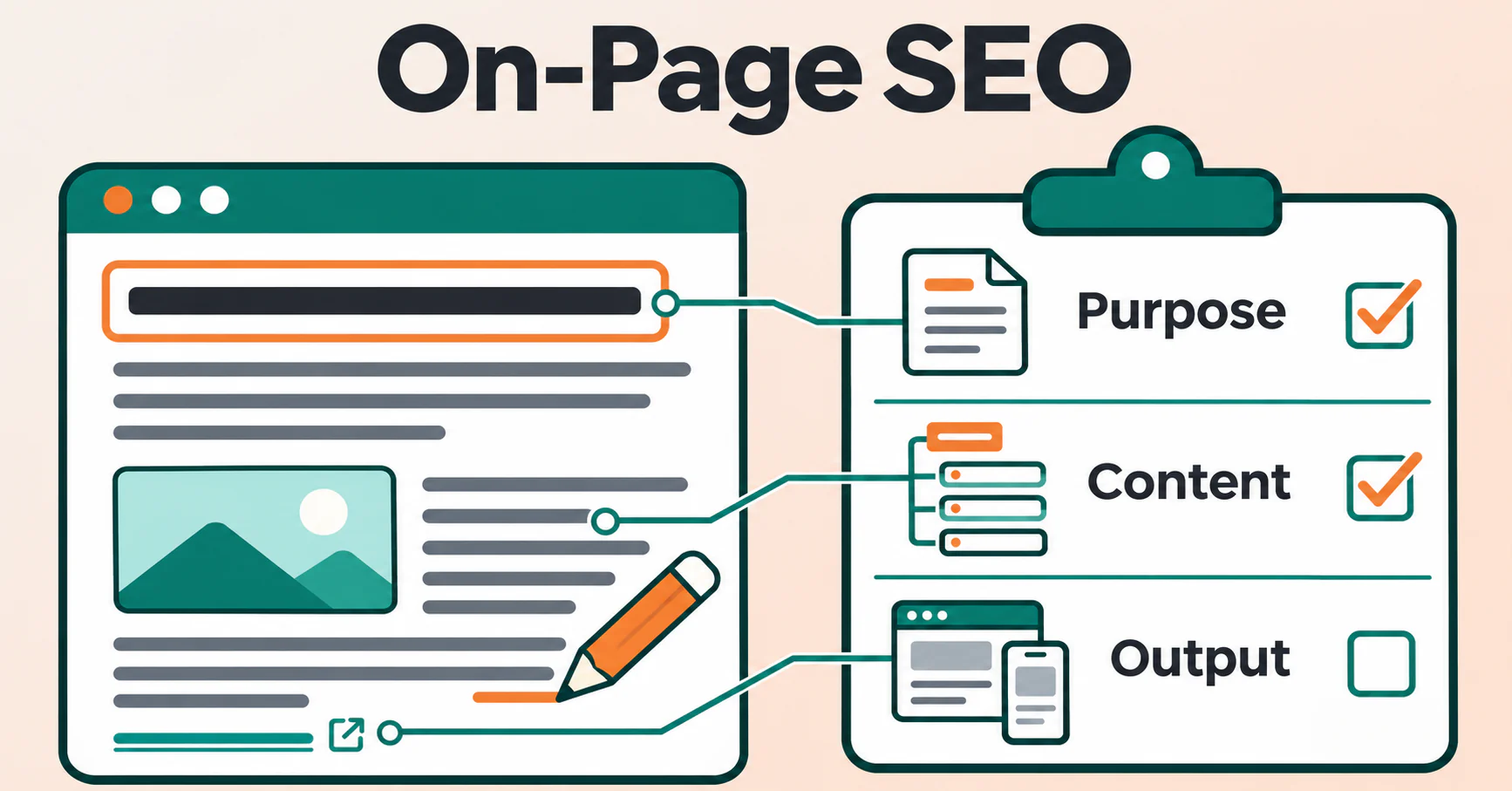
On-page SEO brings a page’s purpose, content, and presentation together. The aim is to help people recognize the right answer, understand it, and take a useful next step, while making that content clear to search engines.
If you write, edit, or review website content, this guide gives you a practical order for doing that work. You can apply it to an existing page or use it before releasing a new one. The checklist near the end helps you review the result; the explanations show what each check means.
What is on-page SEO?
On-page SEO is the work of improving an individual page’s content and HTML elements so that its subject, purpose, and useful information are clear. It includes the main explanation, title tag, headings, page summary, images, and links.
These parts have different jobs. A title identifies the document. A heading introduces the visible content. The main explanation delivers the answer. Links connect that answer to relevant detail. Adding the same phrase to every element cannot make up for missing information.
On-page SEO overlaps with other SEO work:
- Technical SEO addresses conditions such as access, rendering, redirects, and indexing controls. A page-level review can uncover these problems, even when the correction belongs in a shared template.
- Off-page SEO concerns signals and relationships outside the page, including links from other websites. Editing a page does not give you control over those signals.
The boundaries are useful for assigning work, but they are not strict divisions. A page with excellent writing still needs to load correctly. A technically accessible page still needs to offer something worth reading.
Google’s SEO Starter Guide describes the same broad aim: help search engines understand content and help people find and evaluate it. No checklist can guarantee a ranking.
1. Decide what the page should help someone do
Start with a sentence: After using this page, the visitor should be able to… Finish it with a clear outcome, such as compare two options, understand a term, complete a setup, or choose a suitable product.
This is the page’s main task. It helps you decide which sections belong and whether the page is delivering what its title promises.
Connect that task to search intent, the goal behind a search. Someone researching a product may need comparisons and tradeoffs. Someone trying to use a product may need instructions and troubleshooting. Mentioning the product name does not make those pages interchangeable.
If you have relevant search data, look at the queries associated with the existing page. Otherwise, reader questions and representative search results can provide clues. Treat those clues as evidence to interpret, rather than a list of competitor headings to copy.
Then check nearby content. If another page already answers the same question for the same audience, improving that page may be more useful than creating a second version. If the tasks differ, describe the boundary explicitly.
A short brief is enough to begin: name the reader, task, page type, main topic, essential questions, and next action. For a group of pages, topic-cluster planning helps assign each answer a clear place without creating another URL for every keyword variation.
2. Check that visitors can reach the intended page
Before polishing the copy, open the URL you plan to improve. Confirm that it leads to the expected content and works without an unnecessary sign-in or an error message.
If the page is intended for public search, check that its access and indexing instructions match that purpose. An accidental noindex instruction tells Google not to index a page it can access and process. A robots.txt block can prevent crawling; removing that block alone does not guarantee indexing.
Also inspect the preferred address. A canonical declaration identifies a preferred version of duplicate or very similar content. If an important original page incorrectly points to an unrelated URL, changing its heading will not resolve that conflict. Google may choose a different canonical, so a declaration is a signal rather than a command.
Keep this a focused prerequisite check. If access, redirects, or indexing controls are uncertain, a technical SEO audit provides the deeper investigation. Once the intended page is accessible under the conditions being checked, continue with its content.
3. Make the main content complete and useful
A useful page answers the main question promptly and supplies enough detail to act on the answer. Its opening should explain what the visitor will learn or do, without making them pass through a long general introduction first.
Review each section against the page’s task. Instructions need the prerequisites, steps, important exceptions, and a way to recognize success. Comparisons need criteria that affect the choice. A product page needs accurate information about the actual item, rather than a generic paragraph that could describe the whole catalogue.
Look for places where a statement needs a reason. “Choose the better option” does little unless the page explains what makes that option suitable and when another choice would work better.
Use evidence appropriate to the subject. Check factual claims against reliable sources, show relevant experience accurately, and distinguish measured results from illustrative examples. Make authorship, sources, and meaningful update information clear where they help readers assess the answer. Do not describe an invented example as a customer result or a test you performed.
Use keywords as language, not a quota
A keyword is a word or phrase someone uses to search. Choose a main topic and use the wording people recognize when it explains the page clearly. Related terms belong when they add meaning, clarify a distinction, or answer a necessary question.
There is no useful universal keyword-density target for this process. Repeating a phrase a set number of times does not establish that a page satisfies the query. Nor does a fixed word count establish completeness.
The same principle applies to semantic SEO: explain the relevant ideas and their relationships. Adding a list of associated terms without explaining them gives readers more vocabulary but little help.
Edit for clarity after the necessary information is present. Remove repeated answers, define unfamiliar terms, and split paragraphs where the thought changes. SEO copywriting concerns how the explanation reads and leads to an appropriate action; this review checks whether the page as a whole delivers its promise.
4. Align the title, H1, and description
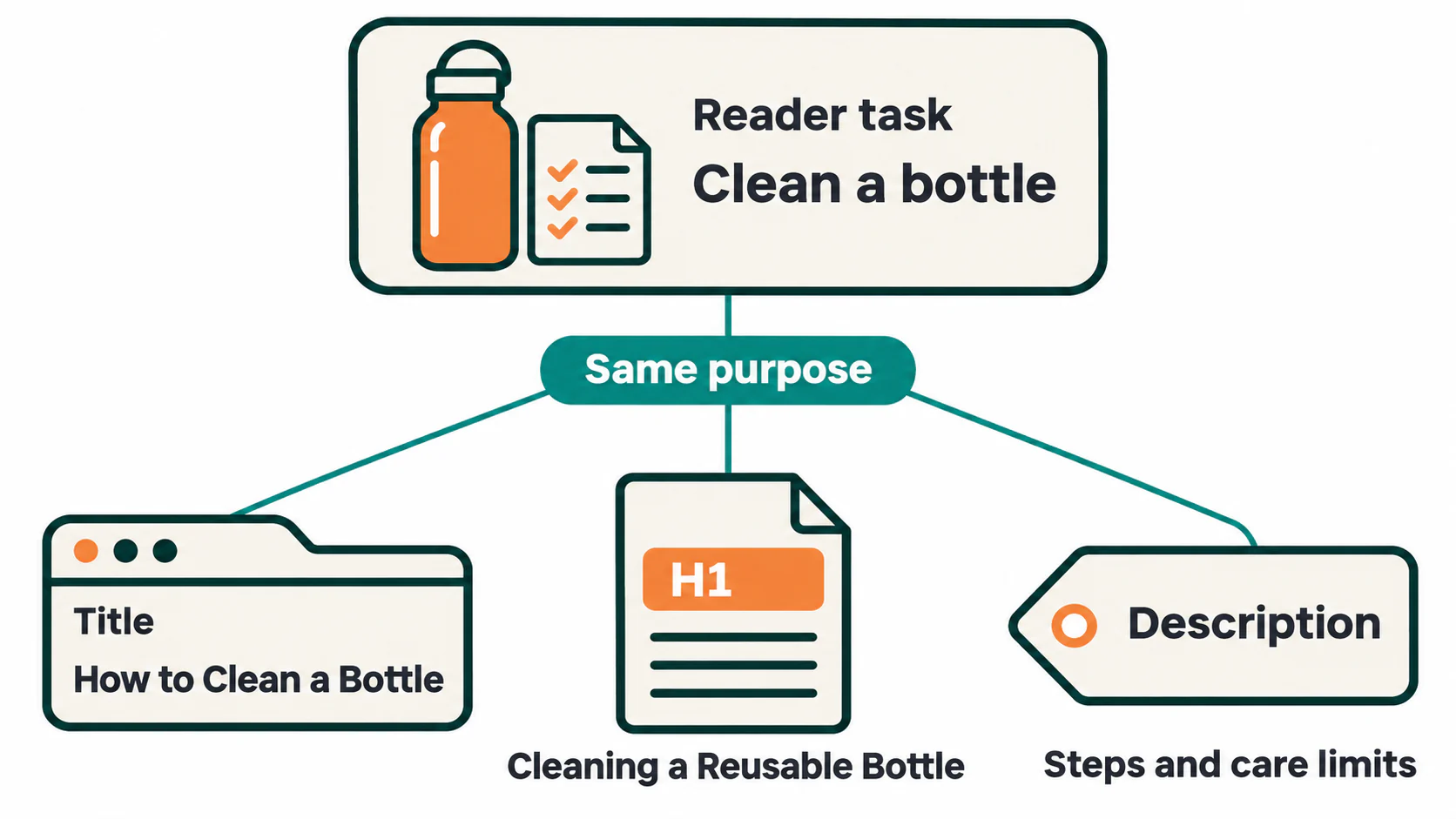
These elements should describe the same page, but they do not need identical wording. Review them beside the opening answer so that their promises can be compared.
Write a title that identifies this particular page
The HTML <title> identifies the document in browser tabs and can supply Google’s clickable search-result title. A useful title tag names the specific topic or task and distinguishes the page from nearby content.
Lead with information that helps someone recognize the page. Remove repeated keywords, vague claims, and unnecessary branding. If a year, price, or availability detail appears, make sure the page and publishing system can keep it accurate.
Google can generate a title link from other page signals, so a saved title field does not give complete control over the search result. There is also no fixed Google character limit that every title must meet. Keep the wording concise and put its distinctive information early.
Give the visible page a clear main heading
The H1 is normally the main visible heading. It should confirm that the visitor has reached the page they expected.
For most content pages, one descriptive page-level H1 is a straightforward convention. Multiple H1s do not automatically create a Google penalty, but several competing main headings can make a page harder to understand. Review the actual hierarchy rather than changing headings only to clear a warning.
The H1 and title tag can differ when the visible heading benefits from extra context. Both should still describe the same subject and task.
Summarize the page accurately
A meta description is a summary supplied in the document’s HTML head. It can help someone evaluate a search result when Google uses it. It is not a direct ranking factor, and Google may select another passage from the page instead.
Write a specific summary of what the page provides. Add useful scope or distinguishing detail rather than repeating the title or promising “everything you need.” Meta descriptions need the same factual review as visible copy: an outdated offer remains misleading even when it appears only in metadata.
Do not force the summary into an exact character count. Review its clarity and accuracy first; displayed snippets can vary by query and available space.
5. Organize the answer with meaningful headings
Headings let visitors scan the explanation and find the part they need. They also provide structure for assistive technologies, including screen readers.
Use H2 headings for the main sections and H3 headings for genuine subsections. Continue to deeper levels only when the explanation requires them. Choose the level by the relationship between sections, then use styling to control its appearance.
Read the heading outline without the paragraphs. Does it show a sensible progression toward the page’s outcome? If the outline jumps between unrelated subjects, reorganize the answer before adding more keywords.
Good heading structure describes what each section actually explains. A heading such as “Check the final page after saving” is more useful in a procedure than a vague label such as “Important information.” There is no need to put the main keyword in every heading or assume that a particular heading level carries a fixed ranking weight.
6. Keep the URL descriptive and stable
For a new page, choose a short, descriptive URL that fits the site’s existing structure. Keep it readable and avoid adding changing details unless they are part of the page’s lasting identity.
For an existing page, an untidy slug is not automatically a reason to move it. Changing an address creates work for links, redirects, and other references. If a move is justified, plan the redirect and internal-link updates before changing the URL.
7. Make images useful and understandable
Keep images that clarify the explanation or show relevant information. Place them near the text they support, choose dimensions suited to the layout, and use an appropriate format and compression level without making important detail unreadable. There is no single image size that fits every page.
Provide a text alternative according to the image’s purpose. For an informative image, the alt attribute should communicate the information a reader would miss if the image were unavailable. It should not automatically repeat the page title or contain a list of keywords. A purely decorative image can use empty alt text, alt="", when it adds no information or function.
If an image is the only content of a link, its text alternative should explain the destination or action. Essential instructions should also be available as page text, rather than appearing only inside an image.
Then test delivery. Does the image load at a useful size on a narrow screen? Is space reserved so it does not push existing text around when it arrives? Does the main image appear promptly? Loading choices for a prominent image can affect Largest Contentful Paint, so do not apply lazy loading to every image without checking its role.
8. Connect the page to useful next steps
Internal links connect pages on the same website. Use them where another page helps with a question the current explanation raises. Keep the essential answer on the current page so that visitors do not need to open several links just to understand the basics.
Choose the destination first, then write descriptive anchor text that fits the sentence. Open the link and confirm that it reaches the promised content. A clearer label cannot repair an incorrect destination.
Check both directions. The page may need links to useful supporting information, and existing relevant pages may need a contextual route into it. If an important page is absent from a link-following crawl, compare the crawl’s scope and rendering with other URL sources before classifying it as an orphan page.
Links used for navigation should have a real destination in an HTML <a> element with an href. JavaScript can insert crawlable links when the resulting markup has that structure. A button that runs a script without exposing a URL needs a different review.
External links should support a claim or supply a useful resource. Ordinary editorial links do not require nofollow by default. Use sponsored for paid placements and ugc for user-generated links where appropriate. Opening a new tab is a browsing choice; it does not by itself determine whether ranking credit can pass.
There is no ideal link count to fill. A link earns its place when its destination helps at that point in the explanation.
9. Verify the page people actually receive
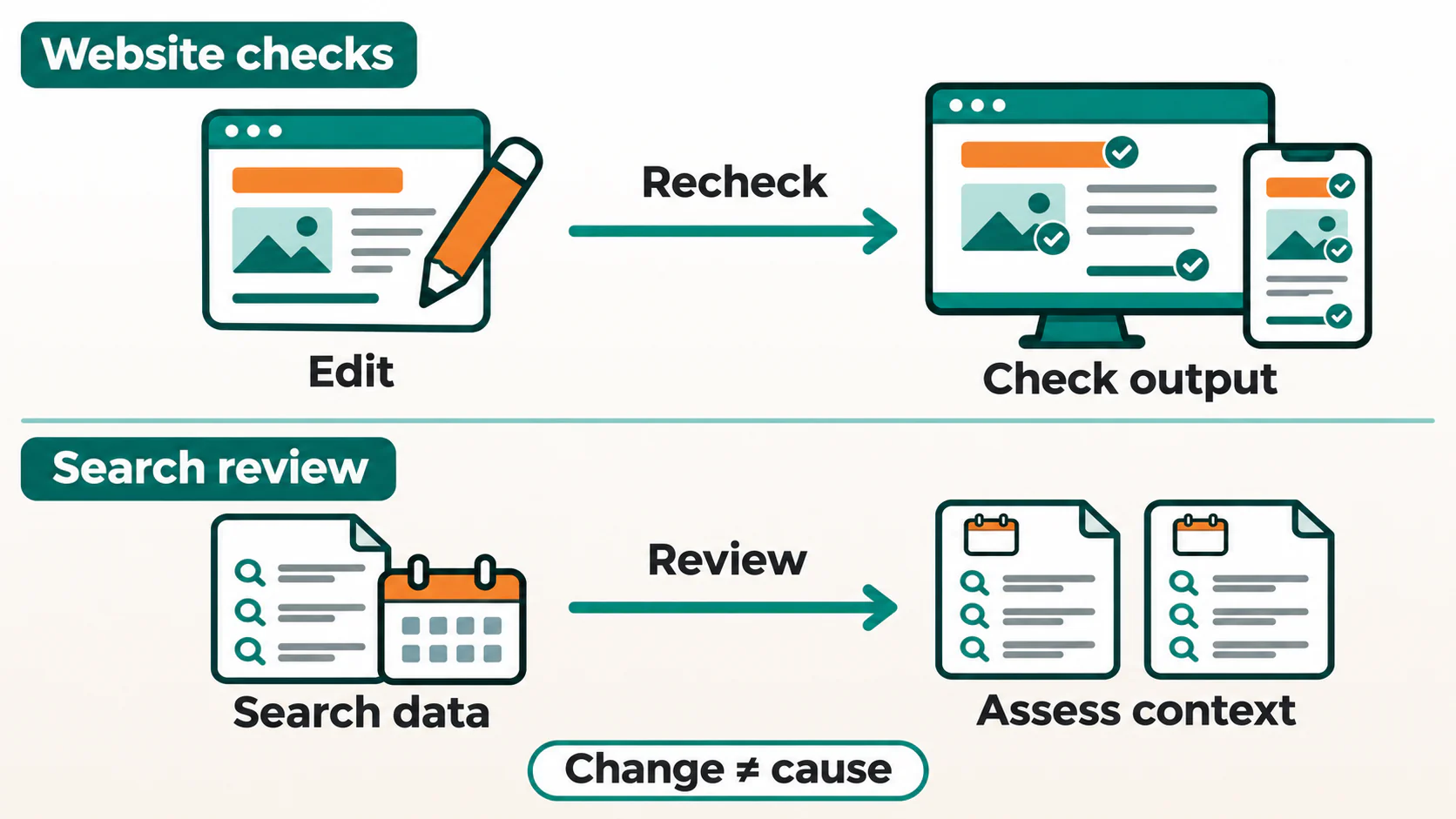
Saving a field in an editor is only one step. Open the page in the environment being reviewed and compare the output with the intended changes.
Check the browser tab, main heading, opening answer, images, and links. Inspect the document head for the title and description. If scripts supply or change the content, compare the response HTML with the rendered document, which is the page after scripts have run.
A difference does not automatically establish an indexing failure. It identifies a dependency that needs testing. The JavaScript SEO workflow helps investigate missing text, stale metadata, and links that depend on rendering.
On a narrow screen, read the page and try its important actions. Confirm that text remains readable, tables can be used, menus and forms work, and overlays do not hide the answer. A correct desktop screenshot does not establish that the mobile page works.
If structured data is present, check that its type and values describe the visible content accurately. Schema markup can communicate facts in a machine-readable format, but cannot supply an answer missing from the page or guarantee a rich result.
For several pages, collect titles, headings, descriptions, links, and relevant response information together. Group repeated problems by template. A generic title on many distinct pages may need a shared publishing-rule correction, while one misleading introduction needs an editorial change.
SEO Neurons Spider’s page metadata auditing can help with that review. Enable the relevant title, description, and H1 capture before crawling the intended pages. Use JavaScript rendering where scripts supply or change those elements. Review the captured text and element counts beside each URL, then inspect representative pages before deciding on a correction. A missing description tag and a present but empty tag are different findings; repeated titles need a check of the pages they describe.
Treat length flags as configurable review prompts, rather than fixed Google requirements. Correct the responsible website field or template, then recrawl the affected pages and inspect their output again. The findings cover the pages and content captured under those settings. They do not judge the usefulness of the explanation, confirm Google’s indexing decision, or automatically edit the website.
An on-page SEO review in practice
Consider a fictional guide about cleaning a reusable water bottle. Its current title is “Bottle Tips,” the H1 is “Welcome,” and the introduction discusses the history of reusable bottles. The page eventually gives some instructions, but it never explains which bottle materials or manufacturer care limits they apply to.
The problem begins with the answer, not its keyword count. The editor first defines the task: help someone find suitable cleaning instructions for their type of bottle. They then verify the advice and make its limits clear before changing the page’s labels.
An illustrative revision might look like this:
- Title: How to Clean a Reusable Water Bottle | Example
- H1: How to Clean a Reusable Water Bottle
- Description: Find cleaning guidance for reusable water bottles, including removable parts, care-label checks, and drying before reassembly.
- Opening: Explain what the guide covers and tell the reader to check the bottle’s manufacturer instructions before choosing a method.
- Structure: Start with care limits and removable parts, then present the supported cleaning steps and how to check that the bottle is ready to reassemble.
- Images and links: Keep only images that clarify the procedure, describe their relevant information, and link to applicable care instructions where they are needed.
That description is suitable only if the revised page actually covers those points. A persuasive summary cannot substitute for missing guidance.
After the edit, the editor opens the final page, checks its metadata and heading, follows its links, and reads the procedure on a phone. Those checks verify the revision’s implementation. They do not establish a ranking improvement; that requires later search evidence and a careful interpretation of other changes.
A practical on-page SEO checklist
Use this after reviewing the page. Mark an item complete only when the current output supports it, and record anything that still needs investigation. An item that does not apply can be marked accordingly with a reason.
Purpose and content
- The page has a clear reader task and an appropriate format.
- An existing page has been considered before creating another answer to the same question.
- The opening gives a useful answer or clearly introduces the task.
- Sections supply the necessary explanations, evidence, steps, and limits.
- Claims, examples, offers, and changing details have been checked.
- Keywords appear naturally, without a density target or repeated variations.
- Repetition and unrelated sections have been removed.
Page elements and connections
- The title identifies this page and matches its content.
- The visible main heading communicates the same purpose.
- Subheadings form a meaningful hierarchy.
- The description accurately summarizes the page without unsupported promises.
- The URL is appropriate; any planned address change includes its required updates.
- Images are relevant, load correctly, and have suitable text alternatives.
- Contextual links reach the intended current destinations and have clear wording.
- Relevant existing pages provide a useful route into the page where appropriate.
Delivery and follow-up
- The expected content loads at the intended URL.
- Access, indexing instructions, and canonical signals match the page’s purpose.
- Final HTML and rendered content have been checked where scripts affect the result.
- The page is readable and its important actions work on a narrow screen.
- Any structured data matches the visible content.
- Corrections have been rechecked on the website, including other affected template examples.
- The change date, affected URLs, and later review method are recorded.
How to decide what to fix first
Start with confirmed barriers. An unavailable page, missing main content, or unintended indexing instruction usually deserves attention before a small change to a description.
Next, fix mismatches between the page’s promise and its answer. A title offering a comparison cannot be fulfilled by a short list of product names. Improve the explanation or narrow the promise so that both describe the same useful page.
Then review repeated template problems and important individual pages. Consider the number and role of affected pages, available search or visitor evidence, and the effort needed. A tool warning needs interpretation; it is not a priority merely because it appears in red.
Record each chosen correction with its URL, observed problem, intended result, and verification step. This makes “improve the page” a task someone can complete and check.
How to evaluate the changes
Separate implementation from results. First confirm that the corrected content and page elements are available on the website. If the page is intended for search, later Search Console inspection can help you understand Google’s stored crawl and indexing information. A successful local check does not establish that Google has processed the change.
For search performance, select the relevant page in Search Console’s Search results report and examine its queries. Compare suitable periods while keeping device, country, and search-type filters consistent. Allow enough observations to make the comparison useful; there is no universal number of days that proves an edit worked.
Read clicks, impressions, click-through rate, and average position together. Click-through rate is clicks divided by impressions. It can fall when a page starts appearing for a broader set of searches, even while total clicks rise. The report also does not tell you the exact title and snippet shown for every impression.
Where existing analytics or feedback supports it, review actions that fit the page’s purpose. Can people complete the form, use the instructions, or reach the relevant next step? Search visibility alone cannot establish whether an explanation helped.
Keep a record of other releases, seasonal demand, and changes affecting the comparison. An increase after an edit does not prove that the edit caused it. Use the evidence to choose the next investigation instead of treating one metric as a verdict.
Choose one important page and work through the process in order: clarify its task, complete its answer, align its elements, check its connections, and verify the delivered result. That gives the checklist a practical purpose and leaves you with a change you can explain.
JOIN THE CONVERSATION
Comments
Have a question or something to add? Comments are moderated and appear here only after approval.
JavaScript is required to submit a comment. Published comments above remain available to read.
No approved comments yet. Be the first to join the conversation.