
THE SHORT VERSION
What you’ll take away.
- Canonical tags identify a preferred URL when duplicate or very similar pages remain available.
- Google considers your preference but can select a different canonical URL.
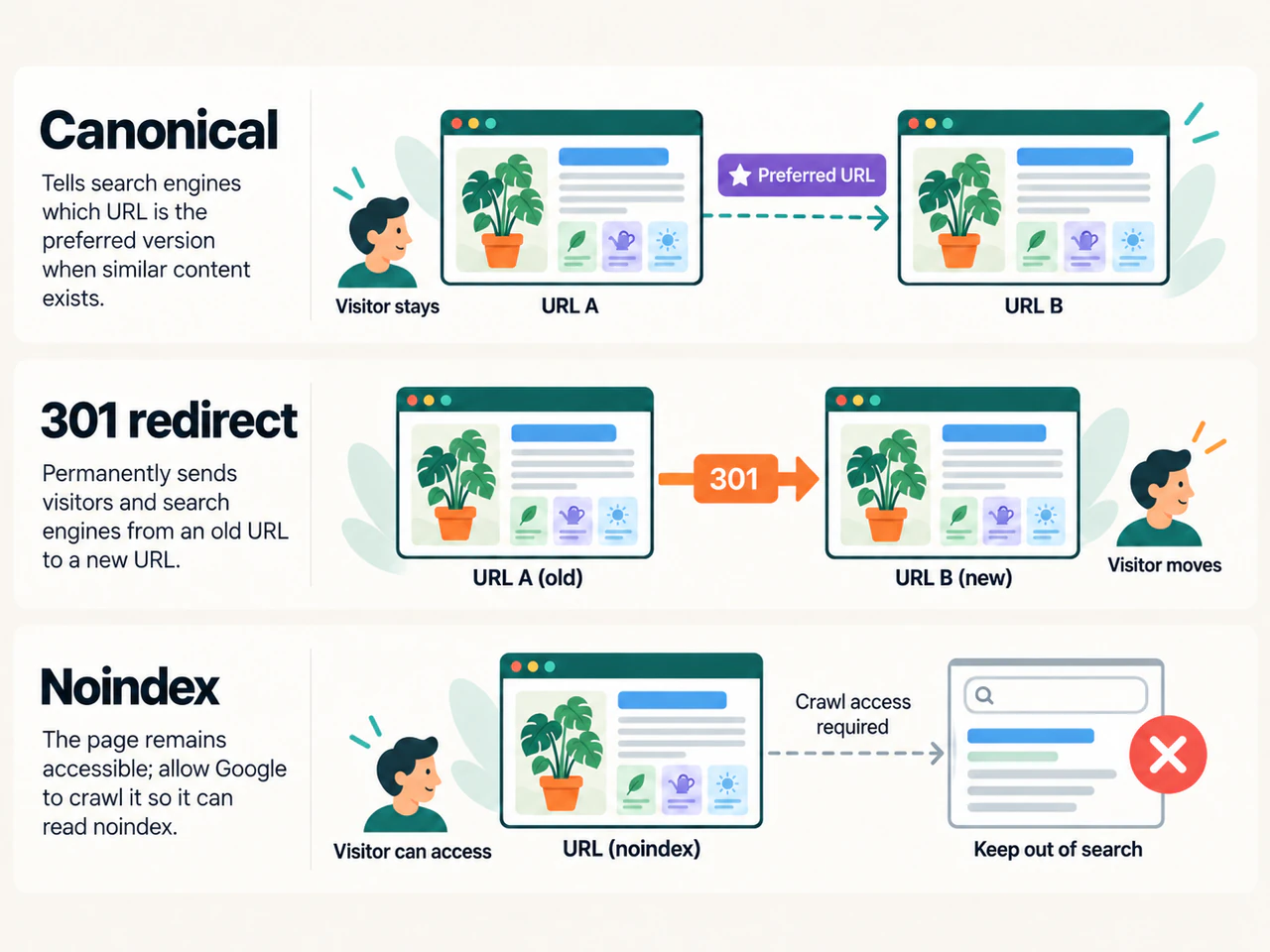
- A canonical tag, a redirect, and noindex serve different purposes.
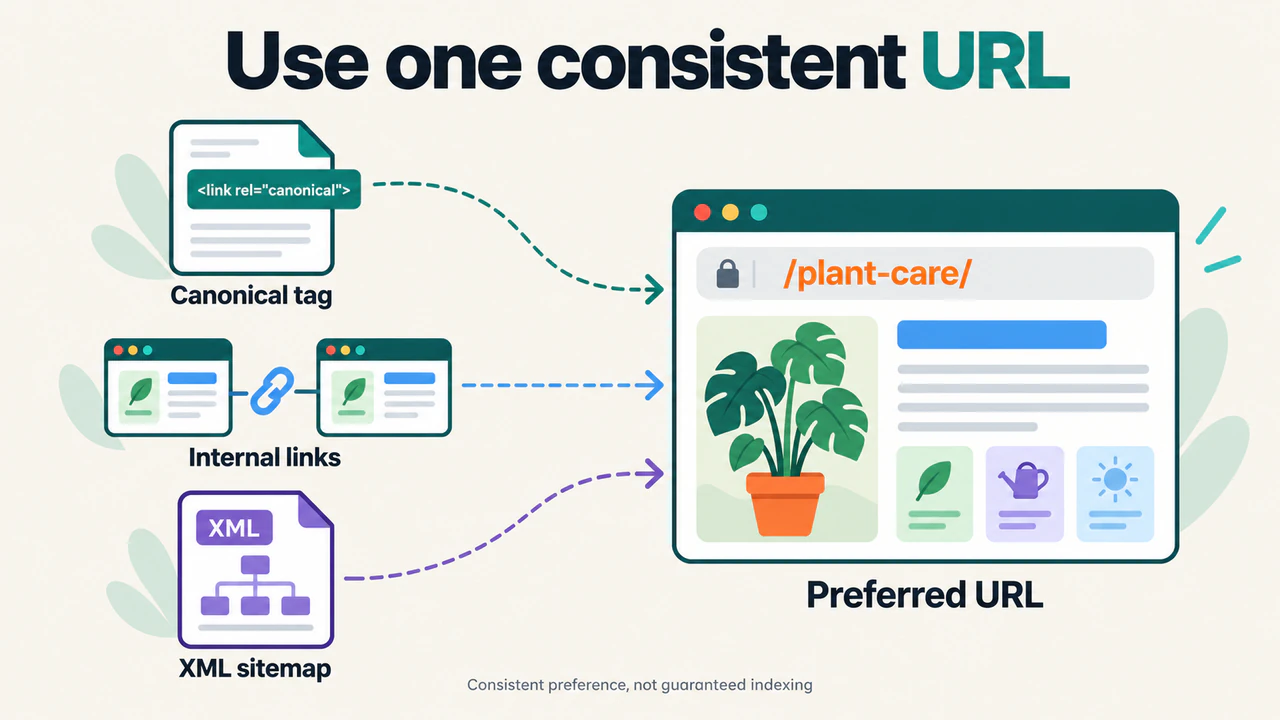
- Keep canonical declarations, internal links, redirects, and sitemap URLs consistent.
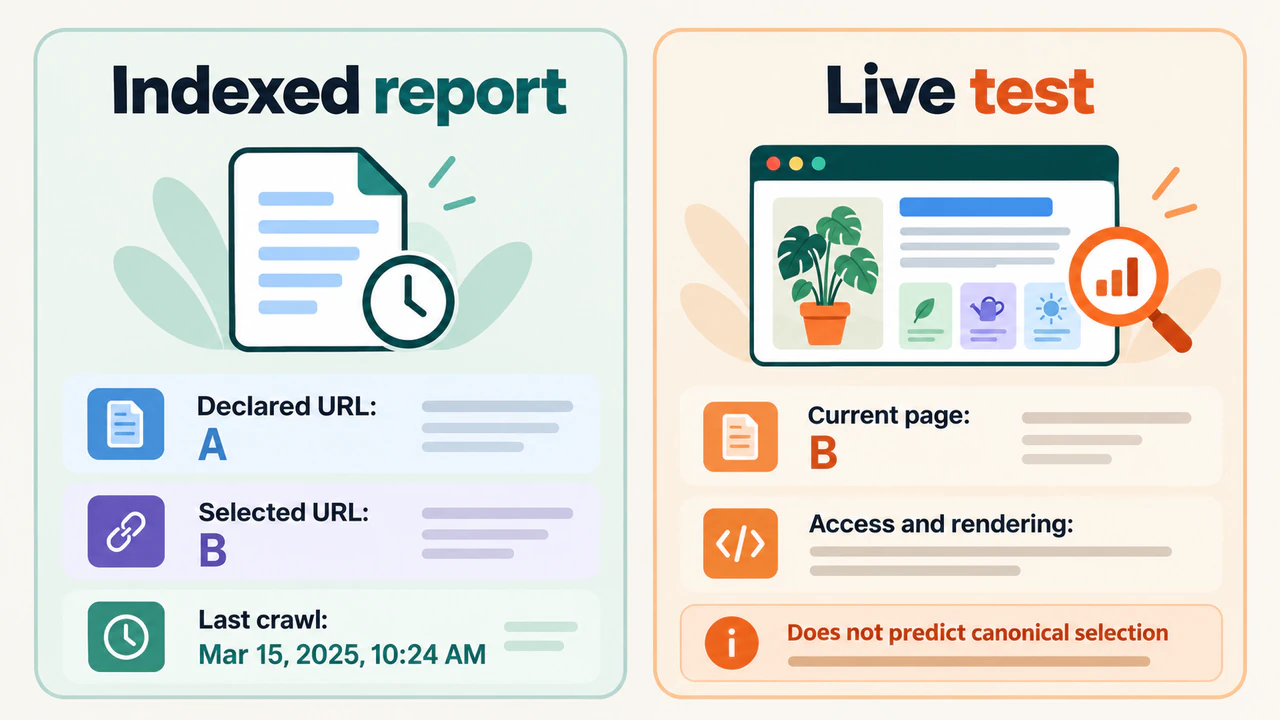
- Check the indexed report in Search Console; a successful live test does not confirm canonical selection.
You open an article from an email and notice extra text after the URL, such as ?utm_source=newsletter. Remove that part and the same article still opens. There are two addresses, but the content you came to read has not changed.
If you later inspect those URLs in Google Search Console, you may find that Google has indexed one version and treated the other as a duplicate. That can be the intended result.
Canonical tags help express which URL should represent duplicate content. The important questions are whether the pages really are duplicates, whether the preferred address is suitable, and whether Google has selected the version you expected.
This guide explains how to make those decisions, add the correct markup, and investigate common mistakes. If you manage website content, you can use the audit steps to review an affected page before changing an entire template.
What is a canonical tag?
A canonical tag is a <link> element that identifies a preferred URL for a page’s content. It uses rel="canonical" to describe the relationship and href to supply the address.
In search, canonicalization is the process of choosing a representative URL when several pages contain the same or very similar main content. A canonical declaration says which version the website prefers. Google evaluates that preference alongside the pages and other available signals.
It helps to separate three terms:
| Term | Meaning |
|---|---|
| Canonical tag | The HTML element that declares a preferred URL |
| User-declared canonical | The preference a website communicates to Google |
| Google-selected canonical | The URL Google has chosen to represent the content |
Those last two addresses can match, but they do not have to. A tag expresses a preference; it does not force Google to index that address.
A canonical tag also does not move a visitor to another page. Someone opening a duplicate URL can remain there while its markup points to the preferred version.
Why canonical URLs matter for SEO
Different addresses can arise from tracking parameters, alternative hostnames, HTTP and HTTPS versions, or publishing systems that expose the same content in several places. A parameter is an extra value in the URL, usually following a question mark. Its purpose determines whether it changes the content.
Some duplication is normal. It does not automatically mean a website has violated Google’s spam policies. The practical concern is whether several addresses represent the same main content and whether the version chosen for search is suitable for the reader.
When Google groups equivalent pages, signals such as links to their different addresses can be consolidated around the representative URL. A clear preference also gives you a consistent address to use in navigation, sharing, and reporting.
Start by comparing the pages themselves. A parameter that only records where a visitor came from is different from one that loads another page of results. Similar addresses do not prove that the underlying content is interchangeable.
How to add a canonical tag
For an HTML page, the declaration belongs in the document’s <head>. This is the metadata area of an HTML page structure, separate from the visible article inside <body>.
Suppose the preferred address is https://example.com/guides/plant-care/. Its declaration can look like this:
<head>
  <title>Plant care guide | Example Site</title>
  <link rel="canonical" href="https://example.com/guides/plant-care/">
</head>
An equivalent tracking version can point to that clean address. On the preferred page itself, the same declaration is a self-referencing canonical: the page points to its own preferred URL.
Use the complete address, including https:// and the hostname, so the intended destination is clear. Check its spelling, path, and trailing slash against the URL the server actually serves.
A canonical declaration is a strong signal, while sitemap inclusion is a weaker signal. They should communicate the same preference. Neither makes an unsuitable target an appropriate representative of the content. Google’s canonical URL guidance documents these methods and their limits.
Check existing output before adding another tag
A content management system, theme, or SEO plugin may already generate the canonical. Inspect the page source before adding anything. Two systems can otherwise produce declarations that disagree.
If the current output is wrong, find the setting or template responsible for it. Correct that source rather than placing a second tag in the article body. Pasting the example into a post editor may display it as content without changing the document metadata.
Check another page using the same template. A template should generate the appropriate address for each page, rather than reuse the URL from the first example you entered.
Canonicals can also use an HTTP header
An HTTP header is information the server sends with its response. For a resource such as a PDF, a canonical declaration can be supplied through a Link response header:
Link: <https://example.com/resources/plant-care.pdf>; rel="canonical"For equivalent PDF download addresses, this header can identify the preferred file. Set it in the server or platform response configuration for the relevant resources. Typing the line into a document does not create a response header.
Choose a method you can maintain reliably. If both HTML and HTTP declarations exist, inspect both so they do not identify different destinations.
Canonical tag, redirect, or noindex: which should you use?
Choose the action from what should happen to the page and its visitors.
| Situation | Suitable approach | What it does |
|---|---|---|
| Equivalent versions must remain available | Canonical declaration | Expresses which URL should represent their content |
| An old address has permanently moved to a replacement | Permanent redirect | Sends visitors and crawlers to the new location |
| A page should remain accessible but stay out of Google Search | noindex |
Instructs Google not to index that page when it can access the instruction |
| A page has distinct, useful content | Keep it independently eligible | Give it an appropriate URL and page-specific metadata |
For a permanent move, server-side permanent redirects such as 301 or 308 are common choices. The browser reaches the replacement instead of continuing to show the old page. Use a redirect when people opening the old address should reach the new location. A canonical tag alone leaves the old page available at its original address.
Use noindex when exclusion is the actual goal. Google must be able to crawl the page to read that instruction. A robots.txt block can prevent it from seeing the rule, so combining a crawl block with noindex is not a reliable way to remove a URL from search.
Keep the preferred page eligible for indexing. Adding noindex there would work against the goal of having that version appear in search. To choose a representative among equivalent pages, make the canonical relationship clear instead of using noindex as a vote for another URL.
Before choosing any of these, write down the intended result: should both versions work, should everyone reach a replacement, or should this page be absent from search? That decision is more useful than applying the same setting to every URL in a report.
Keep the preferred URL consistent across the website
A canonical declaration is easier to interpret when the rest of the website uses the same address.
Internal links should lead directly to the version you want readers and crawlers to reach. Review links in article text, navigation, and reusable page components. If an address has changed, update those links instead of leaving every visitor to pass through an old redirect.
An XML sitemap should list the URLs you want considered for search. Use complete addresses and compare its entries with the preferred versions, especially when a plugin or platform generates the sitemap separately from the page metadata. Avoid listing a duplicate while its canonical identifies a different preferred address. Sitemap inclusion helps communicate a preference; it does not guarantee indexing.
Check URL variations deliberately. A difference in hostname, protocol, or slash can involve an actual redirect or a separately served page. Follow the response to establish which address is available instead of assuming the difference is only cosmetic.
If scripts alter metadata, compare the response HTML with the rendered document. A correct initial declaration can become inconsistent when JavaScript replaces it or inserts another one. Record which system makes the change before editing the template.
How to check Google’s selected canonical
If you have access to the relevant Search Console property, inspect the full URL and open its Page indexing details. Compare:
- User-declared canonical: the preference reported for the inspected page.
- Google-selected canonical: the version Google selected.
- Last crawl: the timing of the stored observation.
Inspect the intended destination as well as the duplicate. Open both pages and compare their main content. An unexpected selection needs that comparison before you decide whether the declaration, the destination, or the content needs attention.
Use the indexed information to check canonical selection. A live URL test helps examine the page currently available to Google, but cannot predict which URL will be selected as canonical. Google’s URL Inspection documentation explains this limit.
If the page changed after the reported crawl, the stored result may describe an earlier version. Keep the current implementation check and Google’s stored selection as separate observations.
When a duplicate report needs no change
“Alternate page with proper canonical tag” can be an expected result. It means the alternate points to a canonical page that is indexed. If that is the intended relationship, trying to index both versions would work against the original decision.
Google may also group duplicates when no preference was declared. An excluded duplicate is not automatically a missing article. Check whether the intended content is represented by the selected URL.
Investigate when Google selects an unsuitable version or groups pages that should offer different content. Compare the inspected page, the version you declared, and Google’s selected version. If the pages are equivalent, check which address the site consistently supports. If their purposes should differ, review whether their main content actually delivers different answers.
Common canonical mistakes and what to check
Review the relationship between the source page and its target, rather than checking only whether a tag exists.
| Finding | Why it needs review | Practical check |
|---|---|---|
| Unrelated pages all point to the homepage | The homepage does not represent each page’s main content | Inspect the template’s page-specific URL value |
| A canonical points to an error page or an unintended redirect | The declared target is not the usable destination you intended | Open the target and inspect its response and final address |
| HTML and HTTP declarations disagree | Different systems communicate different preferences | Check the page source and the response’s Link header |
| Several canonical elements name different URLs | A theme, plugin, or script may be competing with another system | Identify which component generates each declaration |
| Page A points to B, which points to C, or back to A | The declarations form a chain or loop | Map the targets and point equivalent pages directly to the intended representative |
| A canonical points to a page with different main content | The requested relationship may not describe duplicates | Compare the actual answers, products, or listings on both pages |
These are investigation prompts. A different canonical is appropriate when two pages really are duplicates; it is not an error simply because the address differs from the inspected URL.
Do not treat every parameter or listing page as a duplicate
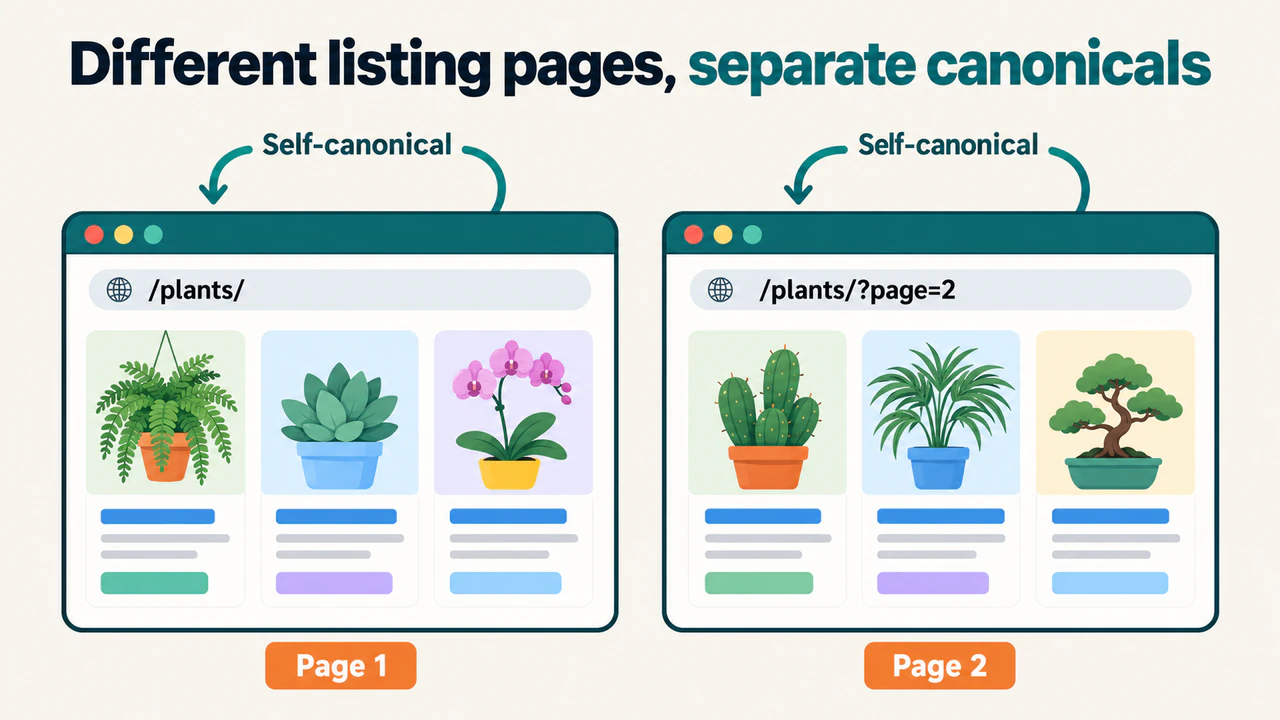
A filtered view can contain a different selection of items. A category page can help someone browse, while an individual article answers a specific question. Decide what each page provides before choosing a canonical target.
Pagination needs particular care. Page two of a listing can contain items absent from page one. Give each page in the sequence its own URL and self-referencing canonical. Pointing every page to the first page would declare that the first page represents content it does not contain.
Changing a title alone does not make duplicated main content different. Equally, sharing a layout or some text does not prove that two pages answer the same question.
A practical canonical audit workflow
Start with one URL and its intended destination. For a larger review, collect the same information for representative pages from each affected template.
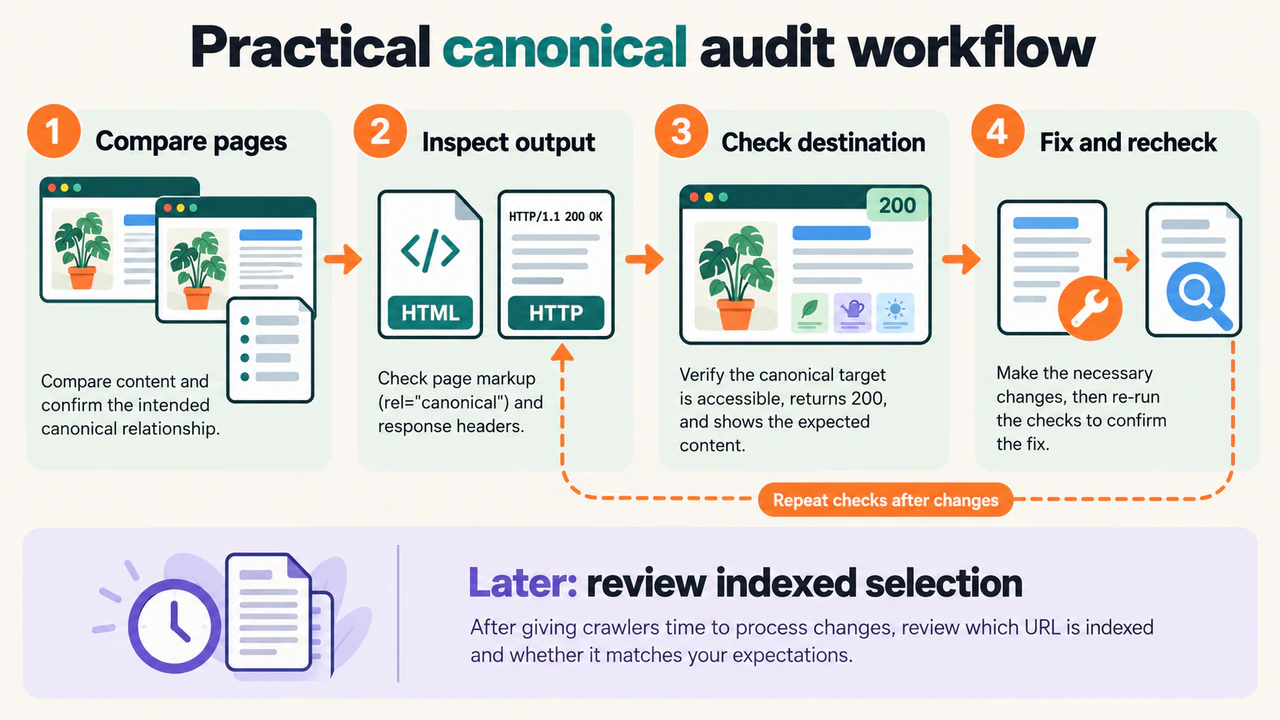
1. Record the intended relationship
Write down the inspected URL, its preferred version, and why the content belongs together. If the pages serve different tasks, describe that difference instead of assuming one must replace the other.
For a website-wide review, keep a row for each source URL. Useful fields include the HTTP status, declared canonical, final target, indexing instructions, and the reason for your decision. Add the Google-selected canonical where you have Search Console evidence; a crawler’s tag extraction alone does not establish Google’s selection.
2. Inspect what the page actually serves
Open the source page and check its initial HTML for rel="canonical". Record every declaration and its resolved destination. Then check whether the rendered document changes it.
In browser developer tools, open Network, reload the page, and inspect the main document request’s response headers. Look for a Link header carrying rel="canonical", along with redirects and indexing instructions. Checking only the visible article will miss those response details.
If several pages have the same wrong value, investigate their shared template or plugin configuration. Fixing the generator can be more useful than changing individual posts one at a time.
3. Check the target and supporting signals
Open the canonical target directly. Confirm that it provides the intended content, works without a required login, and is not accidentally excluded from indexing. Inspect any redirects to identify the final address.
Compare the source and target’s main content. Then review the links and sitemap entries that refer to them. Note the specific disagreement you found; “canonical issue” alone does not explain what needs changing.
4. Make a focused correction and verify it
Change the declaration, redirect, link, or template responsible for the observed problem. Reload the affected pages and repeat the same checks. Include another page using the same template so you can see whether the change was applied correctly.
After the correction reaches the public website, record the date and use Search Console to check the current page. Review the stored selection again after Google has recrawled and processed the change. Where appropriate, request indexing for an important corrected URL, without treating the request as a guarantee.
Do not expect a fixed turnaround time. A successful current test confirms something about the implementation you can access now; Google’s later selection still needs its own evidence.
Frequently asked questions
Does every page need a canonical tag?
Google can choose a canonical without an explicit declaration. A consistent self-referencing implementation can still make the intended URL clear and reduce accidental differences between templates. Treat it as a way to communicate a preference, rather than a requirement that guarantees indexing.
Is a canonical tag a meta tag?
It is commonly discussed alongside metadata, but the HTML declaration uses a <link> element. A line such as <meta name="canonical"> does not use the canonical link syntax shown above.
Can a canonical point to another website?
Yes. The link relation can identify a resource on another domain. Check that the other page provides equivalent content and is the version you intend to represent it. Google can still select a different version, so verify the result instead of assuming that the declaration has been accepted.
Does changing the canonical fix missing rankings?
Only if the canonical relationship was part of the actual problem might the correction help. Missing content, access failures, an unsuitable answer, or a page Google has not selected for indexing need their own investigation. A correct tag is not evidence that every other requirement has been met.
Make the preference clear, then verify it
Begin with the page relationship: which URLs contain equivalent content, and which address should represent it? Choose an appropriate implementation and keep the surrounding links and sitemap consistent.
Then compare what the website serves with what Google’s indexed report shows. That gives you a reason to leave an expected duplicate alone or make a correction you can explain and check.
JOIN THE CONVERSATION
Comments
Have a question or something to add? Comments are moderated and appear here only after approval.
JavaScript is required to submit a comment. Published comments above remain available to read.
No approved comments yet. Be the first to join the conversation.