
THE SHORT VERSION
What you’ll take away.
- A meta description summarizes a page; Google may use different text for a search snippet.
- Describe the specific page and the help it provides, using details the content supports.
- There is no fixed Google character limit, and the description is not a direct ranking factor.
- Check the final HTML to find missing, empty, repeated, or competing descriptions.
- Evaluate search performance with consistent filters instead of attributing every change to the description.
A search result gives you a small amount of information before you decide whether to open a page. A useful summary makes that choice easier. A vague promise such as “the best information online” tells you very little about what you will find.
A meta description is a short HTML summary of a page. Google can use it beneath a search result’s title, although it often selects text from the page instead.
If you write or manage website content, the practical task is to describe each important page accurately, put that description in the right place, and check what the website actually delivers. This guide explains how to do that, with examples for different page types and a workflow for finding common problems.
What is a meta description?
A meta description is supplied through a <meta> element in the document’s <head>, the part of the HTML that contains page metadata.
<meta name="description"
  content="Compare filter, capsule, and espresso coffee makers by cost, cleaning, and capacity to choose a suitable machine for home.">
The content attribute holds the summary. It is not normally displayed as a paragraph inside the article. To read it, inspect the page’s HTML or the field that supplies its metadata.
A title tag identifies the document and can supply the clickable heading in a Google result. The description gives additional context. These elements should describe the same page, but they do not need to repeat the same sentence.
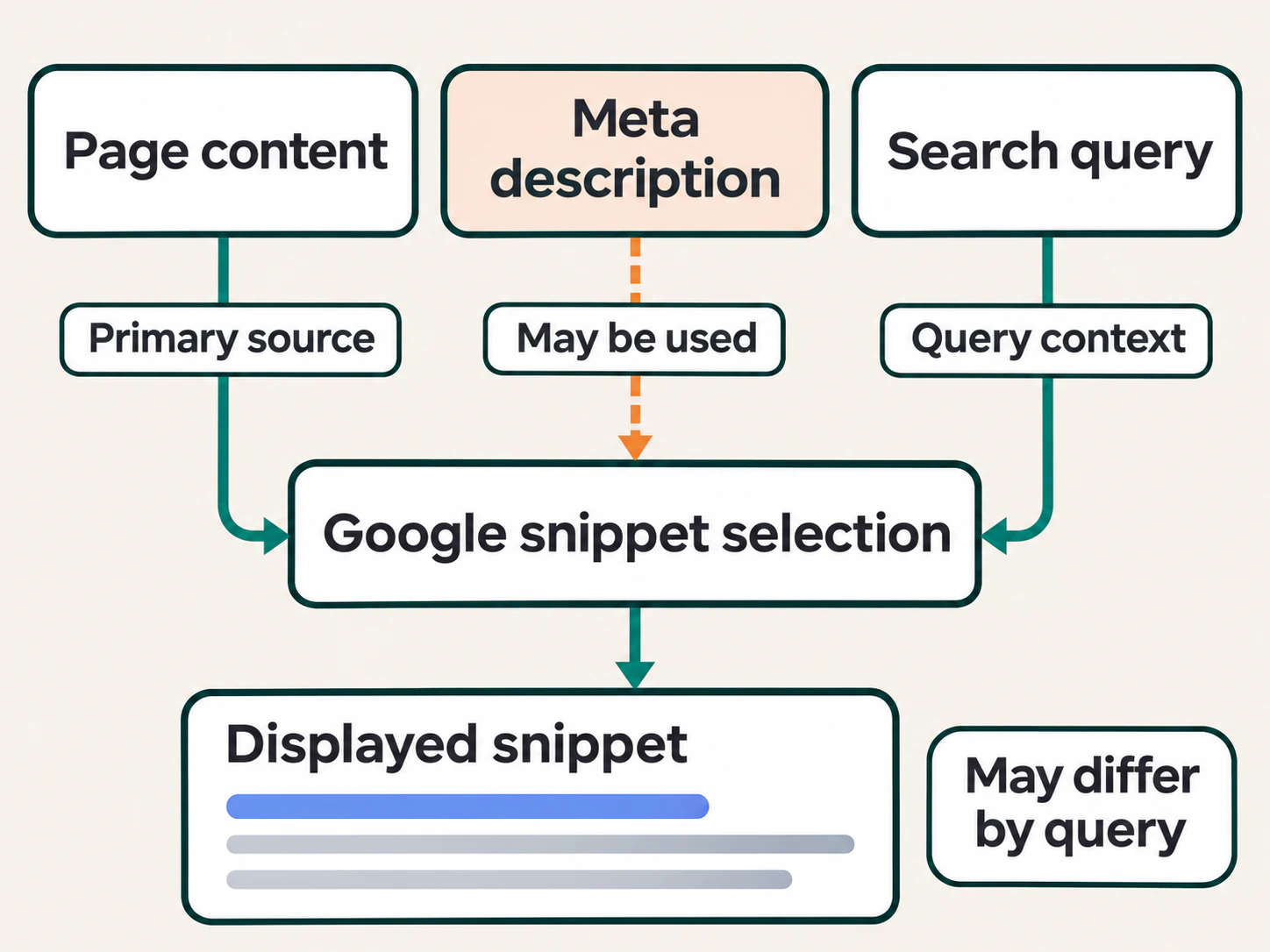
The search snippet is the summary Google actually displays. It may come from the meta description, from visible page content, or from a passage that better matches a particular search. Changing the HTML summary therefore does not give you complete control over the result.
Do meta descriptions affect SEO?
Google does not use the meta description as a direct ranking factor. Adding a phrase to it is not a way to make an unrelated page rank for that phrase.
Its value is in communicating the page’s relevance when the description is shown. Someone should be able to understand what the page offers and whether it matches their need. That can support an informed decision to visit; it does not guarantee more clicks.
Consider two summaries for the same instructional page:
Vague: Everything you need to know about coffee makers. Get the best advice and discover amazing information today.
Specific: Compare filter, capsule, and espresso coffee makers by cost, cleaning, and capacity to choose a suitable machine for home.
The second version names the choices and the comparison criteria. It helps someone decide whether the guide will answer their question. It is useful only if the page actually provides that comparison.
An attractive summary cannot replace missing information. When a result promises a comparison and opens a short sales pitch, rewriting the description alone will not complete the reader’s task.
Why does Google show a different description?
Google’s snippet generation considers the search being made. A broad page summary may be suitable for one query, while a specific passage is more useful for another. Google’s snippet documentation explains that page content is its primary source, with meta descriptions used when appropriate.
For the coffee-maker guide, a search about cleaning might be better served by text from its cleaning section than by the overall summary. This is an illustrative possibility, not a prediction of what a particular result will show.
When the displayed text differs, first compare the query with the page’s explanation. Does the selected passage answer a real question? If so, the difference may need no correction.
Investigate when the result shows misleading, obsolete, or unrelated information. Check the current description, the visible passage involved, and whether a recent change has reached the public page. Updating only the metadata will leave an inaccurate passage available elsewhere in the document.
Also distinguish a different snippet from a missing page. If the page is absent from search, investigate its crawl access and indexing signals rather than assuming that a description edit will make it appear.
How to write a useful meta description
Start with the page that exists. Read its opening, main sections, and any action it helps someone complete before drafting the summary.
Match the reader’s task
Identify what someone can learn, compare, find, or do on the page. That is the starting point for matching the description to search intent.
An article that explains how to clean a coffee maker should sound instructional. A category of replacement filters should help someone recognize a selection of products. A repair-service page should identify the service and any genuine limits on where or how it is provided.
Use the subject naturally. A description about cleaning a coffee maker does not need to repeat “coffee maker cleaning” in several forms. The explanation should sound useful when read aloud.
Add a detail that helps someone choose
A summary should explain more than “this page is about the topic.” Select the detail that makes the page useful: the steps covered, options compared, compatibility information, audience, or decision criteria.
Suppose the title is “How to Clean a Coffee Maker.” Repeating that title gives little additional help. A description such as the following adds scope:
Clean a filter coffee maker’s removable parts, remove mineral buildup, and check which cleaning instructions apply to the machine.
This wording does not promise that one method suits every machine. The page would need to explain the relevant instructions and limits.
For a product, the distinguishing details might be its model, material, capacity, or compatibility. For a service, they might be the work included and the next step. Choose information supported by the page rather than adding a benefit because it sounds persuasive.
Keep the promise accurate
Avoid unsupported superlatives, invented discounts, guaranteed outcomes, and deadlines that the page cannot maintain. “Free delivery” belongs in the summary only when the relevant conditions are true and clear on the page.
A call to action can help when it names a real action: compare models, view available sizes, or request an appointment. It is optional. An explanation does not become more useful merely by ending with “click now.”
Use the page’s language and familiar wording. A description should help someone recognize the answer, not make them decode marketing terms.
Give distinct pages distinct summaries
Compare the proposed description with nearby pages. If it could describe every article in the category, identify the detail missing from it.
For example, “Learn about coffee makers and find helpful advice” does not distinguish a buying comparison from a cleaning tutorial. Their summaries should communicate their different jobs.
This is a content decision before it is a wording exercise. If two pages provide essentially the same answer, changing a few synonyms in their descriptions will not establish a useful difference between them.
Edit for meaning before using a counter
Write a clear summary first. Then remove repeated words, general introductions, and claims that add no useful information.
Place the distinguishing subject and important detail early. A person should still understand the main promise if the end is not visible.
For an important page, compare two or three drafts against the actual content. Ask what each version tells the reader and what it leaves unclear. Choose the one that describes the page most accurately, rather than the one that fills the most available space.
Practical meta description examples
The following examples are fictional. Each improved version assumes that the named products, information, or service really appear on the page.
Informational article
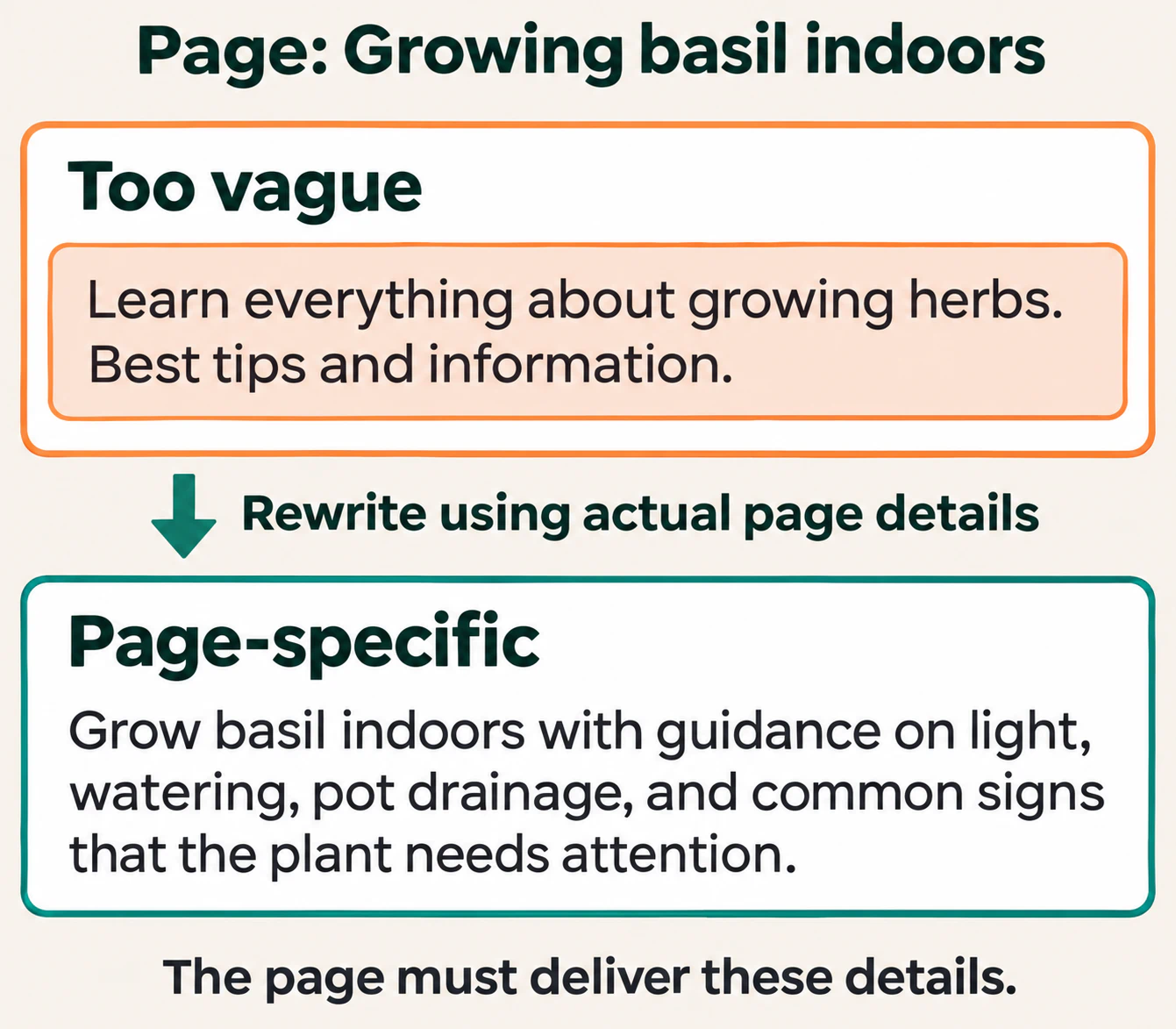
Weak: Learn everything about growing herbs. Best tips and information.
Better: Grow basil indoors with guidance on light, watering, pot drainage, and common signs that the plant needs attention.
Product page
Weak: Buy the best bottle at the best price. Amazing quality.
Better: View the 500 ml stainless steel bottle, including its dimensions, lid design, care instructions, and available colours.
Product category
Weak: Shop our products and find great options for everyone.
Better: Browse insulated lunch bags by size and carrying style, and compare dimensions to find one that fits the containers you use.
Service page
Weak: We offer excellent bike services. Contact us today.
Better: See what a bicycle service includes, which repairs need a separate quote, and how to request an appointment.
Homepage
Weak: Welcome to Example. We are passionate about quality.
Better: Example makes refillable notebooks. Explore notebook sizes, refill formats, and how the binding system works.
Each version identifies the page’s job. The article promises guidance; the product summary names a specific item; the category helps someone browse; the service explains scope; the homepage introduces what the organization offers.
Notice that none needs an unsupported “best” claim. Useful details let the reader judge relevance. For prices, availability, dates, or delivery terms, consider whether the publishing system can keep the summary consistent with the page.
How long should a meta description be?
Google sets no fixed maximum character count for a meta description. Displayed snippets are shortened as needed for the available space, commonly according to device width.
You may see 150–160 characters recommended as a working range. It can be a convenient editing prompt for English text, but it is not a Google requirement or a guarantee that all the words will appear. Different letters, languages, devices, and generated snippets do not occupy the same space.
Use a concise sentence or two when that explains the page well. Do not pad a clear description to reach a minimum, or cut essential meaning only to make a plugin indicator turn green.
For a length review, check three things: whether the page’s subject appears promptly, whether each detail helps someone choose, and whether the ending contains information that should have come earlier. A preview can reveal awkward wording; it cannot reproduce every search result.
How to add and verify a meta description
If you manage a website, find which system generates the page’s document head. That may be the site template, a publishing platform, or one SEO plugin. Make the change there so it reaches the final HTML.
Enter the description in the responsible system
For a hand-written HTML page, place the description inside <head>:
<head>
  <title>How to Grow Basil Indoors | Example</title>
  <meta name="description"
    content="Grow basil indoors with guidance on light, watering, pot drainage, and common signs that the plant needs attention.">
</head>
In a content management system, use the page-specific description or search-description field when available. A site-wide tagline is not necessarily the field controlling an individual article.
Pasting this HTML into the article editor may put it in the body or display it as text. Check the generated output instead of assuming that a saved field or code block changed the metadata.
Avoid having several components generate competing description tags. If the theme already supplies one, configure or replace that output rather than adding another independently. Use one responsible source and inspect the result on more than one page.
Compare the source with the rendered document
Open the actual page after saving. View its source and search for name="description". Then inspect the browser’s Elements panel to see the current document head.
The source shows the HTML response; the rendered document can include later script changes. If they differ, investigate the JavaScript-generated metadata and which component changes it. Test another route as well: an application should not retain the previous page’s summary after navigation.
In the browser console, this command lists description tags currently inside the head:
[...document.head.querySelectorAll('meta[name="description" i]')]
  .map(tag => tag.getAttribute('content'))
For a page configured with one description, expect one entry containing its intended summary. An empty array means the current head has no matching tag. An empty value or several entries needs investigation; the command does not tell you what Google has indexed or displayed.
Check representative pages and cached output
If several pages share a template, test a few with different content. Include a page with a manual description and one using a fallback, if that is how the system works.
Confirm that the final text is complete. Quotation marks or other characters can expose a problem when a template inserts text into HTML attributes without proper escaping. Use the platform’s supported output handling, then inspect the resulting attribute value.
If the editor is correct but the public page still contains old text, inspect the publication, build, and cache responsible for that page. Resolve that delivery difference before waiting for Google to notice a change that visitors cannot yet receive.
How to audit missing and duplicate descriptions
Start with pages intended for public search and collect their URLs with the descriptions actually served. Keep the response, indexing instructions, canonical declaration, and template alongside the text where available. Those details help explain why similar descriptions appear.
Separate the findings before deciding what to change:
| Finding | What to investigate | Useful correction |
|---|---|---|
| No description tag | The template may omit it, or the page-specific field may be unused. | Confirm the intended page, then supply its summary through the responsible field or template. |
| A tag with an empty value | A required field or fallback may be blank. | Populate the field and test the fallback on another page. |
| The same summary on different useful pages | A global description may override page-specific content. | Correct the template or write summaries that explain each page’s distinct purpose. |
| More than one description tag | The theme, plugin, or application may each generate metadata. | Find the owners and retain one consistent output. |
| A complete but misleading description | The summary may describe an old version, unavailable offer, or different task. | Reconcile the wording with the current page and check any changing data. |
Repeated text needs context. Several addresses can be alternative versions of the same content, such as a clean article URL and its tracking version. Review their canonical relationship before spending time inventing different descriptions for equivalent pages.
Prioritize important pages and repeated template faults. A blank summary on a page that is deliberately excluded from search does not deserve the same response as a global template overriding hundreds of useful product summaries.
Review patterns across crawled pages
SEO Neurons Spider’s metadata auditing tools can help collect this review list across a section of a website:
- Capture the relevant pages. Enable meta description extraction before crawling. Use JavaScript rendering when scripts supply or change the description; an HTML-only capture may show different output.
- Review the description with its URL, length, and tag count. A count of zero indicates no captured description tag. A present tag with an empty value is a different finding. If the count is greater than one, inspect the page’s head even when the displayed text looks reasonable: the scraper records the first description’s text and counts the matching tags.
- Investigate repeated patterns. Review missing, empty, multiple, or duplicate findings within the captured pages and enabled audit settings. Open representative URLs to distinguish a shared template fault from an individual editing problem. Length findings follow configurable review ranges, rather than fixed Google limits.
- Correct the website and check again. Change the responsible content field or template, recrawl the affected URLs, and inspect their delivered HTML. A corrected capture verifies the description found under those crawl conditions; it does not establish Google’s chosen snippet or judge whether the wording serves the reader.
Maintain descriptions generated from page data
For a larger catalogue, a maintained pattern can assemble summaries from reliable page-specific data. Test it with missing fields, unusually long names, and different product types. A working pattern should produce useful text when a field is absent, rather than leaving fragments such as “Shop the in today.”
The same review applies to an AI-assisted draft. Verify every feature, price, location, and promise against the page. Generating a different sentence for every URL does not prove that the summaries explain different content accurately.
What if the description is correct but the snippet is missing?
Check whether the page intentionally restricts snippets. A nosnippet directive prevents a text snippet; max-snippet can limit its length; data-nosnippet can exclude marked sections from selection. These controls have different jobs from the description tag.
Inspect relevant robots metadata and response headers before changing a restriction. A rule may exist for a deliberate publishing reason. Removing it changes what content Google is allowed to preview; it is not a way to force your preferred description.
If the current implementation is correct and recently changed, Google still needs to fetch and process the update. There is no guaranteed turnaround time, and the next result may continue to use another suitable passage.
How to evaluate a description change
Record the affected URL, old and new descriptions, date the change became public, and any other edits released with it. First verify the implementation. Then review search performance over a period with enough relevant observations.
If you have access to the relevant property, Google’s Search results Performance report lets you filter to a page and inspect its queries. Compare suitable periods with consistent country, device, and search-type filters.
Review clicks, impressions, click-through rate, and average position together. Click-through rate, or CTR, is clicks divided by impressions. A different ranking position or query mix can change it without any effect from the description.
For example, these figures are illustrative:
| Period | Impressions | Clicks | CTR |
|---|---|---|---|
| Before the change | 1,000 | 40 | 4% |
| After the change | 2,000 | 60 | 3% |
The page received more clicks while its overall CTR fell. The totals do not show whether the new summary helped or hurt. Inspect the relevant queries, positions, devices, and timing before drawing a conclusion.
The report also does not identify the exact snippet shown for each impression. A description change is therefore not a controlled test merely because you compare two date ranges. Record representative search observations where useful, while recognizing that results can vary.
Look for a clearer match between the result’s promise and what the page delivers. If the wording attracts people seeking something the page does not provide, revise the promise or improve the content rather than chasing a higher CTR alone.
A practical meta description checklist
- The summary describes the current page and its main task.
- It adds useful detail beyond repeating the title.
- Every feature, offer, date, and other factual claim is supported by the page.
- The language is clear, with no list of repeated keyword variations.
- Distinct useful pages have descriptions that explain their different purposes.
- One responsible system generates the intended description in the document head.
- The final public output has been checked, including script changes where relevant.
- Any later performance review considers query mix, position, and other changes.
Choose one important page and read its summary beside the title and opening. If they make different promises, correct that mismatch first. A useful meta description gives someone a truthful reason to open the page, and the content should make that decision worthwhile.
JOIN THE CONVERSATION
Comments
Have a question or something to add? Comments are moderated and appear here only after approval.
JavaScript is required to submit a comment. Published comments above remain available to read.
No approved comments yet. Be the first to join the conversation.