
THE SHORT VERSION
What you’ll take away.
- Semantic SEO focuses on what a topic means and what a searcher needs to understand.
- Keywords, search intent, entities, and context work together to make an explanation clear.
- Topic coverage should follow the page's purpose and answer relevant questions.
- Internal links help readers move from an overview to useful supporting detail.
- Useful content, schema markup, and semantic HTML have different roles.
When you search for semantic SEO, you want to understand what it means and why it matters. Definitions that introduce several more SEO terms can leave you with more questions than answers.
The main idea is simple: a web page should explain its subject clearly and answer the questions behind a search. The words people use are the starting point. Their meaning and the person’s needs help shape the answer.
This guide explains how semantic SEO connects keywords, search intent, entities, and related ideas. You’ll also see how those connections affect the content of a page and its links to other pages.
What is semantic SEO?
Semantic SEO is an approach to improving website content by focusing on the meaning of a topic, the searcher’s needs, and the connections between relevant ideas.
The word semantic means “related to meaning.” SEO, or search engine optimization, includes work that helps search engines find and understand web pages.
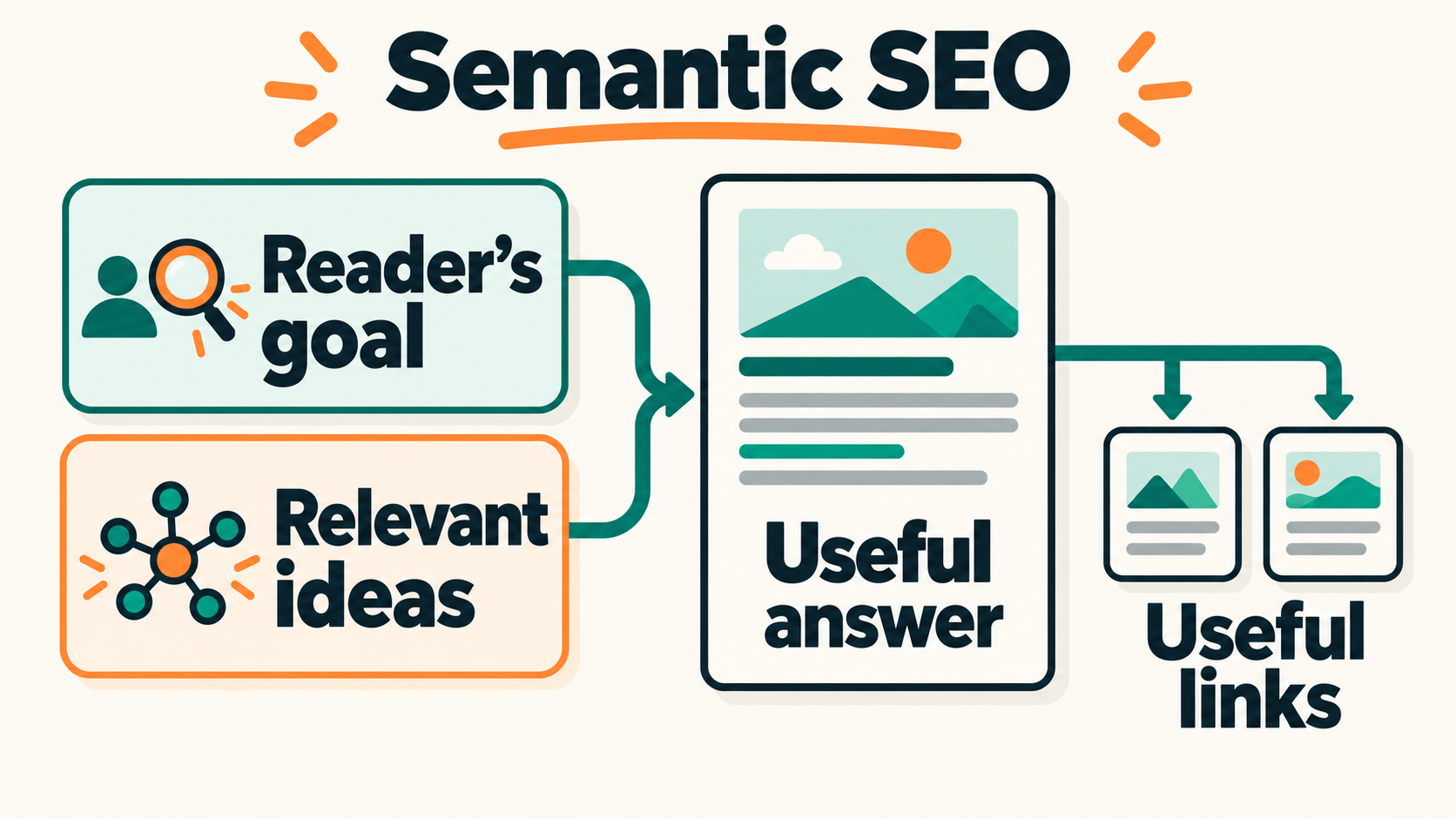
A keyword can tell you what a page is about. A useful explanation goes further. It answers the main question, explains unfamiliar terms, and shows how the important details fit together.
The subject, the reader’s goal, and the explanation need to work together. Repeating a keyword does not supply the missing connections.
How search engines use meaning
People can describe the same need in different words. A useful answer may therefore use wording that differs from the original search.
At the same time, similar words can describe different needs. A page may mention the right subject but still answer the wrong question.
Google’s guide to ranking systems describes systems that help it understand words and ideas in searches and pages. These systems help explain why relevance involves more than matching an exact phrase.
This does not give writers a special formula for each sentence. The practical aim is to explain the right subject accurately, in language the intended reader can follow.
The main parts of semantic SEO
The following terms describe different parts of the same work. Each helps explain how a page can become more useful.
Keywords: the language of a search
A keyword is a word or phrase someone uses to search. The complete search phrase is also called a query.
Keywords help identify the subject and the language people use to describe it. They can reveal questions that need an answer.
Their wording still matters. Clear titles, headings, and explanations should use terms readers recognize. Semantic SEO helps develop those terms into a useful answer.
Search intent: the person’s goal
Search intent is what someone wants to achieve through a search. They may want to learn, compare options, find a destination, or take an action.
That goal affects the kind of page they need. An explanation, a comparison, and a step-by-step guide do different jobs.
A page can discuss the correct topic while missing the visitor’s goal. Understanding intent helps keep the answer focused on the help that person expects.
Entities: the things being discussed
An entity is an identifiable person, place, company, product, or other thing.
On a page comparing phones for camera quality, the named phone models are entities. The useful explanation connects each model to evidence about the photos it produces, such as comparable pictures taken in dim light. Listing model names or camera terms alone does not help someone choose.
Accurate names and descriptions make clear which things the page discusses. Explain their role in the answer instead of simply mentioning them.
There is no need to treat every noun as a term to add. The important things are the ones needed to understand the page’s answer.
Context and relationships: how meaning becomes clear
Context is the information around a word, statement, or question. It helps explain how that information should be understood.
Relationships show how the ideas connect. They can explain why a detail matters, what affects a decision, or how one step leads to another.
These connections turn separate facts into an explanation. Without them, a reader may understand each term but still struggle to understand the subject as a whole.
Topic coverage: the questions a page needs to answer
Topic coverage means explaining the parts of a subject that matter to the page’s purpose.
It includes the main answer and the supporting questions someone needs to understand it. The depth depends on the reader’s goal and what the page promises.
Useful coverage also has boundaries. Related information belongs on a page when it helps complete that purpose.
How much should one page cover?
A page needs enough detail to make its main answer useful. That does not mean every page should explain everything connected to its topic.
Some questions can be answered briefly within the main explanation. Others need enough detail to become separate guides.
The main page should still make sense on its own. A reader should be able to follow its answer without opening a link for every missing detail.
Google’s people-first content guidance asks whether visitors learn enough to reach their goal. It also explains that Google has no preferred word count.
The right depth comes from the question being answered. More sections help when they resolve relevant questions. Extra text becomes a distraction when it moves away from the page’s purpose.
How related pages and internal links help
An overview and a detailed guide can serve different needs within the same topic. Links help a reader move between them when more information becomes useful.
A semantic SEO overview needs a short explanation of search intent to make sense. A separate page can walk through examining search results and building a content brief. The first explains the broader approach; the second helps the reader complete a specific planning task.
Useful internal linking follows those relationships. A link belongs where its destination helps with the question being discussed.
The link’s wording should make the destination clear. Descriptive anchor text helps a visitor decide whether to open the next page. Google’s link guidance also recommends links within relevant explanations.
A connected group of related pages is often called a topic cluster. Each page answers a distinct question, while links show how the answers relate.
Sharing a topic does not require every page to link to every other page. The connection should serve a reader’s next need.
How semantic SEO is applied to content
If you write or manage website content, these ideas can help with a new page or an existing article. The process starts with the purpose of the page.
1. Identify the reader’s goal
Write a completion statement: “After reading this page, someone should be able to…” Name a result, such as understanding a concept, comparing options, or completing a procedure. That gives you a way to decide what belongs in the article.
Search results, reader questions, feedback, and existing website data can help reveal what people need. Search results provide clues; they still need to be considered alongside the intended audience.
2. Build the explanation around relevant questions
Put the main question at the top of the outline. Under it, list only the supporting questions someone needs answered to reach that result. For each section, note the things being discussed, the facts that need evidence, and the relationship you need to explain.
Define unfamiliar terms as they appear, then explain what they change for the reader. If a paragraph lists names or features, add the missing connection: how does that detail affect the answer or decision?
Clear SEO copywriting puts those explanations in words the reader understands. Replace vague claims such as “a better option” with the reason it suits a particular need.
When writing an SEO-friendly article, check the claims against their sources and remove sections that repeat an answer already given. Topic coverage is useful when it resolves another necessary question.
3. Make the title and structure match the content
A descriptive title tag states the page’s subject and purpose. Compare its promise with the completion statement and opening answer. If they describe different tasks, revise the title or bring the content back to its intended purpose.
Headings should organize the explanation in a useful order. A clear heading structure helps readers follow the answer and find a particular part of it.
4. Review existing content and useful next steps
Before creating another article, check whether an existing page already answers the same question for the same audience. Improving that page may be the better use of the work.
Create a supporting guide when a distinct question needs a detailed explanation. Connect it from the relevant part of the main page.
The result should be a collection of useful answers that readers can move through naturally. A small change in keyword wording does not always require a separate page.
Semantic SEO, schema markup, and semantic HTML
These terms often appear together because they deal with different parts of a website. Understanding their roles helps avoid confusion.
| Approach | Its role |
|---|---|
| Semantic SEO | Organizes content around meaning, reader needs, and connections between ideas |
| Schema markup | Describes information about the page in a structured format that machines can read |
| Semantic HTML | Gives the parts of a web page suitable roles within the document |
Schema markup describes facts about a page in structured data, such as an article’s headline and author. Google’s structured data introduction explains how this can help it understand a page and support relevant search features.
The information in the markup should match the page. It cannot supply an explanation that is missing from the content a visitor reads.
A semantic HTML structure helps identify the roles of the document’s parts. It supports the way the content is organized and accessed.
Clear writing, accurate structured data, and suitable HTML can support the same page. Each addresses a different part of the work.
Common mistakes to avoid
Adding related terms without explaining them. A page can contain the expected words while leaving the connections unclear. Terms should help develop the answer.
Making every page cover the whole subject. Give each page a clear purpose. Separate tasks can have their own guides, with useful links between them.
Publishing several versions of the same answer. Similar queries may need the same explanation. Check the purpose of existing pages before creating another one.
Treating a content score as proof of quality. A tool can suggest ideas to investigate. Its score cannot prove that the facts are correct or the explanation is useful.
Expecting guaranteed rankings. Google uses many signals and systems to rank pages. Better topic coverage can improve the content, but it does not guarantee a position in search.
How to check whether a page is useful
As a visitor, ask yourself:
- Does the page answer the question I came with?
- Are unfamiliar terms explained?
- Can I understand how the important ideas connect?
- Is there enough detail to make the answer useful?
- Do the links lead to relevant extra help?
These questions are also useful when reviewing content for a website.
If you manage a website, Google’s Search Console tool can show how people find a page in search. Its Search results report includes clicks, impressions, and reported queries.
Clicks record people opening a page from a search result. Impressions count how often a result is shown, following Google’s reporting rules. The Performance report documentation explains these measurements and their limits.
Relevant queries can reveal questions worth checking. The report does not include every search, so it gives part of the picture.
When assessing an update, compare suitable periods and consider other changes. Demand, competition, and other website edits can affect the numbers. A change in traffic alone does not show which edit caused it.
Frequently asked questions
Is semantic SEO different from other SEO work?
It focuses on meaning, intent, and the connections within content. It works alongside keyword research, technical accessibility, useful writing, and other work that helps people find and use a page.
Is semantic SEO just adding related keywords?
Related terms can help explain a topic. Their value comes from the information they add and the connections the page explains. A long list of terms is not a substitute for a useful answer.
Do I need a paid tool?
A tool can help with research, but it is not required to begin. Reader questions, search results, existing website data, and a careful review of the content can provide useful starting points.
Can a small website use semantic SEO?
Yes. It can begin with one clearly focused page and relevant supporting explanations. Additional pages can be added when distinct questions need more detail.
When you read a page, look at how its title, main answer, supporting details, and links work together. Semantic SEO becomes easier to understand when you can see how those parts help someone find and understand an answer.
JOIN THE CONVERSATION
Comments
Have a question or something to add? Comments are moderated and appear here only after approval.
JavaScript is required to submit a comment. Published comments above remain available to read.
No approved comments yet. Be the first to join the conversation.