
THE SHORT VERSION
What you’ll take away.
- Anchor text should tell readers what they will find when they follow a link.
- Choose wording for the destination and its context, rather than a fixed keyword ratio.
- Internal links, outbound links, and backlinks need different kinds of review.
- Use real link markup and give image links an appropriate text alternative.
- Audit the wording and destination together, then check the updated link in the page.
A link asks the reader to make a small decision: should I leave this explanation and open another page? The words you link should help them decide.
“Read more” offers little information on its own. “How internal linking works” makes the next step clearer, provided that the destination explains internal linking. This simple connection between wording and destination is the starting point for useful anchor text.
If you write or manage website content, this guide explains how to choose those words, recognise common anchor types, and review existing links. You will also learn where image links, JavaScript, and Google’s link-spam guidance fit.
What is anchor text?
Anchor text is the visible, clickable wording of a text link. It can lead to another web page, a file, or a section of the same page.
In HTML, a text link looks like this:
<a href="/blog/internal-linking/">internal linking</a>Here, internal linking is the anchor text. The href attribute supplies the destination. The quotation marks around the URL and the closing </a> are part of the markup.
In a sentence, internal linking connects related pages within a website. The linked phrase names the subject the destination explains.
The words a person reads and the URL the browser opens are separate parts of the link. Both need to be right. Changing the text between <a> and </a> changes the label; changing href changes where the link goes. When editing a link, check both rather than assuming that a clearer label fixes the destination.
Why does anchor text matter for SEO?
Clear wording helps people decide whether a link will answer their next question. It also supplies context about the destination.
Google uses links and descriptive anchor text to discover pages and understand relevance. The linked words and surrounding sentence help explain how the destination relates to the current topic.
Changing a few words does not guarantee a ranking improvement. A misleading label is worth fixing because it creates the wrong expectation; there is no need to assume that every quick exit causes a ranking loss.
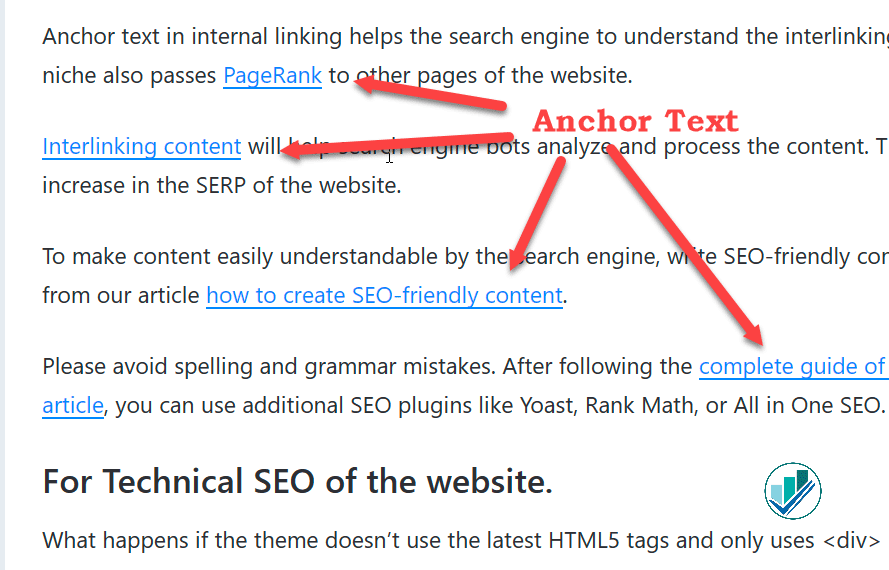
Common types of anchor text
These labels help describe link wording. They are not a checklist of types every page must contain.
For the first two examples, assume the destination is a guide whose main topic is internal linking. The examples are shown as text so you can compare the wording without opening repeated links.
| Type | Example wording | What it means |
|---|---|---|
| Exact match | “internal linking” | Uses the chosen target phrase exactly. |
| Partial match | “a practical guide to internal linking” | Includes that phrase within a longer description. |
| Descriptive alternative | “how to connect related articles” | Describes the same subject using different words. |
| Branded | “SEO Neurons” | Uses the name of the website or organisation being linked. |
| Naked URL | https://seoneurons.com/ |
Displays the destination URL as the link text. |
| Generic | “read more” | Gives little information about the destination by itself. |
A partial match is defined by the linked words, not everything in the sentence. In “read our internal linking guide,” linking only “internal linking” is still an exact match for that target phrase.
Brand names and visible URLs can be appropriate when the website’s identity is the point. A descriptive phrase is usually more useful when the reader needs to know which guide, service, or document will open.
Internal links, outbound links, and backlinks
Anchor text appears in different relationships:
- Internal links connect pages within the same website. If you edit the source page, you can usually change both the wording and destination.
- Outbound links go from the page you are editing to another website. Check that the external resource supports the point you are making.
- Backlinks point to your website from another website. Their wording is controlled by whoever publishes that other page, unless you have an arrangement with them.
This distinction matters during an audit. Editing an outbound link in an article does not change a backlink pointing to it.
For internal links, decide which supporting page the reader needs before choosing the anchor. Semantic SEO helps organise related questions into pages with distinct purposes. That makes it easier to choose a destination that adds useful detail instead of repeating the current explanation.
How to write useful anchor text
Start with the destination
Open the target page before writing its label. Check what it actually helps the reader do.
If the target explains how Google processes JavaScript pages, “JavaScript SEO guide” is a fair description. “Free JavaScript testing tool” would promise something different.
The destination should also match the reader’s search intent, or the goal behind their search. A definition, comparison, and setup tutorial serve different needs. Link to the page that answers the next question your sentence raises.
Link enough words to explain the next step
Compare these illustrative sentences:
- Vague: “To understand website structure, click here.”
- Clearer: “Learn how internal linking connects related pages.”
In the clearer version, linking “how internal linking connects related pages” tells the reader what the destination covers. Linking the whole paragraph would add little value.
Use the length the explanation needs. A brand name may be one word; a specific document title may be longer. Google’s guidance favours concise, relevant descriptions rather than a fixed two-to-six-word rule.
Make the surrounding sentence useful
An anchor should make sense where you place it. Give the essential explanation in the sentence or paragraph, and link the phrase that offers useful depth. The sentence should still be helpful when read without its link.
For example:
If a navigation link appears only after scripts run, compare the response HTML with the rendered page to check whether JavaScript adds a real link and destination.
The sentence identifies a problem and gives the link a purpose. Adding several loosely related links beside it would make that next step harder to follow.
Do not force a link into a sentence simply to include another keyword.
Make links recognisable and accessible
In body text, an underline is a useful way to distinguish links. Do not rely on colour alone. Also check that keyboard users can reach links and see which one has focus.
To check a link, press Tab until it receives focus, then press Enter to open it. The focus indicator should be visible, and the wording or its associated sentence should explain what will open. Links should remain recognisable when a reader cannot distinguish their colour from the surrounding text.
Generic wording is not automatically an accessibility failure when the associated context explains its purpose. However, descriptive wording often makes a link easier to understand, especially when someone scans links separately from the surrounding article.
Can you repeat anchors or use exact-match keywords?
You can use a relevant keyword when it accurately describes the destination. You can also reuse a clear label for the same resource across several articles. There is no reason to invent an awkward synonym just to make each anchor different.
Avoid treating anchor text as a quota. A page does not need a prescribed percentage of branded, exact-match, partial-match, and generic anchors.
The important distinction is between useful descriptions and practices intended to manipulate search rankings. Google’s link-spam policy covers arrangements such as paid links that pass ranking credit, excessive link exchanges, and keyword-heavy links distributed through unrelated articles or widgets. Buying placements and requiring a target phrase is a different practice from naming a relevant subject in an ordinary internal link.
That policy is not a rule that ordinary internal links must avoid their subject’s name. Review the purpose and context of the links rather than applying an automatic “exact match equals penalty” rule.
Make sure the link works in HTML
Good wording cannot repair a missing destination.
For navigation, use a real <a> element with an href that contains the intended URL. For example:
<a href="/blog/search-intent/">
  understand search intent
</a>
Text styled to look like a link, or a clickable element with only a script handler, does not provide the same straightforward markup.
JavaScript can create crawlable links when its output contains the appropriate anchor markup. Check the rendered document if scripts supply the link; do not assume all JavaScript links are unreadable.
Within an HTML page structure, links provide navigation while buttons perform actions such as submitting a form. Choose the element for its job, then give the link wording that describes its destination.
How should you write alt text for image links?
An image can also be the content of a link. Google uses the image’s alt attribute as anchor text for image links.
For accessibility, think about the image’s role. If a logo is the only content of a link to a homepage, a text alternative such as “SEO Neurons homepage” explains the destination better than “logo.”
If an image simply repeats the meaning of text inside the same link, empty alt text may avoid repeating that information. Do not apply empty alt text to an image-only link that would otherwise have no accessible name.
Check the accessible name of the whole link, including any text beside the image. The reader should be able to identify the destination or action without seeing the picture. For an image-only download link, that means identifying the document or download rather than describing an arrow icon.
Write for the link’s purpose. There is no requirement to insert a primary keyword into every image’s alt text. A normal, unlinked illustration needs an alternative suited to the information it conveys instead.
When do outbound links need special attributes?
Link wording describes the destination. A link’s rel attribute can describe a different matter: your relationship with that destination.
Choose the value that describes how the link was placed:
- Use
rel="sponsored"for advertisements and paid placements. Google also acceptsnofollowfor these links. - Use
rel="ugc"for links supplied through user content, such as comments or forum posts. - Use
rel="nofollow"when the other values do not fit and you do not want Google to associate your site with the linked page.
Ordinary editorial links do not need these attributes simply because they go to another website. For example, citing an official reference that supports your explanation is a useful reason to link out.
These attributes do not rewrite the visible label or prevent a visitor from following the link. They also do not block the destination from being discovered through other links. Google treats them as hints about how to consider the link, so they are not a substitute for crawl or indexing controls.
Check the destination and the relationship separately from the anchor’s wording.
How to audit anchor text on an existing website
Start with one important article. A browser and a small spreadsheet are enough for a manual review.
1. Record the source, wording, and destination
For each link, note:
- The page containing it.
- Its visible anchor text, or relevant image alternative.
- The destination URL, including a section fragment if present.
- Any redirect, error, or unexpected destination.
- The sentence around it and the reason it helps the reader.
For a website-wide review, keep the source URL with every row. The same destination may be described well on one page and poorly on another.
To build the review list with a link auditing tool, select a destination URL in SEO Neurons Spider. Its Inlinks show the crawled pages pointing to it, along with the anchor text or image alt text captured for each link. Export the relevant rows with their source URLs if you need a review list. Open each source page to read the surrounding sentence, since a link label alone cannot tell you whether the placement helps. For the reverse view, inspect a source page’s Outlinks to review its destinations. These relationships cover links observed in the crawl; they are not a complete record of backlinks across the web.
2. Check the expectation against the page that opens
Open the destination and read the anchor again. Does it deliver the promised subject, format, or action?
Look for empty labels, repeated “click here” links, outdated promises, and labels that name a different topic. Also check accidental links back to the source article when another resource was intended.
Treat these as review candidates. A visible URL in a reference list is not automatically an error, and repeated anchors to the same destination do not automatically need rewriting.
3. Fix the wording and destination together
Consider this illustrative audit entry:
| Check | Finding |
|---|---|
| Source | An article explaining how to organise related content. |
| Current link | “Click here” opens that same article again. |
| Reader’s next need | Learn how to plan separate pages around related questions. |
| Correction | Link “plan related pages with semantic SEO” to the relevant guide. |
Changing “click here” to a descriptive phrase would only solve half the problem if the URL still returned the reader to the original page.
If the destination does not answer the next question, choose a better resource or remove the link. Do not disguise a poor destination with better wording.
4. Retest the published page
After saving, check the actual page rather than only the editor:
- Follow the link and confirm the final destination.
- Read the sentence with the new wording.
- Use the keyboard to reach and activate the link.
- Check the page on a narrow screen, including any long URLs.
- If JavaScript creates the link, confirm its destination and text in the rendered HTML.
For a larger review, rerun the relevant checks and compare the affected rows. Record what was fixed without assuming an immediate ranking gain.
Keep backlink cleanup separate
Do not turn this content review into a routine disavow exercise. Disavowing asks Google to disregard specified incoming links when assessing the website. Most sites do not need this advanced tool because Google can usually assess which links to trust.
It is intended for significant unnatural incoming links that have caused, or are likely to cause, a manual action, when removal is not possible. A manual action is a restriction applied after a human review at Google; it is not the same as a warning score from an SEO tool. Used incorrectly, disavowing can harm search performance.
An unfamiliar backlink or a third-party “toxic” label alone is not a reason to start disavowing links.
Frequently asked questions
How long should anchor text be?
Long enough to identify the destination clearly, without linking unnecessary words. There is no universal word count that fits a brand name, a guide title, and a document download equally well.
Can several pages use the same anchor text?
Yes, when they point to the same resource and the wording fits each sentence. Keep the description accurate rather than changing it just to create variety.
Does nofollow change the anchor text?
No. The visible wording and the rel attribute do different jobs. Adding nofollow does not make a vague or misleading label clearer.
What is keyword-rich anchor text?
It is a description for link text containing a relevant keyword or phrase. The label does not make the link inherently good or bad. Judge whether the wording helps the reader and whether the link is part of a manipulative arrangement.
Should every link contain a keyword?
No. A brand name, document title, or action can be the clearest label. Choose the words that explain what the reader will open or do.
JOIN THE CONVERSATION
Comments
Have a question or something to add? Comments are moderated and appear here only after approval.
JavaScript is required to submit a comment. Published comments above remain available to read.
No approved comments yet. Be the first to join the conversation.