
THE SHORT VERSION
What you’ll take away.
- Use a permanent redirect for a lasting URL move and a temporary redirect when the original address will return.
- Choose a destination that still answers the reason someone opened the old page.
- Point old URLs directly to their intended destination where possible, and remove conflicting rules that create loops.
- Update internal links, canonical declarations, and sitemap entries after a permanent move.
- Check the original response, the final page, and its referring links; a working redirect does not prove Google has indexed the destination.
You open a bookmarked article and arrive at the same information under a new address. A redirect has kept the old link useful, even though the page has moved.
That is the purpose of a redirect: send a request for one URL to an appropriate different URL. For SEO, the important decisions are whether the move is permanent, whether the destination serves the same need, and whether visitors and crawlers can reach it without unnecessary steps.
If you manage a website, this guide will help you choose between redirect types, handle changed or removed pages, and investigate chains, loops, and incorrect destinations. You will also learn how to check the response itself rather than relying only on the page that opens.
What is a redirect, and how does it work?
An HTTP redirect is a response that tells a browser or crawler to request another address. The response includes a status code, which describes the result of the request, and a Location header, which identifies the destination.
For example, a request for https://example.com/old-guide/ might receive:
HTTP/1.1 301 Moved Permanently
Location: https://example.com/new-guide/
The browser then requests /new-guide/. If that page loads successfully, it will normally return 200 OK. These are two separate requests: one to learn where the content moved, and another to fetch it.
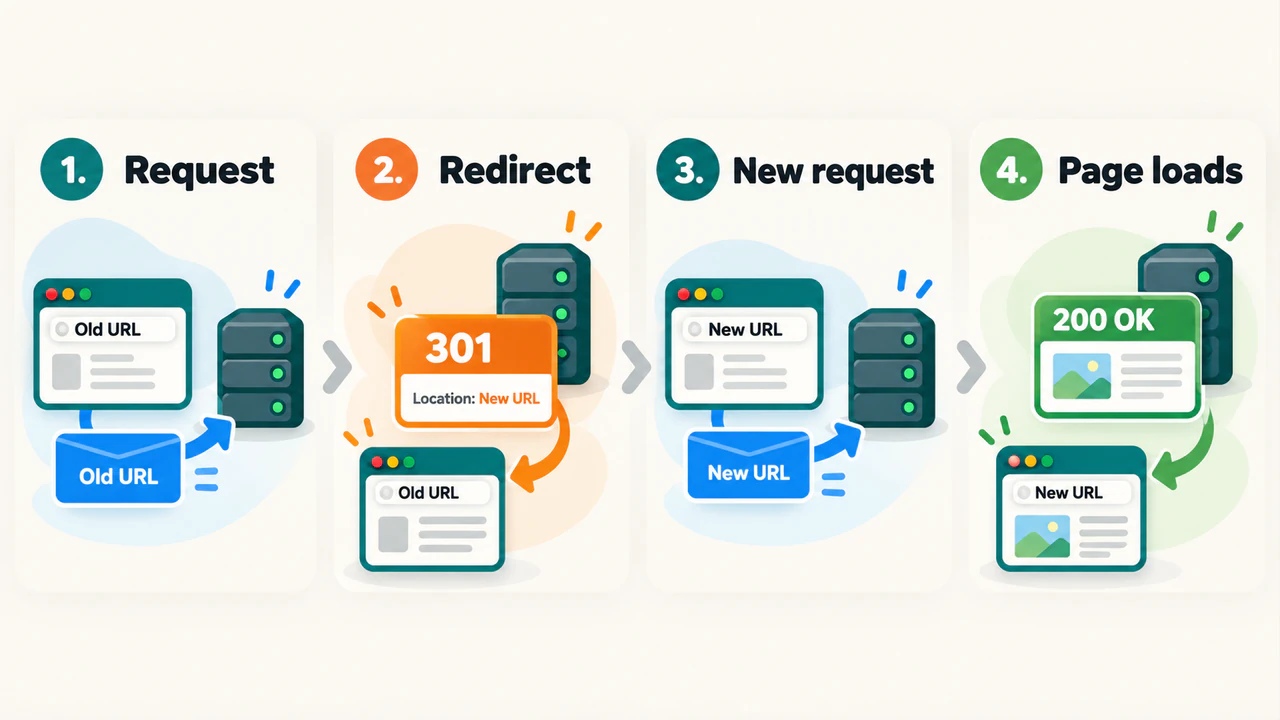
A redirect does not copy content or create the destination page. The replacement must already exist and work. Changing a link inside an article also does not set up a redirect; anyone using an older bookmark still needs a response from the old address.
301 vs 302: choose the redirect that matches the move
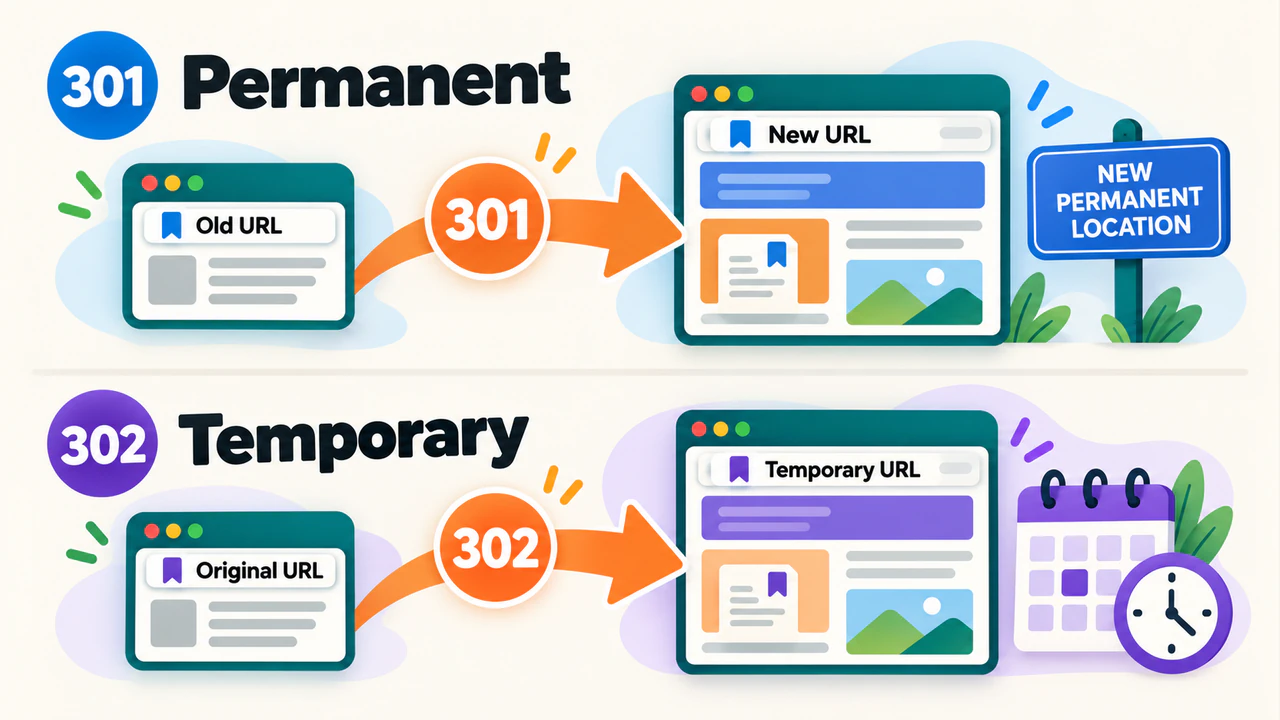
A 301 redirect means the resource has moved permanently. A 302 redirect means the move is temporary. Choose according to what should happen to the original address, rather than treating one code as an SEO improvement in every situation.
| Redirect | Meaning | Typical use |
|---|---|---|
301 Moved Permanently |
A lasting move | A page receives a new permanent URL |
302 Found |
A temporary move | Visitors use an alternate page while the original will return |
308 Permanent Redirect |
A lasting move that preserves the request method and body | A permanent redirect where application behavior requires that preservation |
307 Temporary Redirect |
A temporary move that preserves the request method and body | A temporary redirect with the same requirement |
A request method describes the action being made. GET normally retrieves a page; POST can submit form data in the request body. With 301 and 302, some clients can change a POST request into a GET. Codes 307 and 308 preserve the method and body. For forms, checkout flows, and APIs, that behavior needs application-specific testing; the choice is about more than search.
Google treats permanent redirects as a strong signal that the destination should represent the content. Temporary redirects communicate a different intention: the original address is expected to remain relevant. Other signals still matter, so a 302 does not guarantee which URL Google will display.
For an ordinary article that has permanently moved, a server-side 301 or 308 is appropriate. For a short-lived alternate location, use a temporary redirect and remove it when the original page is ready again.
What about meta refresh and JavaScript redirects?
A server-side redirect is sent before the original page needs to run JavaScript. This makes it the preferred option for a normal URL move.
A meta refresh instructs the browser to navigate from an HTML page, immediately or after a delay. A JavaScript redirect changes the location through a script. These methods depend on processing the page rather than simply following an HTTP redirect response.
Google can process these alternatives, but a script-based move depends on successful rendering. If you are investigating JavaScript SEO, inspect both the initial response and the behavior after scripts run. A changing address bar alone does not prove that the server returned 301 or 302.
Use a server or hosting-platform redirect where available. If that is not possible, check which alternative the platform supports and test its actual output. Avoid adding several redirect methods for the same move without understanding how they interact.
Decide whether the page needs a redirect
Start with the outcome you want for someone opening the old URL.
| Situation | Appropriate approach |
|---|---|
| The same page has moved permanently | Redirect to its new address with 301 or 308 |
| A temporary replacement is needed | Use 302 or 307, then restore the original behavior when appropriate |
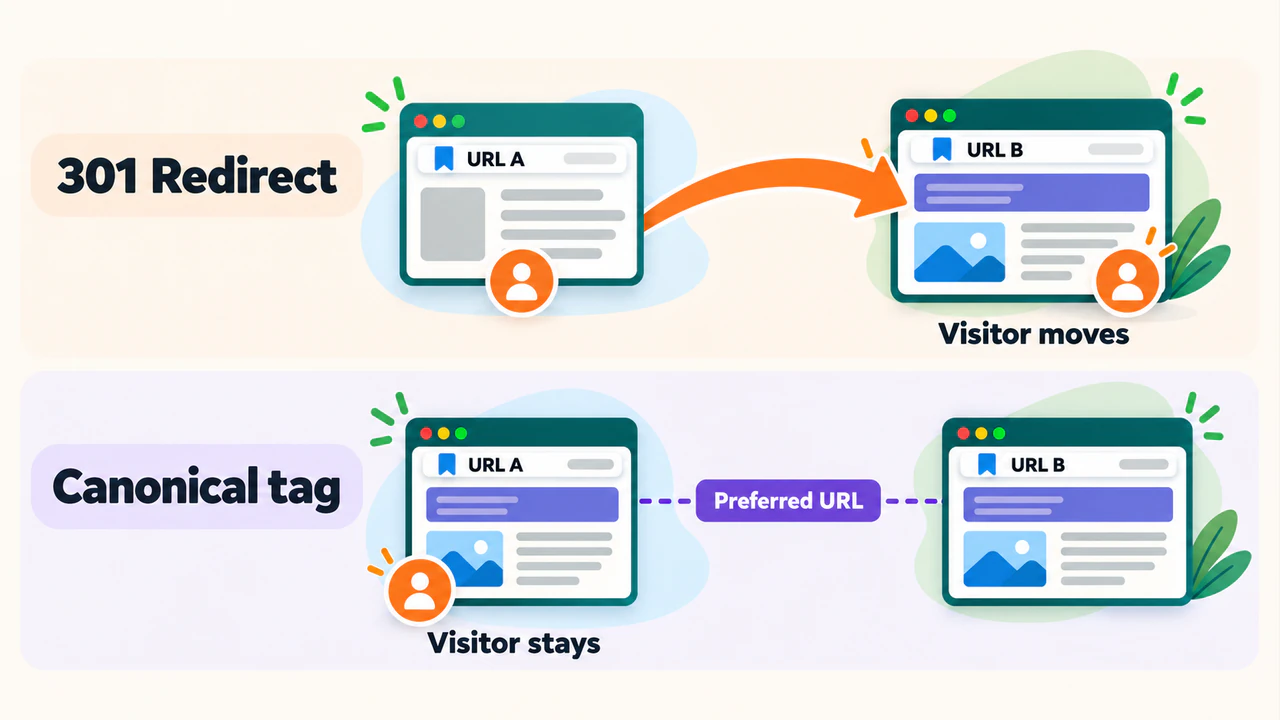
| Equivalent pages must remain accessible at different URLs | Consider a canonical declaration instead of moving the visitor |
| A page is gone and has no suitable replacement | Return a genuine 404 Not Found or 410 Gone response |
| A page should remain accessible but be excluded from search | Consider noindex; it does not forward visitors elsewhere |
A canonical tag identifies a preferred URL for equivalent content while leaving the current URL accessible. A redirect sends the visitor away. These tools solve different problems.
For a removed page, ask whether the proposed replacement actually provides the information or service the reader expected. A new page on the same website is not automatically a suitable destination. If several older guides have been combined into one complete replacement, those older URLs may reasonably point to it.
Avoid sending every missing address to the homepage. The request may concern a specific article or product that the homepage does not replace. Such unrelated redirects can also be treated as soft 404s, where Google considers the requested content missing despite the response suggesting otherwise.
A legitimate 404 is sometimes the correct result. An accidentally broken link to a page that should exist needs fixing; a deliberately removed page without a replacement does not need a redirect simply to make a report look cleaner.
Plan and set up the redirect
Before changing a rule, write down the old URL, the intended destination, and whether the move is permanent. For several changes, keep a small redirect map so the decisions can be reviewed together.
Here is an illustrative map using paths on the same example website:
| Old path | Destination or result | Reason |
|---|---|---|
/old-guide/ |
301 to /new-guide/ |
The guide has moved permanently |
/booking/ |
302 to /temporary-booking/ |
The original booking page will return |
/retired-announcement/ |
410, with no redirect |
The page has been removed and has no replacement |
Open each intended destination before setting the rule. Check that the main content is present and that the page does not immediately send you somewhere else. If the destination should appear in search, also check that it has no unintended noindex instruction, crawl restriction, or canonical pointing elsewhere.
Redirects can be configured in a content management system (CMS), hosting dashboard, server configuration, or CDN. A CDN is a service in front of the website that can deliver content and handle requests. Identify which layer owns the existing rule before adding another one.
In a redirect manager, the essential steps are:
- Enter the old URL or path in the format the platform expects.
- Enter the intended destination and choose the permanent or temporary status.
- Use an exact match for a single-page change unless a broader rule is deliberately needed.
- Save the rule, then test the old URL and the destination separately.
Some platforms keep the original query parameters; others drop or replace them. A query parameter is a value after the ? in a URL. Decide whether it carries useful information, such as a selected language, before changing it. Test both the ordinary address and relevant parameter variants.
Rules can also match more URLs than their label suggests. Before applying a pattern to a whole directory, test a path that should match and one that should remain unchanged. Keep a copy of the previous configuration so an incorrect rule can be reversed.
Find and fix redirect chains and loops
A redirect chain adds intermediate stops
A chain occurs when the first destination redirects again:
/old-guide/ --301--> /updated-guide/ --301--> /new-guide/ --200This can happen when a page is renamed more than once. Each extra request adds another step before the reader reaches the content.
If /new-guide/ is now the intended permanent location, update the rules so both older addresses point directly to it:
/old-guide/     --301--> /new-guide/ --200
/updated-guide/ --301--> /new-guide/ --200
Keep the rule for /updated-guide/ if people may still use that address. Fixing a chain does not mean deleting intermediate URLs’ redirects and leaving their existing links broken.
Address variations can add steps too: HTTP to HTTPS, non-www to www, then an old path to a new path. Review the complete route for the variants people actually use. Combine rules where appropriate, but preserve any necessary application behavior.
A redirect loop never reaches the intended page
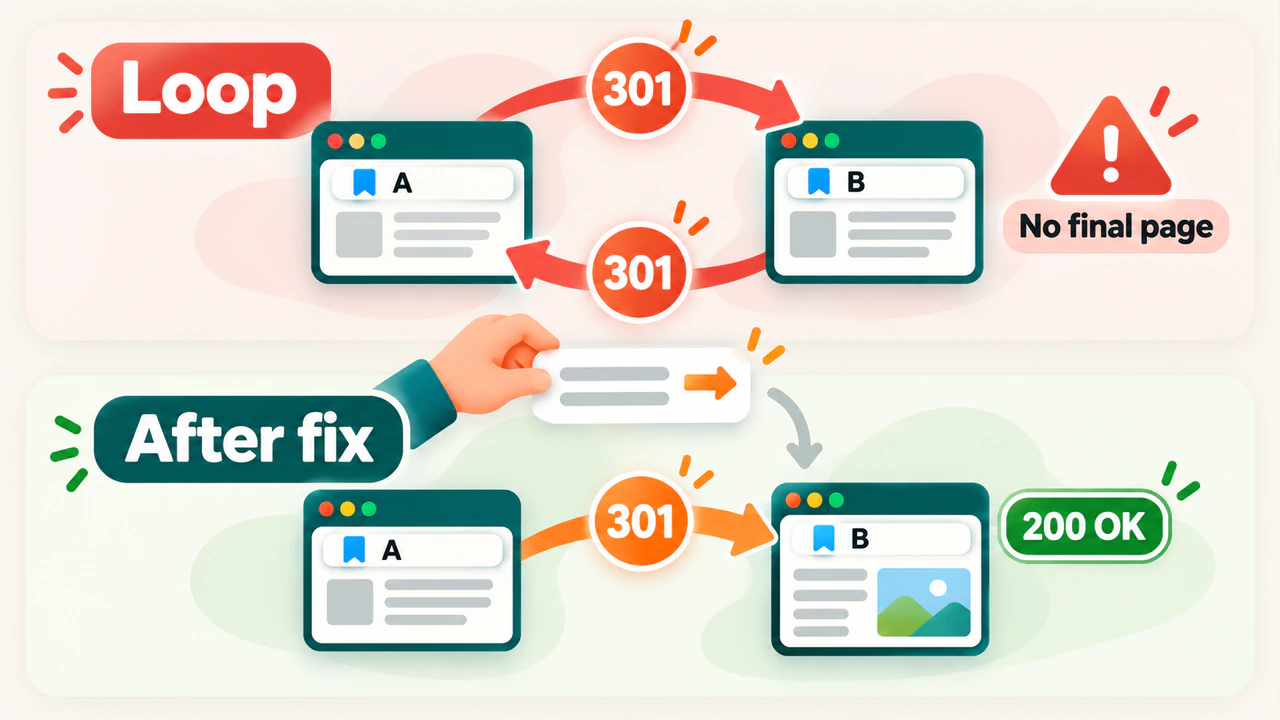
A loop sends a request back to a URL it has already visited. For example, one rule sends A to B while another sends B back to A. A rule that redirects a URL to itself is another form of loop.
Check each response’s destination to find the conflicting rule. Common places to compare include a CMS redirect manager, the web server, and the CDN. One layer might enforce a trailing slash while another removes it, or the layers might disagree about HTTP and HTTPS.
Correct the conflicting configuration, then request the original URL again. If a cache still serves an old response, clear the cached response for the affected URL using the platform’s controls and retest. Clearing a browser cache alone will not repair contradictory rules on the website.
Check the destination and update the website’s links
A redirect can return the expected status and still lead to the wrong result. Verify the destination as a page, not just as a URL in a table.
| Finding | What to check or change |
|---|---|
Destination returns 404, 410, or a server error |
Restore the intended page or choose a working, relevant replacement |
Destination returns 200 but shows an error or unrelated content |
Inspect the actual page and correct the mapping or content |
| A public search destination requires a login or blocks crawling | Review its access settings and whether it is a suitable public replacement |
Destination has an unintended noindex or conflicting canonical |
Correct the instruction responsible for the mismatch |
| Internal links still point at the old address | Update those source pages to link directly to the final destination |
For a permanent move, update internal links in article text, navigation, and shared templates. The redirect still protects older bookmarks and external links, while the website’s own links can take people directly to the replacement.
Update canonical declarations that reference the old address. In the current XML sitemap, use the preferred destination URLs you want considered for search. If the site has language alternatives or structured data containing the old URL, review those references too.
The redirect source must remain accessible enough for crawlers to receive its redirect response. A robots.txt rule that blocks the old path can prevent Google from seeing the move. Do not block that path merely because you no longer want the old URL displayed in search.
How to audit redirects and verify a fix
Start with one affected address and its expected result. Record the original URL, each observed destination, the final response, and whether the content matches the intended replacement.
Check one URL in the browser
In Chrome, open the browser’s developer tools and its Network panel. Turn on Preserve log, select Disable cache while the tools are open, and enter the original URL. Inspect the document requests, their status codes, and the Location response header for each HTTP redirect. Other browsers provide similar request details, though their controls can have different names.
Then open the final address directly. A redirect that works does not establish that the page has useful content or is eligible for indexing. Check the visible content, response status, canonical declaration, and indexing instructions as separate parts of the review.
If the address changes through JavaScript, the initial document may return 200. That is why you need both the request evidence and the rendered behavior. Browser-internal upgrades or cached redirects should also be distinguished from fresh responses sent by the website.
Review several URLs together
For a larger review, include the affected old URLs as well as the current website. A crawl that follows only today’s internal links may never discover an old address after all those links have been updated. Use the redirect map to keep those addresses in the review.
SEO Neurons Spider can support this review as a website crawler for redirect audits. After crawling the relevant URLs, use its captured HTTP responses, redirect destinations, and chain or loop findings to work through the problem:
- Compare the observed result with the redirect map. Check the starting URL and final destination. Review the captured redirect path when intermediate steps or a loop are reported. Open the intended destination to confirm that its content fits the move.
- Find links that still use the old address. Select the old URL and inspect its Inlinks. These identify crawled pages referencing it. Review the link type and surrounding page before deciding which website links should point directly to the replacement.
- Correct the responsible website setting. Update the redirect rule, destination page, or referring link as needed. The crawl findings help locate the work; they do not change the website for you.
- Recrawl the affected URLs. Recheck the original address, the destination, and any source pages whose links changed. Confirm that the intended response and direct links now appear in the fresh evidence.
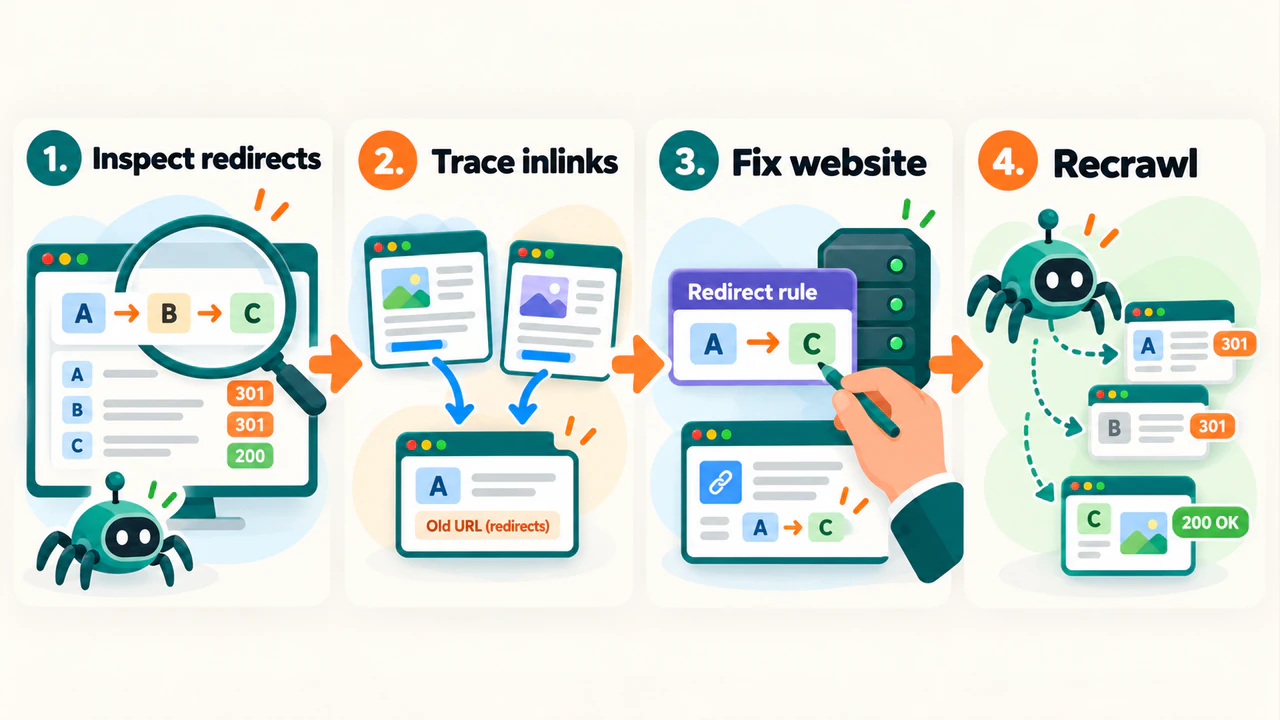
These results cover the URLs and relationships captured by the crawl. If an expected address or link is absent, check crawl scope and access before concluding that it does not exist. For redirects or links created by JavaScript, use browser rendering and verify the behavior in a browser too. A crawler’s result reflects its settings and access conditions, rather than proving what Google has rendered or indexed.
Separate the current response from Google’s stored result
After fixing the website, inspect the old URL and destination in Google Search Console if you have access. An old URL reported as Page with redirect can be expected when it intentionally forwards to another page; the useful question is whether the destination is correct and eligible.
Check the timing of Google’s stored crawl information. A current browser or crawler result and an older Search Console observation can differ after a change. A successful request does not prove that Google has indexed the new page or selected it as canonical.
Frequently asked questions
Do redirects automatically hurt rankings?
Redirects are a normal part of maintaining a website. Problems arise when they send people to unsuitable content, create avoidable chains or loops, or hide errors at the destination. A correct redirect supports a move, but cannot promise unchanged rankings or an immediate search update.
How long should a permanent redirect stay in place?
For site moves, Google recommends keeping redirects as long as possible, generally at least one year. Keeping useful redirects longer can protect visitors following older links. That period is not an automatic deletion date: consider continued traffic, external references, and whether the old address remains in use.
For a domain move, the old domain and its hosting or redirect service must continue to work. Redirect rules saved in a dashboard cannot help if requests no longer reach that service.
Make the next request lead to the right page
A useful redirect starts with a clear decision about what should replace the old URL. Choose the matching status, send the request to a relevant working destination, and keep the website’s own references consistent with that choice.
After a change, test the original address again and read the destination page. Those two checks establish both parts of the result: the route works, and the reader reaches the content they expected.
JOIN THE CONVERSATION
Comments
Have a question or something to add? Comments are moderated and appear here only after approval.
JavaScript is required to submit a comment. Published comments above remain available to read.
No approved comments yet. Be the first to join the conversation.