
THE SHORT VERSION
What you’ll take away.
- Give each group of items a stable URL that opens directly.
- Use ordinary links to connect listing pages and point to the individual items.
- Keep those links available when JavaScript adds Load more or infinite scroll.
- Give distinct listing pages their own canonical URLs when they are intended for indexing.
- Test later pages in a fresh session and check Google's rendered output.
A product catalogue can feel complete while hiding most of its items from a link-following crawler. A visitor sees the first group, presses Load more, and continues browsing. If the next group exists only after that click, the listing may provide no crawlable path to the products farther down.
Pagination and infinite scroll SEO address that discovery problem. Give each group of items a stable URL, make that URL work on a direct visit, and connect the groups with ordinary links. The browsing experience can still use Load more or automatic loading.
If you build or manage a product listing, article archive, or another long collection, start with the second group. Can someone open it in a fresh tab and follow its links without first visiting page one? That small test reveals whether the collection has a usable structure behind its interactive controls.
What pagination, Load more, and infinite scroll mean
Pagination divides a collection into separate pages. A visitor follows a numbered link or a Next link to open another group of results.
Load more adds another group to the current page when someone activates a control. The earlier items usually remain on screen.
Infinite scroll loads more items automatically as someone approaches the end of the displayed results. It removes the repeated need to press a button, although the visitor still needs a reliable way to return to a particular place.
| Pattern | How browsing works | What later items need |
|---|---|---|
| Pagination | Open another page of results | A working page URL and links between pages |
| Load more | Request another group on the current screen | A directly accessible URL behind each group |
| Infinite scroll | Load another group as browsing continues | Addressable groups connected by crawlable links |
Choose the interface according to the collection and how people use it. Numbered pages help visitors jump between groups. Load more gives them control over when another request happens. Infinite scroll can suit continuous browsing, but needs careful handling of navigation, returning visitors, and access to the footer.
These choices do not require three different SEO structures. The same set of page URLs can support all three interfaces.
Why later items can be missed
Google generally discovers page links through anchor elements with usable destinations. A control that fetches items only after a click does not, by itself, provide a link to the next group. Google’s crawlers do not press buttons to reveal the rest of a collection.
That is why a successful browsing session is only part of the test. Opening page one and scrolling until every product appears shows what the interface can do after interaction. You also need to establish how a crawler can reach those products through URLs and links.
Google’s guidance on pagination and incremental page loading recommends giving paginated pages separate URLs and linking them sequentially. This lets a collection expose later items while still loading small groups for visitors.
A product may also be discovered through a category, another article, or a sitemap. A broken pagination path does not prove the product is invisible everywhere. It means that one important route through the website is missing. Likewise, discovery gives Google an opportunity to fetch a URL; it does not guarantee that the URL will be indexed or rank.
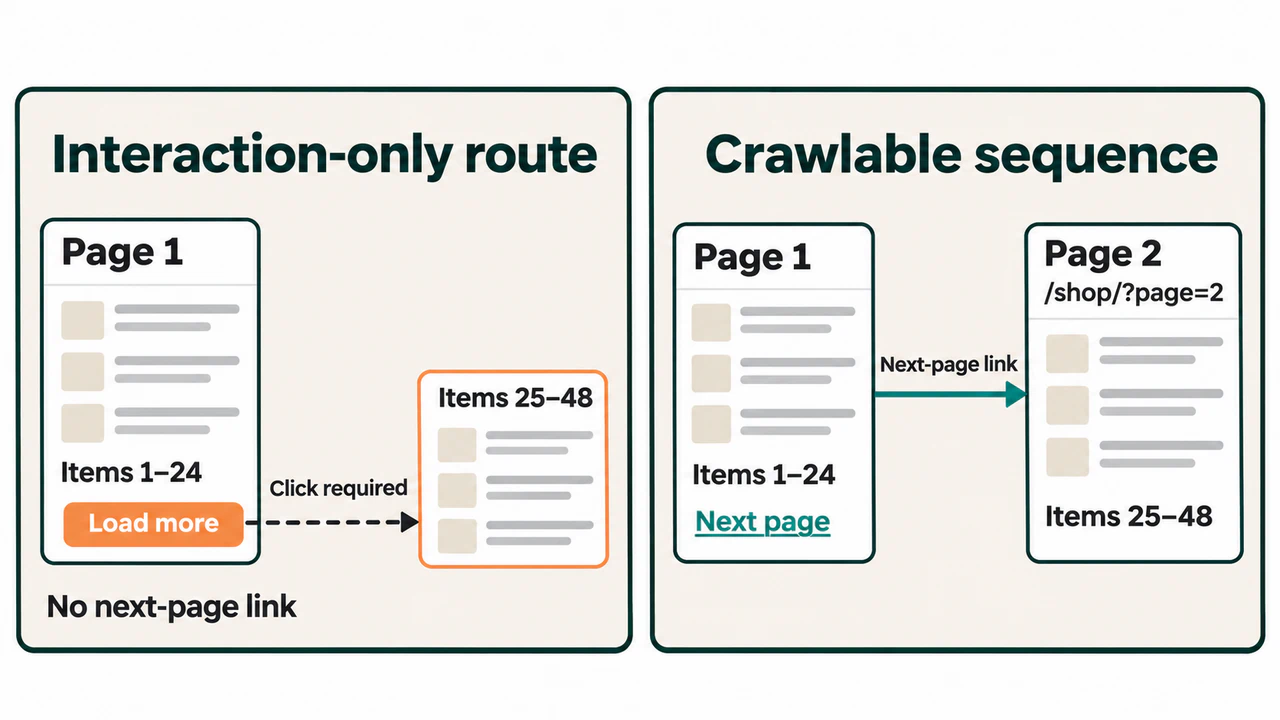
Give every group a URL that opens directly
Consider an illustrative catalogue of 72 products, displayed in groups of 24. The first page is /shop/, the second is /shop/?page=2, and the third is /shop/?page=3.
Opening the second URL in a fresh session should select the second group. It should not depend on a cookie remembering that someone already pressed Load more, or on items stored in the previous page’s browser state.
The URL must represent a real page of the collection. Either a query parameter such as ?page=2 or a path such as /shop/page/2/ can work. Choose one pattern and use it consistently. A fragment such as #page-2 identifies a location within a document; it does not give Google a separate pagination URL to request.
Use a repeatable sort order. For example, a catalogue ordered by publication date can use a stable item identifier to break ties when several products share the same date. Otherwise, equal values may cause items to appear in different groups between requests.
Products can move between numbered pages as the catalogue changes. The aim is to make the page number select a defined position in the current ordered collection, without relying on a visitor’s earlier actions. For a historical collection that must retain fixed groups, use persistent boundaries rather than a moving label such as “yesterday.”
Also define the end of the sequence. In this three-page example, a request for page four should return a 404 Not Found response. Do not keep returning empty pages with a success response, or silently serve page one’s products for every larger number.
Connect the pages and the items with ordinary links
Each listing page needs links to the items it displays and, when another group exists, a link to that next page. The following navigation belongs on page two of the example catalogue:
<nav aria-label="Product results pages">
  <a href="/shop/">Previous page</a>
  <span aria-current="page">Page 2</span>
  <a href="/shop/?page=3">Next page</a>
</nav>
The destinations remain available to a browser or crawler following the links. The navigation label also describes what the controls belong to. On the final page, omit the Next link because there is no next group.
The product cards need usable links too. Reaching page two is of little help if its cards open products only through click handlers attached to images or containers. A product name can link directly to the product’s own URL.
These links can be present in the initial response or added to the rendered document by JavaScript. A link created by a script can still use a normal anchor and href. The important questions are whether it appears reliably and whether its destination opens correctly. A JavaScript SEO review helps distinguish missing links from resources or data that failed during rendering.
For a large collection, useful category links and navigation shortcuts can reduce unnecessary steps. There is no need to link every numbered page from every other page. Start with a connected sequence and add shortcuts that help people reach relevant groups.
Keep Load more usable when JavaScript changes the page
One practical approach starts with a link to the next group:
<a href="/shop/?page=2" class="load-more">
  Load more products
</a>
Without the enhancement, following this link opens page two. JavaScript can intercept an ordinary activation, request the next group, and append its items to the current list. The link still identifies the next page’s address.
After page two’s items have loaded successfully, update the next destination to page three. Once the final group has loaded, remove the control or clearly show that the collection has ended. Keep a working way to open the separate page if the background request fails.
A button can also be appropriate for the interactive action. In that design, provide ordinary pagination links alongside it so later pages remain reachable. The requirement is a crawlable route through the collection, rather than a rule that every Load more interface must use the same HTML element.
When checking the implementation, inspect the document before activating the control. If the only link to page two is created after someone presses the button, it still depends on the interaction you are trying to avoid. The links to the individual products should also be available when their group URL is opened directly.
Support direct visits and navigation with infinite scroll
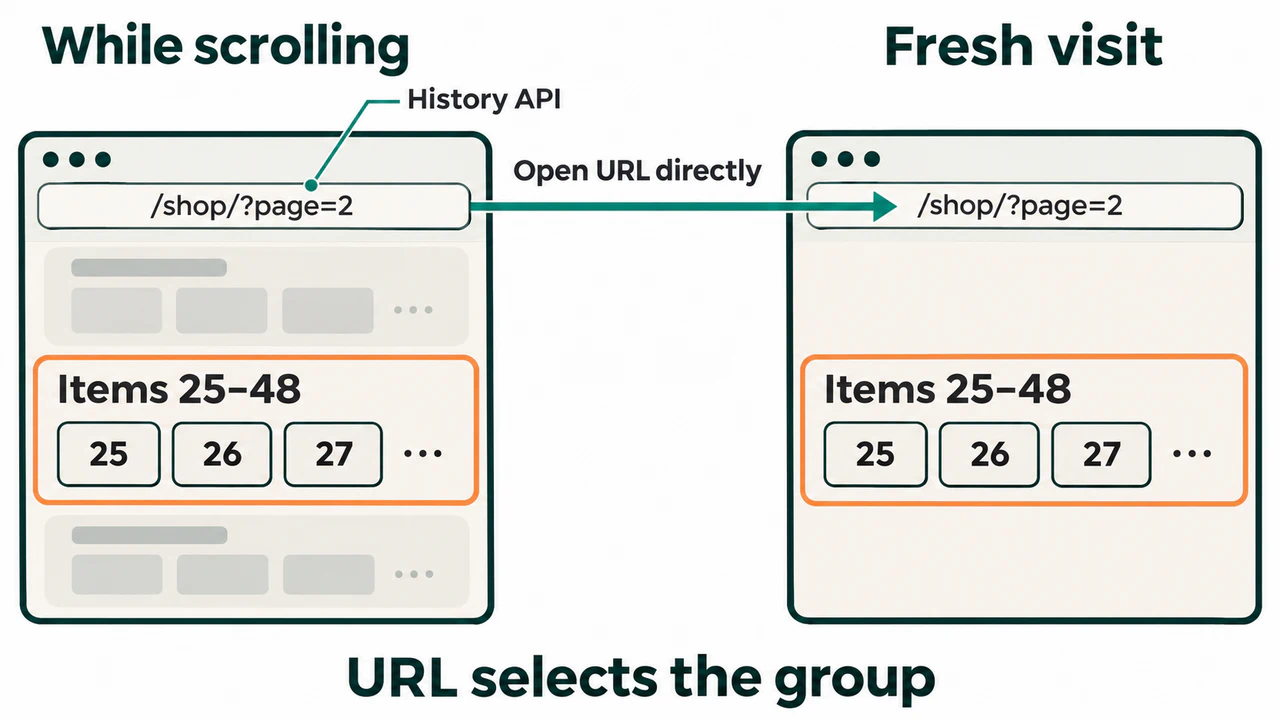
Infinite scroll can fetch the same addressable groups automatically. A browser may display pages one and two as a continuous list, while /shop/?page=2 still opens the second group on its own.
Keep the sequential page links available alongside the scrolling enhancement. Automatically requesting another group should not be the only way to reach it. Google’s guidance on paginated loading for infinite scroll describes persistent group URLs, sequential links, and updating the address as a new group becomes the main one in view.
The browser’s History API lets an application change the displayed URL and manage navigation history without a full page reload. Use it to represent a meaningful change of group. Changing the address for every small movement would make the browsing history difficult to use.
An address-bar change does not create a working page on the server. After the address becomes /shop/?page=2, refresh it or copy it into a fresh session. The page must still select the appropriate group. If it falls back to page one, the direct route or its data selection needs work.
Test the Back button as well. A visitor who opens a product and returns should be able to recover their position in the list. This is especially useful when several groups have already loaded. Also check that automatic loading does not continually move the footer away from someone trying to reach it.
Give each distinct listing page its own canonical
A canonical tag indicates the preferred URL for duplicate or very similar versions of a page. It is not a control for choosing which page number matters most.
Page two contains a different group of products from page one. For an indexable page two, its canonical should identify page two:
<link
  rel="canonical"
  href="https://example.com/shop/?page=2"
>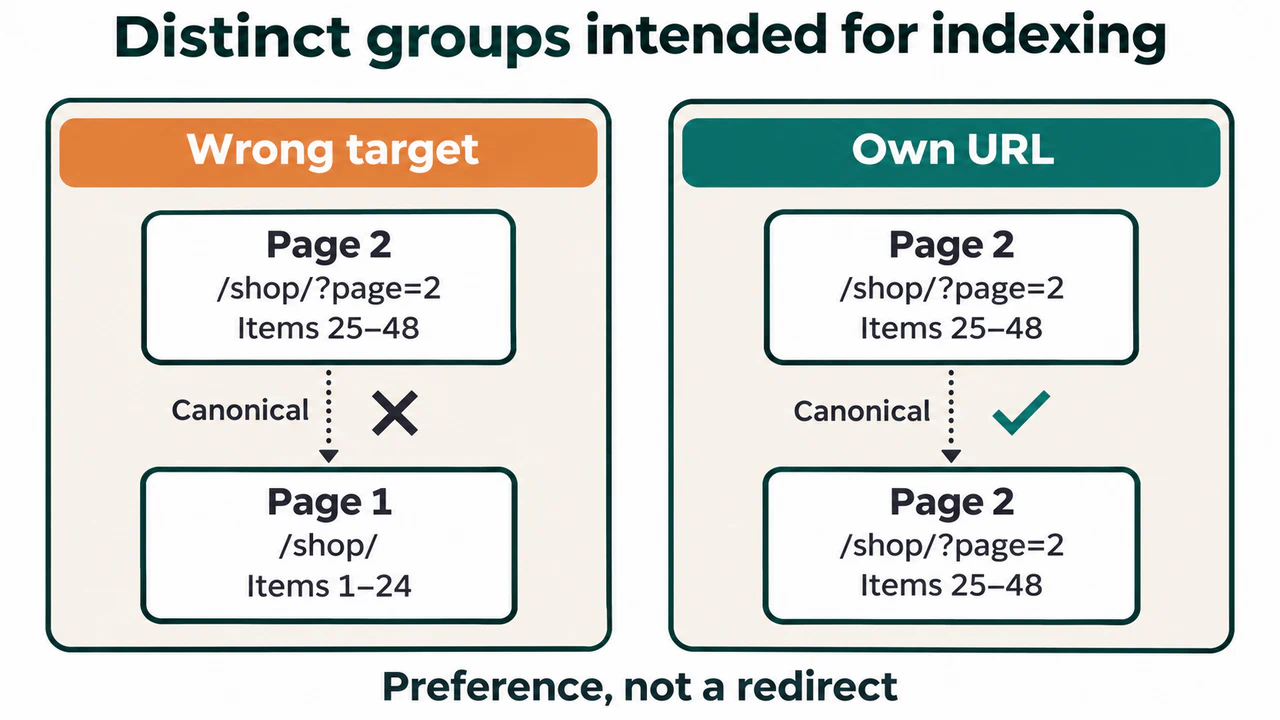
Making every page canonical to /shop/ would describe distinct groups as though they were alternate versions of the first group. Check the listing template for this error, particularly when it builds canonicals from a shared category address and drops the page parameter.
If /shop/ and /shop/?page=1 serve the same first group, choose one preferred address. Point the canonical and internal navigation to that version. A permanent redirect can also consolidate the alternate address when it fits the site’s routing.
Check both the original response and the rendered page for conflicting canonical output. The page should not begin with its own canonical and acquire a different one after scripts run. Google’s selected canonical is a separate result to investigate in Search Console; a declaration on the website expresses a preference.
Decide which listing pages should be eligible for indexing
A useful second page is not automatically low-value or duplicate content because it shares a category heading and layout with page one. Its item list can serve a distinct part of the collection.
Avoid applying noindex to every paginated URL without assessing the purpose of those pages. If a particular listing should be excluded from search, that can be an intentional choice. Still provide appropriate routes to the detail pages that matter. Excluding a listing from search does not repair its navigation.
Treat filters and alternative sort orders separately. A URL that displays the same products ordered by price serves a different purpose from page two of the main category. Decide which variations provide useful search landing pages and which are unnecessary combinations before choosing indexing or crawl controls.
Remember that robots.txt rules control crawling. Google needs access to a page to read a noindex instruction in its HTML or response headers. Blocking a URL and expecting Google to discover a new instruction inside that blocked page can therefore work against the intended result.
Test the second, middle, and final pages
Begin with page one, page two, and an item listed on page two. Record the expected item group, response, canonical, and next-page destination before testing. Then extend the same checks to a middle page and the final page of a longer collection.
Open a later page in a fresh session
Paste page two’s URL into a new private browser window. Confirm that the correct group appears without loading page one first. Refresh it and open one of its item links directly.
Use the browser’s Network panel to inspect the response for the page document. A successful-looking screen can still be served with an error response, or an empty screen can be served with 200 OK. Record the status and the actual content together. Test a page number beyond the collection as well.
Inspect the links and page instructions
On page one, look for an anchor pointing to page two before clicking or scrolling. On page two, look for its item links and a link to the next group. Check rendered HTML where scripts add the navigation.
Confirm that the page’s canonical matches the intended URL. For a page meant to be indexed, check for an unintended noindex in a meta tag or an X-Robots-Tag response header. Also confirm that crawl rules or access challenges do not prevent the page and its required resources from loading.
Compare Google’s tested and recorded information
In Search Console, inspect the exact later-page URL and use Test live URL. When View tested page is available, examine the rendered HTML for an expected item name, its destination, and the next-page link.
The live test helps establish what Google’s inspection tool can access now. It does not guarantee indexing or predict Google’s canonical choice. Review the stored indexing information and its crawl date separately to see what Google has recorded. If a page has been crawled but is currently not indexed, finding its links is only one part of the investigation.
Use the observed difference to choose a correction:
| Observation | What to investigate |
|---|---|
| Page two opens, but page one has no link to it | The navigation or loading control |
| Page two opens with page one’s items | Route handling, cache keys, or data selection |
| Correct items appear, but the canonical points to page one | Canonical generation in the listing template |
| Products appear only after a click | The direct group URL and interaction-dependent loading |
| Out-of-range pages keep returning empty success responses | The end-of-sequence check and response handling |
Check discovery across a larger collection
For a collection with many pages, an SEO crawler such as SEO Neurons Spider can follow the listing’s internal links. Start from the first listing page with link capture enabled. Keep the pagination URLs in scope and use JavaScript rendering if scripts add the links. Review whether the crawl reaches page two, later listing pages, and the items linked from them.
Check page two’s inlinks for a recorded page link from page one. An inlink is a link from another page pointing to the URL being reviewed; a sitemap reference is a different kind of connection. If a later page is missing, inspect crawl scope, query parameter settings, access, and the navigation itself before assuming the website has no route to it.
Starting a crawl from a supplied list of every page URL can help inspect those addresses, but it does not establish that the first listing links to them. For a discovery check, follow links from the starting page. Compare the result with an independent inventory to investigate pages missing incoming internal links.
Repeat the crawl after a correction using comparable settings. The result records the crawler’s observations under those conditions. Verify representative URLs in Google’s tools separately, and use the wider technical SEO audit to investigate problems beyond the listing sequence.
Frequently asked questions
Does Google still use rel=“next” and rel=“prev” for pagination?
Google no longer uses these link annotations to identify a paginated sequence. They do not replace ordinary links in the page body. A Next link with a usable href still helps visitors and crawlers reach another page, whether or not it also carries a rel attribute.
Does every paginated page need a different title and description?
Google allows pages in a paginated sequence to share titles and descriptions. Adding a clear page number can help visitors distinguish their position, but it is not a requirement to invent new descriptive text for every group. Keep the category or collection name understandable.
Does a sitemap replace pagination links?
A sitemap provides another way to discover URLs. It does not add navigation between listing pages or help a visitor reach the next group. Include useful detail URLs in the sitemap where appropriate, and keep the collection connected through internal links.
Should infinite scroll keep every loaded item on screen?
That is an interface and performance decision. A very long document can become difficult for a browser to manage. Some implementations remove distant items from the rendered document to reduce that work. If the interface does this, preserve the addressable groups and verify that a direct visit to each group still exposes its intended items and links.
Will fixing pagination make every item appear in Google?
It can repair a missing discovery path. Google still makes separate crawling and indexing decisions, and an individual item may have other issues. Verify the repaired links first, then investigate the specific item URLs that remain absent from search.
Conclusion
Reliable pagination gives each group a usable address and a clear path to the next group. Load more and infinite scroll can build on that structure while keeping later items reachable. Test a direct visit to page two, inspect the links and canonical, and repeat the checks farther into the collection. Those observations show which part of the implementation needs attention.
JOIN THE CONVERSATION
Comments
Have a question or something to add? Comments are moderated and appear here only after approval.
JavaScript is required to submit a comment. Published comments above remain available to read.
No approved comments yet. Be the first to join the conversation.