
THE SHORT VERSION
What you’ll take away.
- Start with the pages that matter and record whether they should be accessible, indexable, or intentionally excluded.
- Combine a website crawl with browser checks and Search Console evidence; each answers a different question.
- Check access and indexing controls before spending time on smaller presentation improvements.
- Prioritize confirmed problems by the importance of affected pages, their reach, and the effort needed to fix them.
- Verify the website correction first, then review Google's later processing separately.
A website audit can produce hundreds of warnings. Some describe an actual barrier to finding a page. Others reflect a deliberate choice, such as a login page excluded from search. Treating every warning as equally urgent creates work without a clear result.
A useful technical SEO audit connects an observed problem to a page that matters, a specific correction, and a way to check the outcome. It should explain what needs attention and why, rather than simply deliver a list of errors.
If you manage or review a website, this guide will help you collect that evidence, investigate the main technical areas, and turn your findings into a practical repair plan. You can apply the process to a small website first and expand it as the number of pages and templates grows.
What is a technical SEO audit?
A technical SEO audit examines whether a website lets search engines discover, fetch, understand, and consider its intended pages for indexing. It also reviews technical conditions that affect visitors, including broken navigation, missing content, mobile layouts, and slow interactions.
These stages are related, but they are different. A crawler finding a URL does not mean it successfully downloaded the page. Downloading it does not prove that Google indexed it. An indexed page may still fail to answer the searches you want it to serve.
Google’s explanation of how crawling, indexing, and serving search results work makes those distinctions clear. Technical corrections can remove obstacles, but cannot guarantee indexing, a particular ranking, or more traffic.
The audit therefore needs an intended outcome for each page type. A public service page might belong in search; a private account page should require authentication. A removed page without a suitable replacement may correctly return a missing-page response.
1. Define the scope and collect a baseline
Begin with the question the audit needs to answer. You might be reviewing a new website before launch, investigating a group of missing pages, checking a migration, or assessing a site that has grown without regular maintenance.
Write down the domain, relevant subdomains, directories, and environment. A staging website and the public website may have different access rules, so a result from one does not establish the condition of the other.
Then select important URLs and representative templates. Include the homepage, key category or listing pages, useful detail pages, and examples from different sections. For a shop, include an available product and an unavailable product. For a publication, include an article and a later page of an archive.
Collect what is available:
- A list of intended public URLs from the publishing system or another reliable inventory.
- XML sitemap URLs and a crawl started from the main website.
- Relevant Search Console indexing and performance information, if you have access.
- Recent deployment dates, migrations, and template changes.
- Browser observations for the pages under investigation.
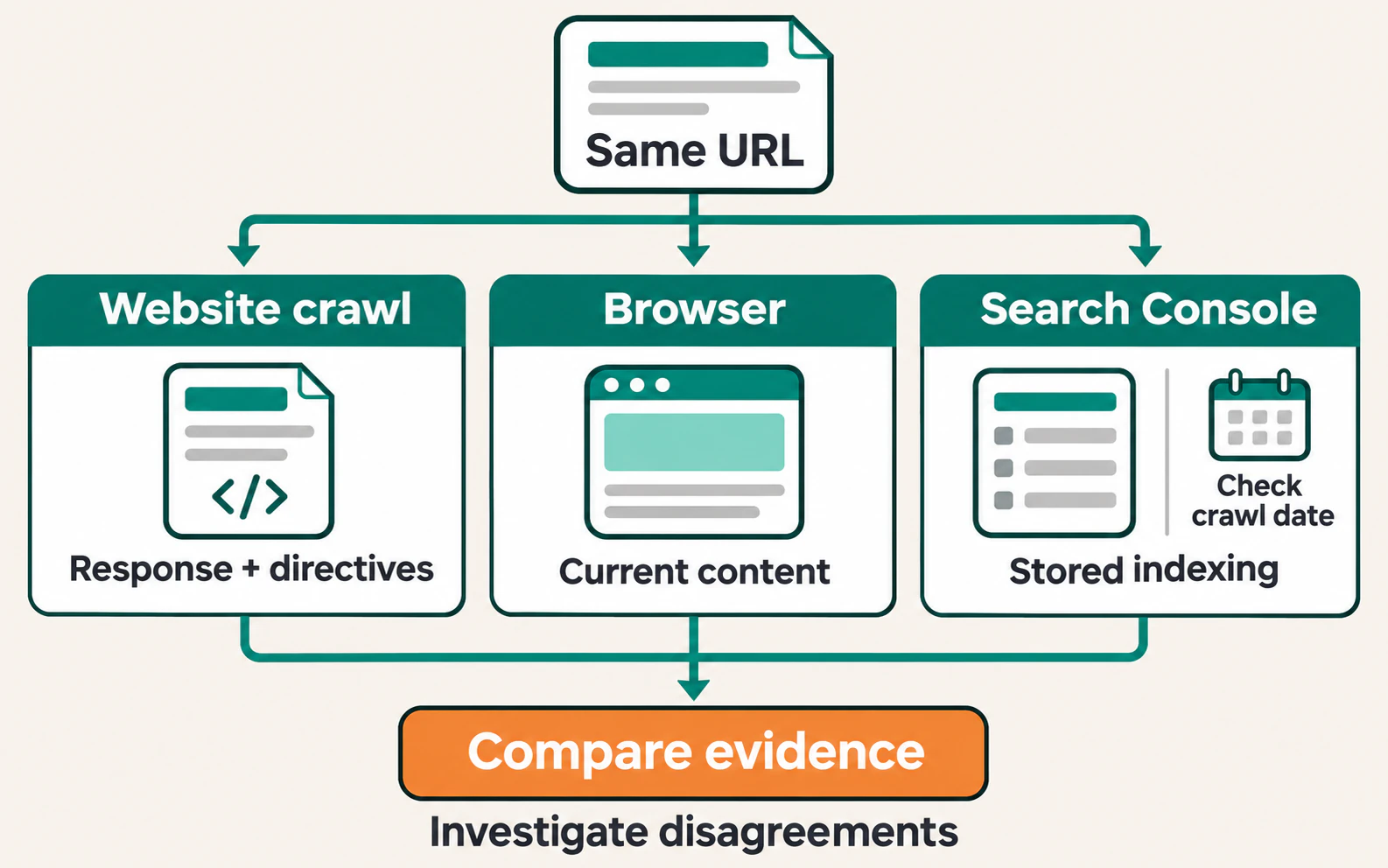
Keep these sources distinguishable. A crawl that follows internal links can miss a working page that nothing links to. A sitemap can contain obsolete addresses. Comparing the lists is more informative than assuming either one contains every current page.
Record the starting state before making changes. Save the audit date, crawl settings, affected URLs, and examples of the observed problem. That gives you a meaningful comparison later.
2. Run a crawl that matches the website
A website crawler requests pages and records information such as response codes, links, titles, canonical declarations, and indexing instructions. It helps reveal repeated problems that would be difficult to find by opening every page manually.
Choose a sensible starting URL and check the crawl scope. Confirm whether subdomains, parameters, redirected URLs, and external links are included. Use a request rate the website can support, and agree on access before testing restricted environments.
Rendering settings matter. An HTML-only crawl inspects the response without running the page’s JavaScript. Browser rendering can reveal content and links added by scripts, but takes more resources. Start with representative pages to establish whether that extra processing is needed.
Before interpreting the report, check whether the crawl actually reached the intended section. A page limit, excluded directory, login requirement, or blocked crawler can produce incomplete results. A low URL count is not automatically evidence that the website has few pages.
Also keep the crawler’s identity separate from Google’s. A firewall may treat them differently, and a different user agent does not by itself reproduce Googlebot’s access or processing.
3. Check whether important pages can be fetched
Access comes before smaller improvements. A carefully written title cannot help a visitor who receives an error instead of the page.
Open an affected URL in a browser without relying on an existing signed-in session. In developer tools, open Network, reload the page, and select the main document request. Record its status, any redirect destination, and relevant response headers.
Follow the response through to the content people receive:
| Observation | What to investigate |
|---|---|
An intended public page returns 200 OK |
Confirm that the expected content loads; success alone does not prove indexing. |
| The address redirects | Check whether the move is intentional and the destination is relevant. |
A page returns 404 or 410 |
Establish whether it was deliberately removed or should still exist. |
A missing-page message returns 200 |
Investigate incorrect routing or a possible soft 404. |
Requests receive 429 or repeated 5xx responses |
Check rate limits, server capacity, and application or hosting failures. |
For a permanently moved page, an appropriate permanent redirect usually makes sense. For a deleted page without an equivalent replacement, a genuine missing-page response can be correct. Sending every old address to the homepage does not restore the content someone expected.
Inspect redirect chains and loops where the route takes extra steps or never reaches a usable destination. Once a move is permanent, update the website’s own links to the intended destination where practical.
To trace a failing destination across several pages, you can use SEO Neurons Spider. Crawl the affected section with link capture enabled, using browser rendering where scripts create the links. Review the destination’s captured response, then inspect its inlinks: the source pages found pointing to it. Check each relevant link in its page context before deciding whether to update the reference, restore the missing content, or provide a suitable redirect. After making that correction on the website, crawl the affected URLs again. These relationships cover the links captured within the crawl’s scope and access conditions; they do not establish what Google has indexed.
Review robots.txt and access restrictions
Check the robots.txt served by each relevant host. Look for rules that unintentionally block important pages or resources needed to render them. A rule on one host does not automatically describe another host’s configuration.
Robots.txt controls crawling by compliant bots. It does not protect confidential information, and blocking a URL there does not reliably remove it from search. Private content needs proper access controls.
If only the audit crawler is blocked, investigate that access condition before reporting a Google crawling failure. Compare the current response with Search Console evidence or verified bot requests where those are available.
4. Compare indexing instructions with the page’s purpose
Once a page can be fetched, establish whether it is intended to appear in search. An audit should not try to index every URL a website can generate.
Inspect the page’s robots meta tag and any X-Robots-Tag response header. A noindex instruction can exclude a page when Google can access and process it. Blocking the same URL in robots.txt can prevent Google from seeing that instruction.
Next, check its canonical declaration. This identifies a preferred URL for duplicate or very similar content; Google can select a different version. A canonical is not a replacement for a redirect when visitors should move, or for noindex when a page should remain accessible but be excluded.
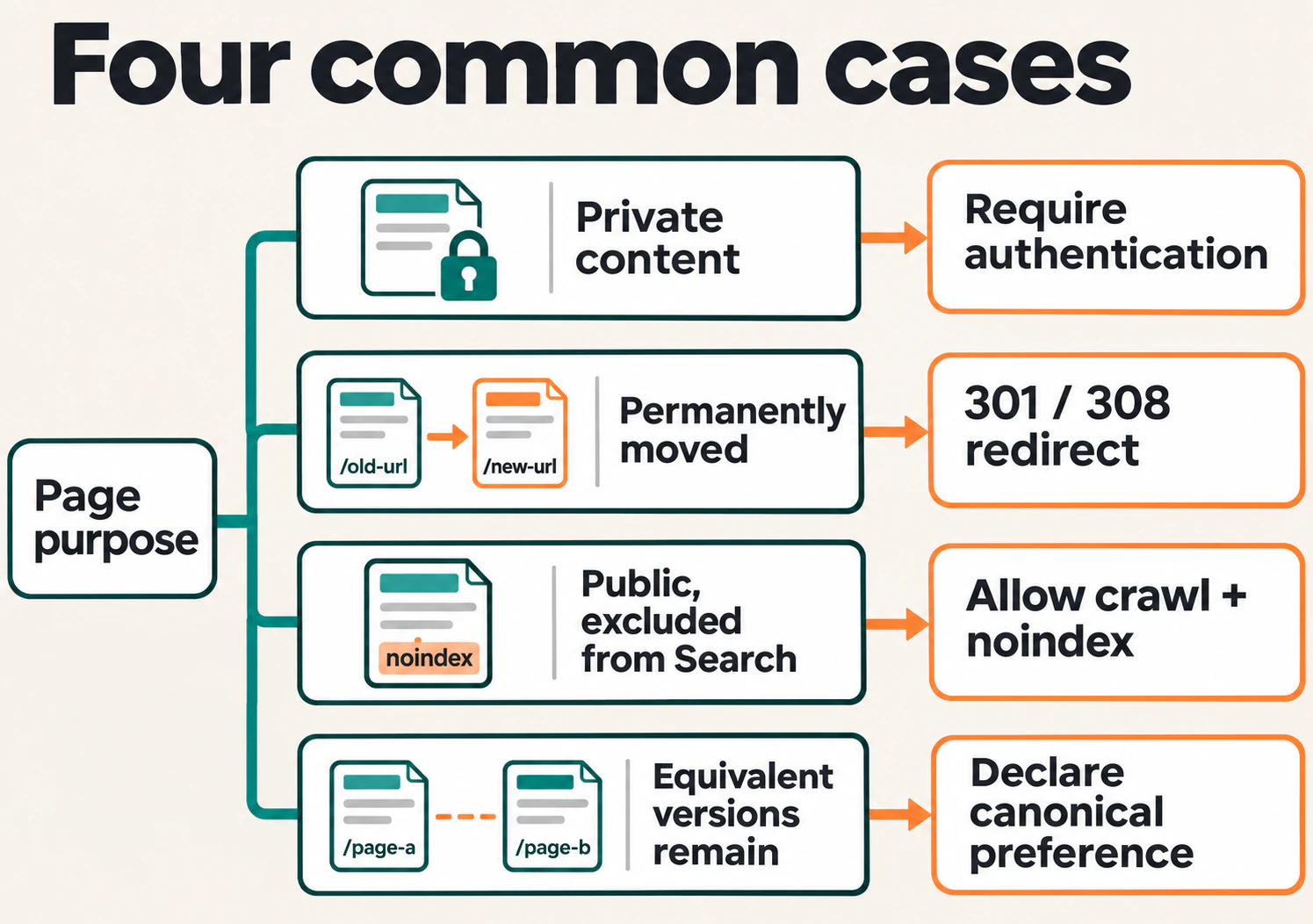
Compare the signals rather than checking each in isolation:
| Signal | Useful audit question |
|---|---|
| Page purpose | Should this URL be considered for search, or is its exclusion intentional? |
| Robots instructions | Do the served HTML and response headers match that decision? |
| Canonical declaration | Does it identify the intended equivalent page or the page itself? |
| Internal links and sitemap entries | Do they consistently use the intended address? |
| Google’s stored information | Does it show the expected indexed URL and canonical relationship? |
For an important URL in a verified Search Console property, use the URL Inspection tool. Record the stored indexing information and crawl date. Run a live test when you need to examine the current page, and inspect tested HTML or resource details where available.
A live test does not establish Google’s final canonical choice or confirm that the index has updated. Keep current implementation evidence and stored indexing evidence in separate notes.
Do not automatically noindex all categories, tags, or paginated pages. A useful listing can serve a different purpose from its individual items. Decide from the content, navigation role, and intended search use of that page type.
5. Check discovery through links and sitemaps
An XML sitemap helps communicate important URLs to search engines. It does not guarantee that the listed pages will be crawled or indexed, and it does not create a browsing route into them.
Review whether the sitemap lists the current, intended canonical URLs. Investigate entries that redirect, fail, or carry an unintended noindex instruction. Where modification dates are supplied, they should reflect meaningful page changes rather than update automatically on every request.
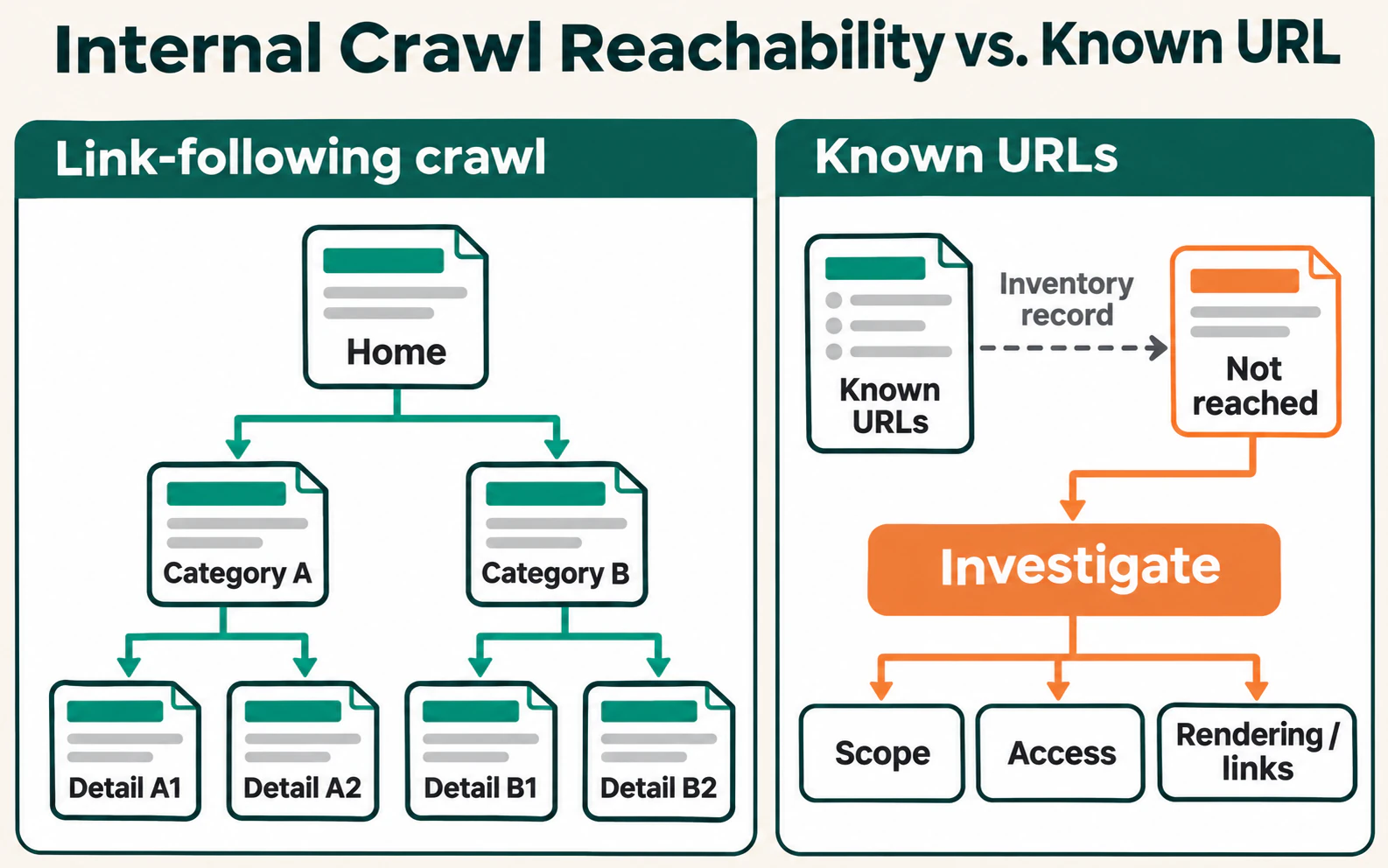
Compare those URLs with the pages reached through internal links. An address known to the publishing system but absent from a link-following crawl needs investigation. It might be outside the crawl scope, require rendering, or lack an incoming internal link.
A true orphan page has no incoming internal links from other pages on the website. It may still be known through a sitemap or external reference. Confirm the missing route before labelling it orphaned, then decide whether to connect, consolidate, exclude, or remove the page.
Inspect navigation and deeper listings
Follow the route from the homepage or a relevant category to an important detail page. Check menus, breadcrumbs, archive pages, and links between related content. Link distance is the number of links followed from a starting point; it is not the number of folders in a URL.
Look for unnecessary steps and missing connections rather than enforcing a universal click limit. A deeper page may be appropriate for a large catalogue, while an important service hidden behind unrelated listings may need a clearer route.
For pagination or infinite scrolling, confirm that later items have accessible URLs and crawlable links. Do not assume a crawler will press a load-more button. Different listing pages can contain different items, so they should not all be treated as copies of page one.
Links should resolve to real destinations. Inspect the rendered page for normal <a href="..."> links and use descriptive anchor text that helps readers understand what opens.
6. Verify rendered content and page structure
Choose a representative page and compare its initial HTML response with the document after scripts run. Check the main heading, meaningful text, navigation, and any metadata that changes during rendering.
The important question is whether the expected content becomes available reliably. Text missing from the initial response is evidence of a JavaScript dependency, not automatic proof of an indexing problem.
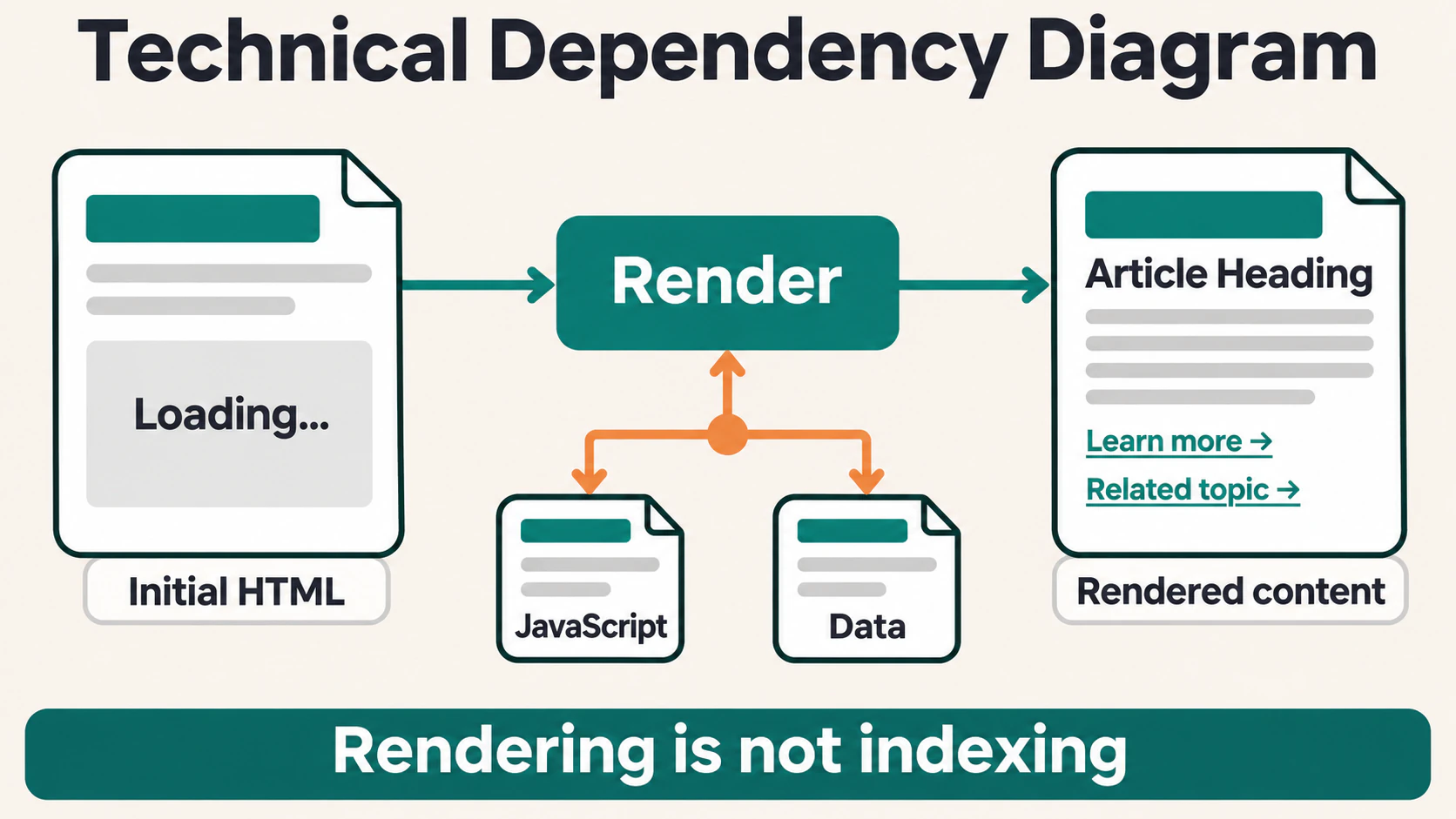
If content is missing from Google’s tested output, investigate required scripts, data requests, resource access, and loading triggers. If a page works only after scrolling or clicking, establish how that content can be reached without relying on the interaction. The JavaScript SEO workflow explains how to trace these differences on an individual URL.
Review the document’s meaning too. A clear main content area, sensible heading order, and links that behave as links help people and software navigate the page. Semantic HTML structure should describe the content rather than simply provide elements for visual styling.
Check that each important page has a useful title tag and a visible heading that identifies its subject. Repeated titles can expose a template problem, but similarity alone does not prove duplicate content. Review the actual page before changing it.
7. Review mobile usability and performance
Test important templates on a narrow screen and a real mobile device where possible. Check that text can be read, navigation opens, controls can be used, and important content is present. Look for overflowing tables, intrusive overlays, broken forms, and resources that fail on the mobile experience.
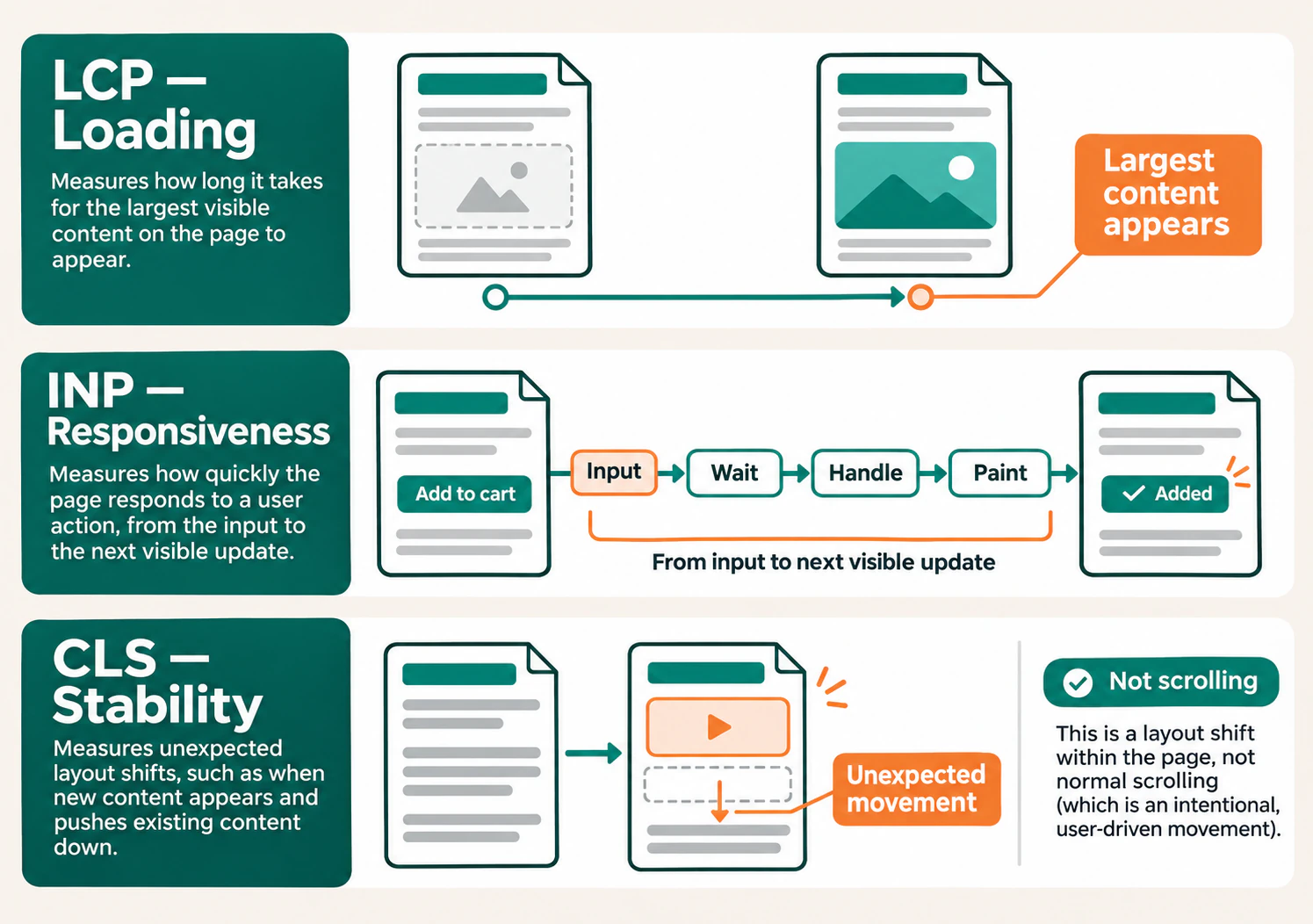
Then review loading, responsiveness, and stability using Core Web Vitals:
- Largest Contentful Paint (LCP): how quickly the main visible content appears.
- Interaction to Next Paint (INP): how quickly the page provides visual feedback after interactions.
- Cumulative Layout Shift (CLS): how much visible content moves unexpectedly.
Use available field data in PageSpeed Insights or Search Console to identify patterns, then use a controlled browser test to investigate a likely cause. Field data reflects real visits over time; a lab test reflects particular conditions. One successful test cannot establish that every visitor has a good experience.
Investigate the element or action behind the metric. A large image arriving late may contribute to poor LCP, while missing space for media or adverts can contribute to layout shifts. Slow interactions may involve other work occupying the browser, the event handler itself, or the visual update.
Record the device, page, conditions, and observation. “The mobile menu responds late while this script runs” gives a developer a clearer starting point than “the performance score is low.”
8. Validate structured data and checks specific to the site
If a template includes schema markup, compare its values with the visible page. Check whether the declared type fits the content and whether dates, authors, product details, and referenced URLs remain accurate.
Use Schema Markup Validator for broader Schema.org checks and Google’s Rich Results Test for supported Google features. Valid markup does not guarantee a rich result. Test the live page as well as a copied code block, particularly when scripts or plugins generate the data.
Review more than one item per template. A valid product record does not establish that another product has a price, image, or availability value. Repeated problems may belong in the template or its source data.
Expand the audit where the site requires it:
| Website condition | Additional checks |
|---|---|
| Multiple language or regional versions | Equivalent pages, hreflang references, return links, and canonical alignment. |
| Filters and URL parameters | Valuable landing pages versus unnecessary combinations, and consistent crawl and indexing controls. |
| A recent migration | Old-to-new URL mapping, relevant redirects, updated links, and changed sitemap entries. |
| Large or frequently changing URL inventories | Verified bot activity, server availability, and unnecessary crawling. |
| HTTPS or hosting changes | Secure destinations, certificate failures, insecure resource requests, and redirect consistency. |
These checks should follow the website’s actual features. A small publication does not need an ecommerce filter audit, and a few unindexed pages do not by themselves establish a crawl-budget problem.
9. Prioritize findings and write a useful repair plan
Group findings by cause and affected template. Hundreds of URLs with the same unintended instruction may need one template correction. Treating them as hundreds of unrelated tasks makes the work harder to manage.
For each finding, record the evidence, affected pages, likely cause, proposed action, owner, and verification condition. Keep an unconfirmed explanation labelled as a hypothesis until a test supports it.
Use these questions to choose an order:
- Does it prevent an important page from working or being considered for search? A confirmed access failure usually deserves attention before a minor metadata improvement.
- How much of the useful website is affected? Check the role and reach of the pages, rather than counting every generated URL equally.
- How strong is the evidence? Reproduce the problem before prescribing a large change.
- What effort and dependencies does the repair involve? A focused template correction and an application rewrite require different planning.
An intentional exclusion belongs in the audit record as an explained decision. It does not need a repair merely because a tool lists it.
An illustrative issue record
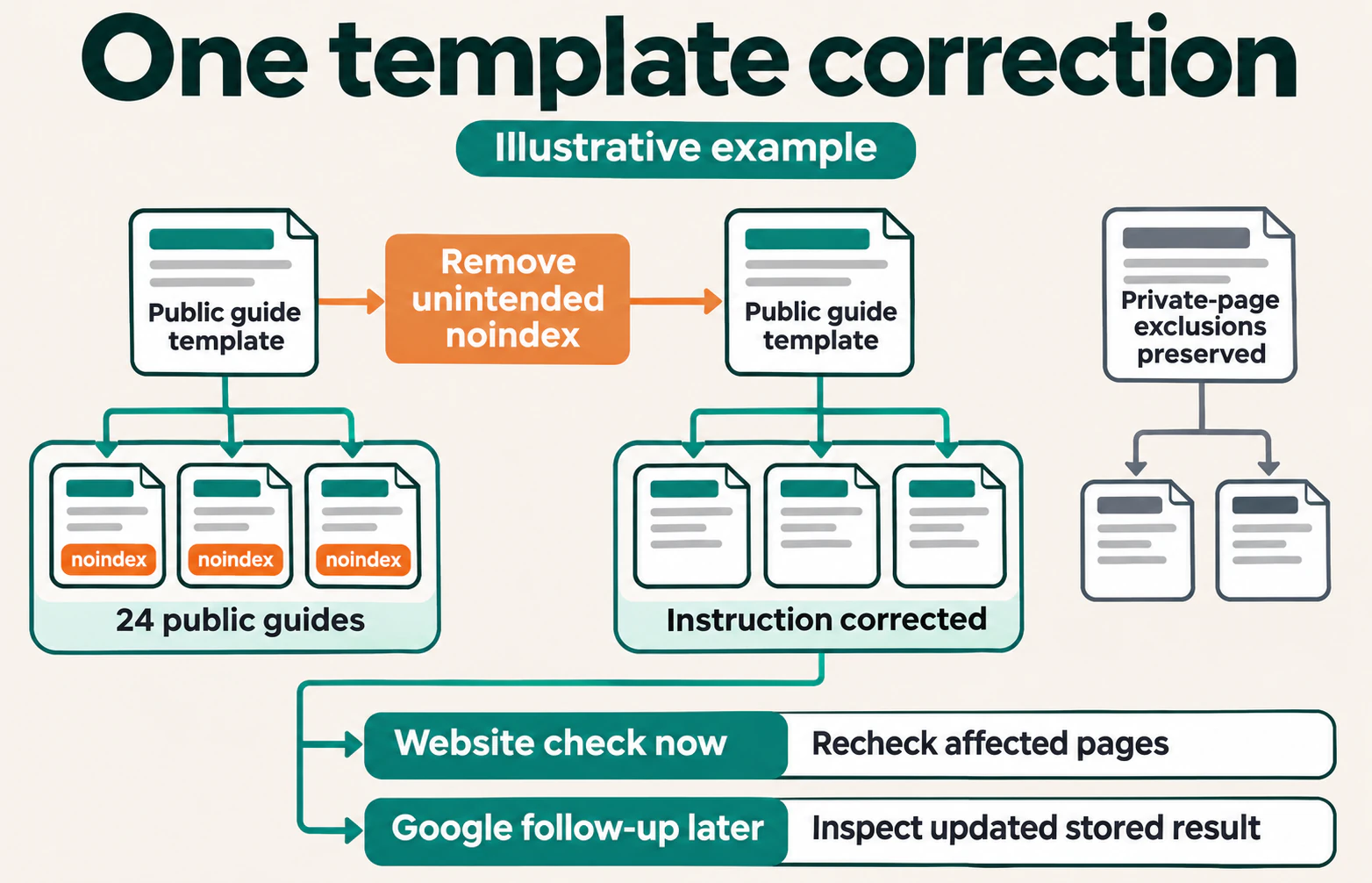
Suppose 24 public guides unexpectedly carry noindex after a template release. They are intended for search, and the current output confirms the instruction. A useful issue record would look like this:
| Field | Recorded finding |
|---|---|
| Affected pages | The 24 guide URLs using the changed template. |
| Evidence | Current HTML contains noindex; saved examples include the URL, capture date, and release date. |
| Scope check | Private account pages have a separate, intentional exclusion. |
| Proposed correction | Remove the unintended instruction from the public guide template while preserving intended exclusions. |
| Website verification | Recheck the affected URLs and a private-page sample; confirm the served instructions match their purposes. |
| Google follow-up | Inspect important examples later for updated crawl and indexing information. |
This record gives the person making the change a defined target. If those same guides remain absent after Google processes the correction, continue investigating their content and other signals instead of declaring the entire indexing problem solved.
10. Verify corrections and keep the audit current
After a correction reaches the environment being reviewed, repeat the original test. Check the changed URL, other pages sharing its template, and a relevant page whose behaviour should remain different.
For another crawl, retain comparable scope, rendering, and access settings. If you deliberately change a setting, record it. Otherwise, a change in the report may describe different collection conditions rather than a repaired website.
Separate three outcomes:
- Website implementation: the response, content, link, or instruction now matches the intended behaviour.
- Search processing: later evidence shows whether Google has recrawled, processed, and indexed the intended page.
- Visitor and search results: relevant pages become easier to use or find, assessed over a suitable period.
Do not promise a fixed indexing turnaround or attribute a traffic change to one correction without considering other releases, content changes, and timing. Where appropriate, request indexing for an important corrected URL, then review later evidence.
Repeat focused checks after migrations, template releases, plugin changes, and significant navigation updates. Revisit the broader audit as the website changes. The useful interval depends on the pace of change and the consequences of a failure, rather than a universal monthly rule.
Technical SEO audit checklist
Use this to review the work completed, with a short evidence note beside any uncertain item:
- Important page types and their intended indexing treatment are documented.
- The crawl reached the intended scope, with suitable rendering and recorded limits.
- Public pages and required resources are accessible under the conditions being tested.
- Responses, redirects, robots instructions, and canonical declarations match page purpose.
- Sitemap entries and internal links use appropriate current URLs.
- Important pages have useful incoming routes, including through deeper listings.
- Essential content and navigation appear in the rendered document.
- Titles, headings, mobile layouts, and performance have been checked on representative templates.
- Structured data and any language, filter, or migration requirements have been reviewed where applicable.
- Findings have evidence, a responsible owner, a clear action, and a verification condition.
Frequently asked questions
Can I do a technical SEO audit without paid tools?
Yes. Browser developer tools, Search Console access, page source, and available URL inventories can support a useful review. A crawler makes repeated checks easier, especially across templates. Begin with important pages and record the limits of your coverage rather than assuming an expensive tool makes the findings complete.
Do I need to fix every warning?
No. Confirm what the warning describes and whether it conflicts with the page’s intended purpose. An expected redirect, deliberate exclusion, or removed page may need documentation rather than a change. Prioritize actual barriers affecting useful pages.
Will a technical SEO audit fix a traffic decline?
It can identify technical causes worth testing, but a decline can also involve content relevance, demand, competition, or search changes. Compare affected pages and dates before deciding on a cause. A completed checklist does not establish that every reason for the decline has been investigated.
Finish with a correction you can explain
A useful audit ends with a small set of clear decisions: what is working as intended, what needs investigation, and which confirmed problems should be repaired first.
Choose the highest-priority finding, record its evidence, and define the expected result before changing the website. Then repeat the check. That gives the next audit a reliable starting point and turns a warning list into maintainable improvements.
JOIN THE CONVERSATION
Comments
Have a question or something to add? Comments are moderated and appear here only after approval.
JavaScript is required to submit a comment. Published comments above remain available to read.
No approved comments yet. Be the first to join the conversation.