
THE SHORT VERSION
What you’ll take away.
- A topic cluster connects an overview with related articles that answer different questions.
- Each page needs a clear purpose and enough information to stand on its own.
- Reader tasks help you decide which questions belong together and which need separate pages.
- Add links where another page helps with the reader's next question.
- Start with useful existing content, then review gaps, overlap, and outdated links.
You finish reading an article and understand the main idea. Then another question comes to mind. Where can you find the answer?
A website may already have a useful guide, but finding it can take several searches or clicks. Sometimes the opposite happens: one article tries to explain everything, and the answer you need gets lost in the middle.
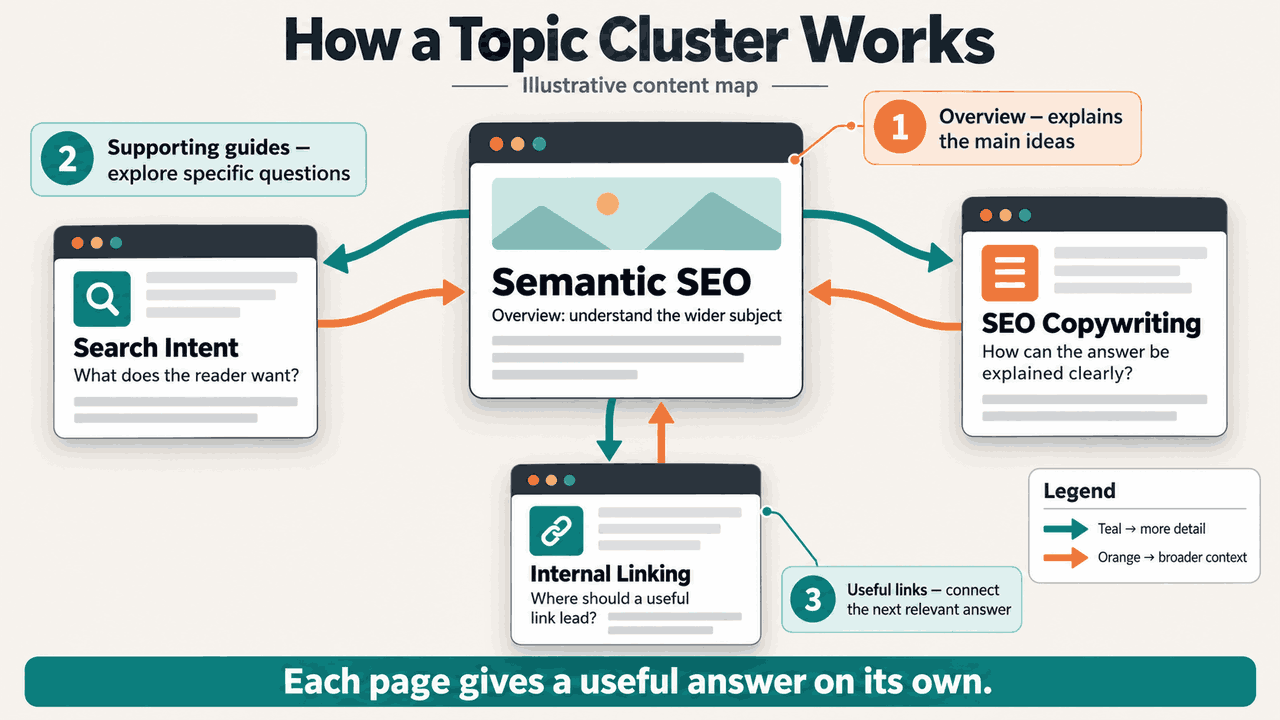
Topic clusters give related articles a clear connection. An overview explains the wider subject. Supporting pages answer more specific questions. Links help you move between them when you need more detail.
In this guide, you’ll learn how that structure works, when a question deserves its own page, and how to plan connections that help a reader continue. If you write or manage website content, you can use the same process to make a small content map.
What is a topic cluster?
A topic cluster is a group of related web pages, each with a clear purpose, connected through useful internal links. An internal link takes you to another page on the same website.
The group usually includes a main overview and several supporting articles. The overview introduces the subject and its important parts. Each supporting article explores a question or task in greater detail.
A book’s contents page helps you find the chapter you need. A clear overview can offer a similar route to a more detailed explanation on a website.
The connection comes from what the pages help you understand. Sharing one keyword is not enough. Two articles can use similar words while answering very different questions; their purpose determines how they fit together.
In SEO, or search engine optimization, this is a way to organize useful content and make related pages easier to discover. It is a planning method, rather than a guarantee of higher rankings.
How an overview and supporting articles work together
The overview is often called a pillar page. You may also see the term content hub used for a page that brings related resources together. These labels describe a role: helping someone understand a subject and find relevant detail.
An overview should provide a useful answer on its own. If it only lists links, you may have to open several pages before understanding even the basics. Explain the main ideas first, then offer deeper guides where they help.
A supporting article has a narrower job. It might explain a term, walk through a process, compare options, or solve a specific problem. Its title and introduction should make that job clear.
Someone can arrive directly at a supporting article from search. That page should explain enough context for the answer to make sense. A link to the overview can help when the person wants the broader explanation.
Why this structure helps readers
Useful connections reduce the effort of finding the next explanation. When an article introduces a subject briefly, it can point you to a guide that answers your next question in detail.
They also help keep a page focused. A comparison can explain the differences needed for a decision without becoming a complete setup tutorial. A tutorial can then guide someone through the next task.
Search engines can also discover pages through crawlable links. Google’s internal-link guidance recommends linking to relevant resources within useful context. The important decision is whether the destination helps with the question being discussed.
Check that each destination delivers the help its title and surrounding link text promise.
How to plan a topic cluster
If you manage content, start with a small map before planning a long publishing schedule. You need a subject, the questions people ask about it, and a clear job for each page.
1. Choose a subject with a useful boundary
Write down what the group will help someone understand or do. A subject such as “SEO” can cover many different needs. A smaller subject, such as planning useful website content, gives the first group a clearer boundary.
Choose something the website can explain accurately. The subject should also matter to its intended readers. A collection of loosely related articles becomes difficult to organize because there is no clear reason to move between them.
Semantic SEO connects a subject with the ideas needed to explain it. Those relationships can help you group questions, while each reader task determines how much detail belongs on a page.
2. Identify the questions and tasks
List the questions a reader is likely to have before, during, and after the main explanation. Look at existing articles, relevant search results, and reader questions when they are available.
Then describe what the person wants to finish. “Understand a term,” “choose between two options,” and “complete a setup” are different tasks, even when they mention the same product or subject.
Use search intent, the goal behind a search, to distinguish those tasks. Two searches with similar words may need different answers; different wording may describe the same need.
3. Check what already exists
Review current pages before adding new ones. Note what each page answers, whether that answer is still useful, and where more detail would help.
An existing article may already be suitable as the overview. Another may work as a supporting guide after a focused update. Reusing useful content can give the group a clearer starting point than creating several new introductions.
Also note pages that repeat the same answer. Similar titles are a reason to investigate, not proof that one page must be removed. Read the content and compare the reader tasks before making that decision.
4. Give each page one main purpose
Describe each page’s job in one sentence. For example: “This guide helps someone decide which related questions need separate articles.”
That sentence becomes a boundary for the outline. Include the explanations needed to complete the task. Give related but substantial tasks their own space when they would pull the article away from its purpose.
Record the page’s URL, main question, role, and whether it already exists or needs to be written. Add the next useful connection and the editorial action needed, such as updating an answer or adding a contextual link.
5. Plan the useful next steps
For each page, ask what a reader might need after the current answer. The next step could be broader context, a detailed explanation, or instructions for taking action.
Some connections will go from the overview to a supporting guide. Others may go between two supporting guides. Add each connection because it helps at that point in the explanation.
Start by improving the pages that readers need most. A small group of accurate, complete answers is a useful first step. Expand it as you identify further questions that deserve attention.
When should questions share one page?
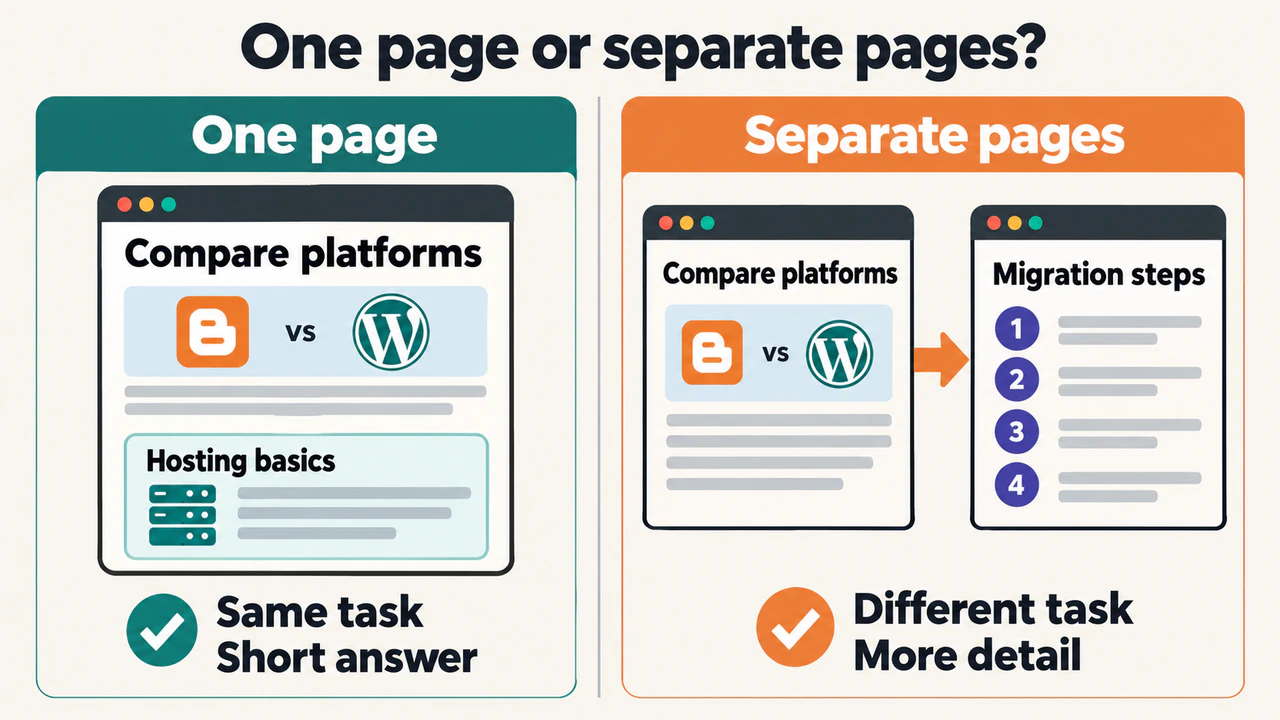
A related question can stay on the same page when a short answer helps complete the main task. Readers should not have to open another article for every unfamiliar term.
A separate page becomes useful when the question has a distinct purpose and needs enough detail to be answered properly. The decision depends on the task and depth, rather than a change in wording or a target word count.
A platform comparison, for instance, may need a short explanation of hosting so the differences make sense. Detailed instructions for moving an existing website to another platform serve a different task. A link to a migration guide would let the comparison stay focused.
Before splitting a page, ask whether both parts would give a useful answer independently. If one part has almost nothing to explain, it may work better as a section. If both need a substantial explanation, separate guides may be easier to follow.
There is no preferred word count that determines whether an answer needs its own page. Choose enough detail for someone to complete the task, then check whether splitting the explanation would make that task easier or harder.
When writing an SEO-friendly article, use that page purpose to choose the opening, headings, and explanations. The outline should help someone finish the task identified in the map.
A simple content map
Here is an illustrative planning map using existing articles about website content. It records the page’s job, address, status, and a possible next action. The actions are proposed editorial checks, not a claim that every connection already exists.
The Semantic SEO article gives broad context about meaning and useful explanations. A reader can then explore a more specific question about planning, writing, or connecting pages.
| Page and main task | URL | Status | Next useful connection or action |
|---|---|---|---|
| Semantic SEO: explain the wider approach | /blog/semantic-seo/ |
Exists | Review the passage about grouping related answers; connect it to the planning guide when that guide is published |
| Search Intent: identify the reader’s task | /blog/search-intent/ |
Exists | Check whether the explanation shows when similar searches need one answer or separate pages |
| Topic Clusters: plan page purposes and connections | /blog/topic-clusters/ |
Exists | Check that each proposed supporting guide has a distinct job and a useful route from the overview |
| SEO Copywriting: develop a clear explanation | /blog/seo-copywriting/ |
Exists | Review whether someone choosing an article’s purpose can continue to practical writing advice |
| SEO-Friendly Content: prepare an individual article | /blog/seo-friendly-content/ |
Exists | Check that the outline and examples support the chosen reader task |
| Internal Linking: connect useful destinations | /blog/internal-linking/ |
Exists | Review the source paragraphs and link directly to the relevant supporting answer |
| Anchor Text: describe the destination | /blog/anchor-text/ |
Exists | Replace unclear link wording where it does not tell the reader what opens |
This map is a reading route, rather than a rule that every page must have one strict parent. Someone may need the anchor-text explanation while writing a comparison, or the intent guide while reviewing an old page.
If a reader task remains unanswered, add a Proposed row with a working title and URL. Compare it with existing pages before commissioning another article. A short missing explanation may belong in an existing guide; a substantial, different task may justify a new page. A proposed URL is a planning note until the page exists, so do not link readers to it yet.
Prioritize an essential missing answer or a broken route between useful pages before optional new topics. SEO copywriting then turns the chosen purpose into an opening and explanation that keep the article focused.
How to connect the pages
Place a link where the destination becomes helpful. A short introduction to a related idea is often a natural place to offer its detailed guide.
From the overview, link to supporting articles alongside the relevant explanations. Someone who only needs the overview can keep reading. Someone who needs more detail can open the appropriate guide.
From a supporting article, link to the overview when broader context would help. A reader arriving directly from search may want to understand how the specific question fits into the wider subject.
Connections between supporting guides can also help. For example, after explaining how to choose a destination, the next question may be how to describe that destination in the link. That relationship gives the connection a reason to exist.
Internal linking gives those next steps a path through the website. Link directly to the intended article, then open the link to check that it reaches the correct page.
Choose descriptive anchor text so the words tell the reader what they will find. “Website migration steps” names a destination more clearly than “click here.” The surrounding sentence should also explain why that destination helps.
There is no need for every page to link to every other page. Google does not prescribe an ideal link count in its linking guidance. Review the connections as part of the explanation: does each one offer help at the moment it appears?
Keep the cluster useful over time
As content changes, review the map along with the articles. A new guide may answer a question that previously had only a short mention. An old guide may need updated instructions before other pages recommend it.
Check that the overview still introduces the important parts of the subject. Then check supporting pages for missing context, repeated answers, and links that no longer lead to the right destination.
Look for gaps by following a reader’s path. Can someone understand the main idea, find the detail they need, and take an appropriate next step? A missing explanation may matter more than another article about an already well-covered question.
You can compare the plan with observed connections using SEO Neurons Spider’s content-link analysis tools. After crawling the relevant pages:
- Choose the pages in the group. Add the overview and supporting internal URLs to Cluster Analyze. Use the map to make the selection; the graph does not decide which subjects belong together.
- Compare captured links with the intended reading route. The graph shows Content links between those selected URLs. Check whether a reader can move from the overview to the relevant detail and back to broader context where useful. Inlinks and Outlinks can help you inspect the referring page and link wording.
- Review a missing connection in context. Open both articles and find the passage where the other answer would help. Add the link in the website’s content only if that passage gives it a clear purpose.
- Recrawl the affected pages and check again. Review the fresh link evidence and rebuild the selected graph. Confirm the intended connection, then open the article as a reader to check its wording and destination.
The graph covers the selected pages and links captured by the crawl. A page without connections in that selection may still have links from other pages. If JavaScript creates the links, use rendering that captures them before treating a missing edge as evidence. The tool helps inspect connections; it does not automatically choose topics, add links, or establish ranking improvements.
If you have access to Search Console, its Performance report shows queries, pages, impressions, clicks, and click-through rate. Use a consistent date range and inspect the relevant pages and queries to investigate whether the articles appear for searches that match their purpose.
Where existing analytics records reader actions, you can also examine whether people follow relevant links or complete the intended action. Search data alone cannot tell you whether an explanation was easy to understand.
Compare changes with care. Search demand, competition, technical issues, and other edits can affect results. A traffic increase after connecting pages does not prove that the links caused it.
Common mistakes to avoid
Creating another page for every keyword variation. Similar searches may need the same answer. Check the task before creating articles that repeat each other.
Making the overview too shallow. A useful main guide should explain its subject, with links providing deeper detail where needed.
Adding links without a clear reason. Related subjects do not make every connection useful. The destination should help with the reader’s question.
Treating a category as a complete content plan. A category groups posts for browsing. A topic cluster also considers each page’s purpose and the connections within its content. A category archive does not automatically provide the explanation expected from a pillar page.
Changing page addresses just to make the map look neat. Related articles can connect through links even when their addresses use different folders. If their existing addresses work, plan the reading route around them.
Frequently asked questions
How many articles does a topic cluster need?
There is no required total for this planning method. Start with an overview and the supporting answers the audience needs. Add another guide when it serves a useful purpose, rather than to reach a fixed number.
Can existing articles form a topic cluster?
Yes. Review what they answer, improve unclear or outdated explanations, and plan useful connections. A cluster does not need to begin with an entirely new set of articles.
Must all the articles link to each other?
No. An overview may connect to several guides, while a supporting article may need only a few relevant destinations. Each link should help the reader understand the current subject or continue to an appropriate next task.
How are topic clusters different from semantic SEO?
Semantic SEO concerns meaning, relevant ideas, and the searcher’s needs. Topic clusters concern how related answers are organized across pages. Search intent helps identify the task that each of those pages should serve.
Try planning one small group
If you write or manage content, choose one subject and review the articles already covering it. Write one sentence describing what each page helps a reader finish.
Choose an overview, identify the questions that need supporting detail, and note a useful next destination for each page. Mark missing answers and unnecessary overlap before adding more titles.
You now have a starting map. Improve the answers and add the connections a reader needs to move through the subject with less effort.
JOIN THE CONVERSATION
Comments
Have a question or something to add? Comments are moderated and appear here only after approval.
JavaScript is required to submit a comment. Published comments above remain available to read.
No approved comments yet. Be the first to join the conversation.